
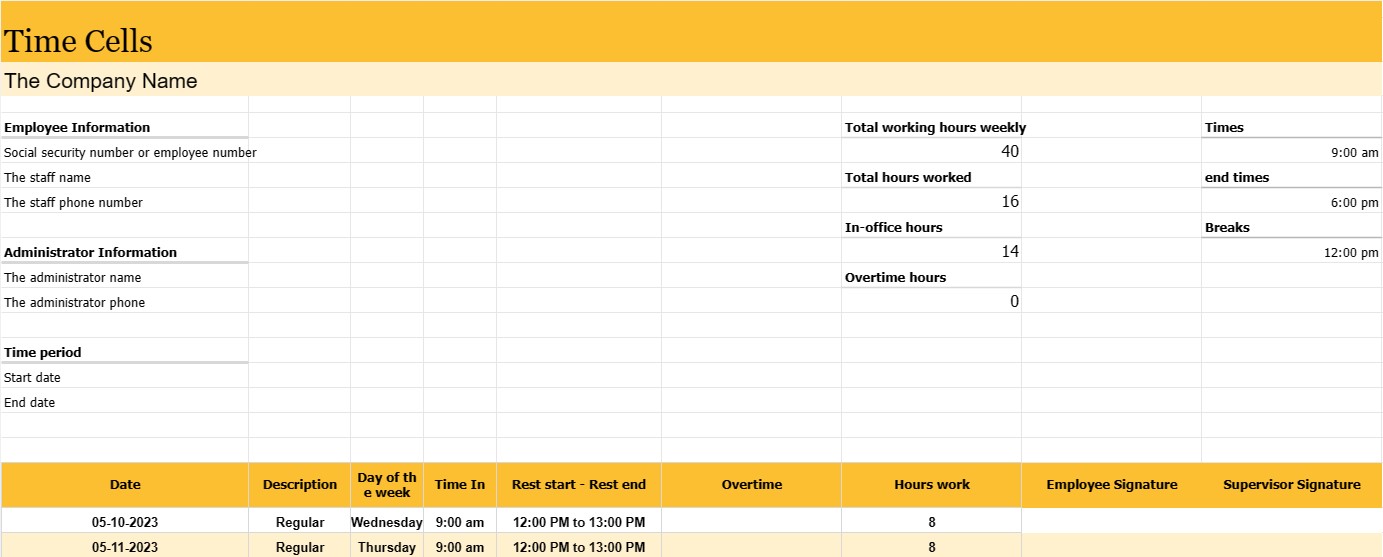
Komórki czasu
Kategoria : Trackery
Menedżer musi to wykorzystać do zarządzania pracownikami, co umożliwi im dokładniejsze śledzenie swoich pracowników.
Raport czasu pracy to zapis lub dokument służący do śledzenia czasu pracy pracownika w określonym przedziale czasu, zwykle w tygodniu pracy lub okresie rozliczeniowym. Jest to niezbędne narzędzie do śledzenia i zarządzania frekwencją pracowników, obliczania listy płac i zapewniania zgodności z prawem pracy i polityką firmy.
Raporty pracownicze są powszechnie stosowane w różnych branżach i miejscach pracy, w tym w firmach, agencjach rządowych, organizacje non-profit i wiele innych.
Najważniejsze części i informacje, które zazwyczaj można znaleźć w dzienniku zatrudnienia pracownika, to:
- Informacje o pracowniku: Imię i nazwisko pracownika oraz, w niektórych przypadkach, numer ubezpieczenia społecznego lub numer pracownika.
- Okres czasu: Określony okres objęty kartą czasu pracy, np. tydzień, dwumiesięczny okres rozliczeniowy lub miesiąc. Data: data lub daty każdego dnia roboczego w określonym przedziale czasu.
- Dzień tygodnia: odpowiedni dzień tygodnia dla każdej daty (np. poniedziałek, wtorek) .
- Godziny i godziny zakończenia: dokładne godziny rozpoczęcia i zakończenia zmiany przez pracownika w każdym dniu roboczym. Informacje te są zwykle przechowywane w godzinach i minutach.
- Przerwy: czas przerw pracownika, jeśli ma to zastosowanie, łącznie z godziną rozpoczęcia i zakończenia przerw na posiłek i odpoczynek. Łączna liczba przepracowanych godzin: łączna liczba godzin przepracowanych przez pracownika w każdym dniu roboczym i skumulowana suma w całym okresie.
- Nadgodziny: Jeśli pracownik pracował w godzinach nadliczbowych (ogólnie definiowanych jako godziny więcej niż normalny tydzień pracy lub dzień pracy), są one zgłaszane oddzielnie.
- Podpisy pracowników i przełożonych: Wiele arkuszy czasu pracy zawiera miejsca, w których pracownik i przełożony mogą podpisać i zweryfikować dokładność zarejestrowanych godzin.
Biuletyny pracownicze służą kilku ważnym celom:
- Wynagrodzenie: Stanowią one podstawę do obliczania wynagrodzeń pracowników, w tym wynagrodzeń regularnych, nadgodzin i wszelkich świadczeń dodatkowych.
- Zgodność z przepisami prawa pracy: Arkusze czasu pracy pomagają organizacjom przestrzegać przepisów prawa pracy i przepisów, szczególnie tych związanych z wynagrodzeniem za nadgodziny i maksymalną liczbą godzin.
- Śledzenie obecności: Monitorują obecność i punktualność pracowników, co może być pomocne w ocenie wyników i zarządzaniu frekwencją.
- Śledzenie projektów i zadań: W niektórych przypadkach do przydzielania godzin wykorzystuje się arkusze czasu pracy do konkretnych projektów lub zadań, dzięki czemu są cenne dla zarządzania projektami i fakturowania.
- Rejestrowanie: Arkusze czasu pracy tworzą historyczny zapis godzin pracy pracownika, co może być ważne dla audytów, wymagania prawne i dokumentacja kadrowa.
- Planowanie zasobów: Arkusze czasu pracy pomagają firmom planować i alokować zasoby, dostarczając informacji o dostępności pracowników i obciążeniu pracą.
Podczas gdy niektóre organizacje w dalszym ciągu korzystają z tradycyjnych papierowych arkuszy czasu pracy, wiele firm przeszło na elektroniczne systemy pomiaru czasu, które zapewniają większą dokładność, wygodę i wydajność. Systemy elektroniczne mogą automatycznie obliczać godziny pracy, przetwarzać obliczenia nadgodzin i generować raporty, upraszczając płace i zmniejszając prawdopodobieństwo błędów.
Łatwy podgląd i pobranie szablonu arkusza kalkulacyjnego
Zobacz pełną wersję szablonu arkusza kalkulacyjnego bez ograniczeń, aby sprawdzić, czy Ci się podoba, a następnie możesz pobrać szablon Excela, aby zapisać go na swoim urządzeniu i używać go za darmo.
Uzyskaj dostęp do szablonu arkusza kalkulacyjnego z dowolnego miejsca
Działa to na wszystkich popularnych systemach operacyjnych, takich jak Windows, MacOS, Linux, iOS. Możesz zobaczyć szablony arkuszy kalkulacyjnych i pobrać je bez dodatkowych programów.
Jak korzystać z szablonu
Dowiedz się, jak wyświetlić podgląd, pobrać i następnie używać szablonu arkusza kalkulacyjnego, wykonując niezwykle łatwe do wykonania kroki
Więcej podobnych szablonów
Zobacz więcej szablonów arkuszy kalkulacyjnych, które należą do tej samej kategorii co wybrany.













