
Oś czasu projektu
Kategoria : Trackery
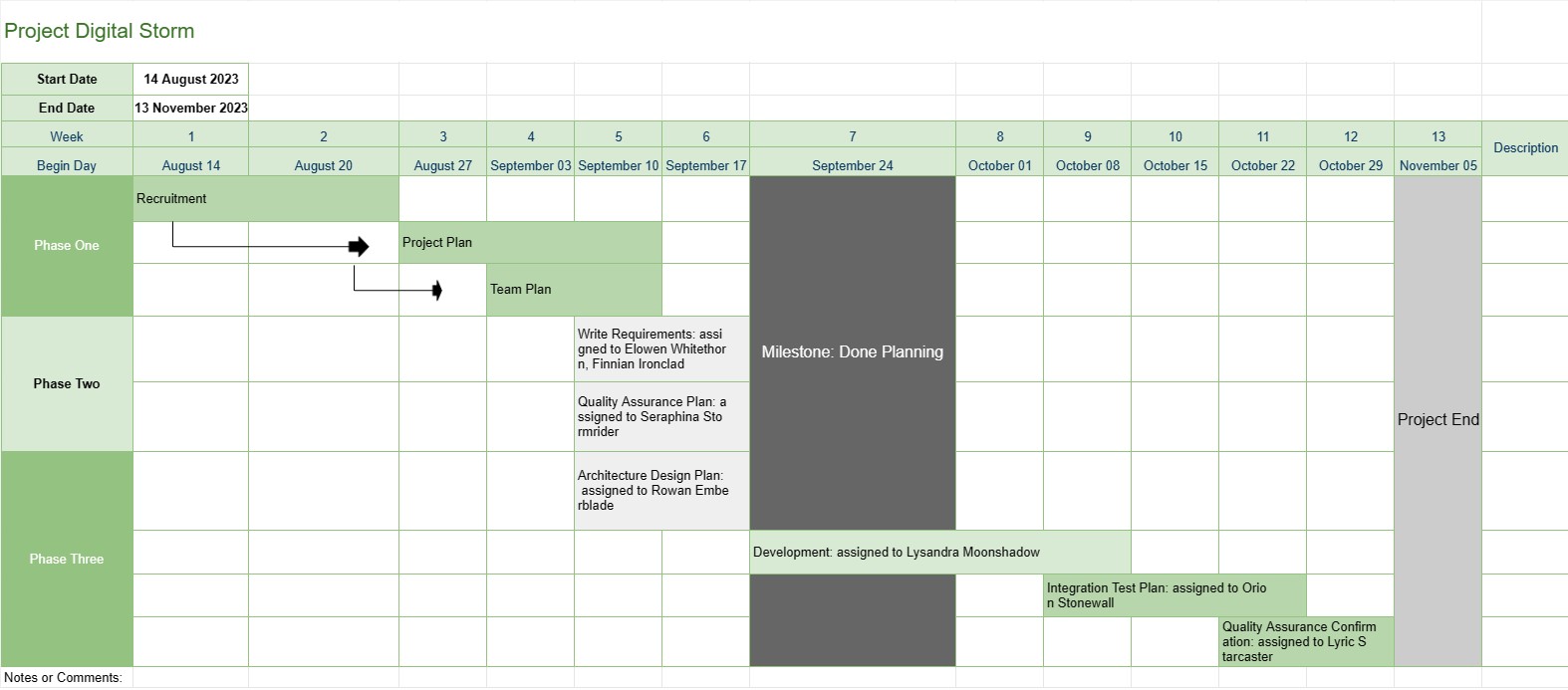
Zapewnia to kierownikowi projektu lepszy przegląd projektu, w tym fazy, zadania i terminy całego postępu prac rozwojowych, a wszystkie dane zostały zwizualizowane w przyciągający wzrok sposób.


Szablon Oś czasu projektu to podstawowe narzędzie do zarządzania projektami, które zapewnia wizualną reprezentację kluczowych kamieni milowych, zadań i terminów projektu w określonym okresie. Służy jako plan działania dla zespołów projektowych i interesariuszy, oferując jasny i zwięzły przegląd postępu i harmonogramu projektu.
Oto kluczowe komponenty i funkcje zwykle zawarte w szablonie osi czasu projektu:
- Nazwa projektu: Szablon zaczyna się od nazwy lub tytułu projektu w celu łatwej identyfikacji.
- Czas trwania projektu: Określa początek data i data zakończenia projektu, określająca ramy czasowe, w których projekt zostanie ukończony.
- Kamienie milowe: Kamienie milowe to ważne wydarzenia lub osiągnięcia w ramach projektu, które wyznaczają ważne punkty postępu. Zazwyczaj są one przedstawiane jako konkretne daty na osi czasu i służą jako punkty odniesienia do śledzenia postępów projektu.
- Zadania lub działania: szablon przedstawia różne zadania, działania lub fazy w projekcie. Każde zadanie jest powiązane z datą rozpoczęcia i szacowanym czasem trwania.
- Zależności: niektóre szablony osi czasu projektu zawierają strzałki lub linie łączące zadania w celu zilustrowania zależności między zadaniami. Pomaga to zespołom projektowym zrozumieć kolejność, w jakiej zadania muszą zostać wykonane.
- Przydzielone zasoby: Menedżerowie projektów mogą wskazać członków zespołu lub zasoby odpowiedzialne za każde zadanie. Ułatwia to alokację zasobów i przydzielanie zadań.
- Czas trwania zadań: Często wyświetlany jest szacowany czas trwania każdego zadania, co pozwala zespołom ocenić, ile czasu zajmie każde działanie.
- Śledzenie postępu: Szablon może zawierać wskaźniki wizualne umożliwiające śledzenie ukończenia zadania i ogólnego postępu projektu.
- Ścieżka krytyczna: W bardziej zaawansowanej osi czasu projektu szablonów można zidentyfikować ścieżkę krytyczną, która reprezentuje sekwencję zadań określającą minimalny czas trwania projektu.
- Notatki lub komentarze: Użytkownicy mogą dodawać notatki, komentarze i opisy aby zapewnić dodatkowy kontekst lub szczegóły dotyczące konkretnych zadań lub kamieni milowych.
Szablon osi czasu projektu odgrywa kluczową rolę w zarządzaniu projektami, zapewniając kilka kluczowych korzyści:
- Wizualizacja: zapewnia wizualną reprezentację projektu, ułatwiając zespołom projektowym i interesariuszom zrozumienie zakresu projektu, harmonogramu i kluczowych rezultatów.
- Komunikacja: Oś czasu służy jako narzędzie komunikacji, umożliwiając kierownikom projektów przekazywanie postępu i statusu projektu członkom zespołu, klientom i kierownictwu.
- Planowanie i koordynacja: zespoły projektowe może wykorzystać oś czasu do planowania zadań, przydzielania zasobów i koordynowania działań, aby zapewnić realizację projektu zgodnie z planem.
- Zarządzanie ryzykiem: identyfikując zależności między zadaniami i ścieżki krytyczne, menedżerowie projektów mogą proaktywnie zarządzaj potencjalnymi ryzykami i wąskimi gardłami.
- Dokumentacja: Oś czasu zapewnia historyczny zapis postępu projektu, pomagając w analizie i dokumentacji po zakończeniu projektu.
Podsumowując, szablon Oś czasu projektu jest niezbędnym narzędziem do zarządzania projektami, które usprawnia planowanie, realizację i monitorowanie projektu. Zapewnia, że zespoły projektowe dobrze rozumieją cele projektu, harmonogramy i zależności, co ostatecznie przyczynia się do pomyślnego zakończenia projektu.
Łatwy podgląd i pobranie szablonu arkusza kalkulacyjnego
Zobacz pełną wersję szablonu arkusza kalkulacyjnego bez ograniczeń, aby sprawdzić, czy Ci się podoba, a następnie możesz pobrać szablon Excela, aby zapisać go na swoim urządzeniu i używać go za darmo.
Uzyskaj dostęp do szablonu arkusza kalkulacyjnego z dowolnego miejsca
Działa to na wszystkich popularnych systemach operacyjnych, takich jak Windows, MacOS, Linux, iOS. Możesz zobaczyć szablony arkuszy kalkulacyjnych i pobrać je bez dodatkowych programów.
Jak korzystać z szablonu
Dowiedz się, jak wyświetlić podgląd, pobrać i następnie używać szablonu arkusza kalkulacyjnego, wykonując niezwykle łatwe do wykonania kroki
Więcej podobnych szablonów
Zobacz więcej szablonów arkuszy kalkulacyjnych, które należą do tej samej kategorii co wybrany.














