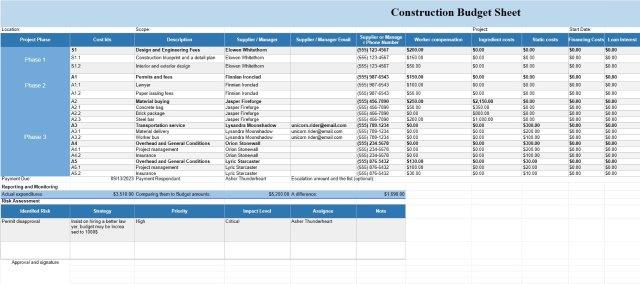
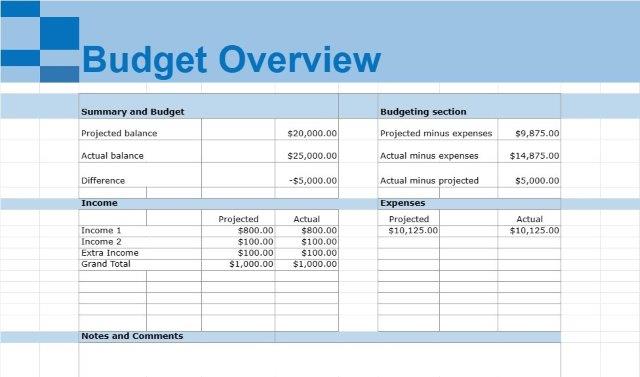
Mėnesio asmeninis biudžetas
Kategoria : Budżety
Tvarkykite savo asmenines mėnesio išlaidas ir pajamas naudodami šį šabloną
Asmeninio biudžeto šablono dokumentas yra išsamus įrankis, kurį asmenys ar namų ūkiai naudoja efektyviai valdyti savo finansus. Tai struktūrizuota sistema, leidžianti asmenims reguliariai stebėti ir kontroliuoti savo pajamas, išlaidas, santaupas ir investicijas.
Pagrindiniai asmeninio biudžeto šablono dokumento komponentai:
- Pajamų stebėjimas: vartotojai gali įrašyti visus pajamų šaltinius, pvz., atlyginimus, darbo užmokestį, nuomos pajamas, palūkanas ir dividendus. Šioje skiltyje pateikiama aiški bendrų pajamų, galimų sudaryti biudžetą, apžvalga.
- Išlaidų skirstymas į kategorijas: išlaidos skirstomos į fiksuotas ir kintamas kategorijas. Fiksuotos išlaidos apima tokius elementus kaip hipotekos ar nuomos mokėjimai, komunalinės paslaugos, draudimo įmokos ir paskolos grąžinimas. Kintamos išlaidos apima savo nuožiūra pasirenkamas išlaidas, pvz., bakalėjos produktus, pietus, pramogas ir keliones.
- Biudžeto sudarymas: šablonas palengvina biudžeto sudarymą, nes leidžia naudotojams kiekvienai išlaidoms skirti konkrečias sumas. Kategorija. Tai padeda nustatyti išlaidų limitus ir užtikrinti, kad pajamos padengtų visas būtinas išlaidas.
- Taupymas ir investicijos: Asmeninio biudžeto šablono dokumente dažnai yra skyrelių, skirtų taupymo tikslams nustatyti ir pažangai stebėti. Naudotojai gali skirti lėšų taupymui skubiai, pensijų sąskaitoms, investicijų portfeliams ar kitiems finansiniams tikslams.
- Analizė ir ataskaitų teikimas: vartotojai gali reguliariai atnaujinti dokumentą, kad įrašytų faktines pajamas ir išlaidas. Palyginę faktines sumas su biudžetu, asmenys gali nustatyti sritis, kuriose jie gali per daug išlaidauti arba kur gali papildomai sutaupyti.
- Finansiniai tikslai: šablonas taip pat gali būti naudojamas kaip nustatymo platforma. ir sekti finansinius tikslus. Nesvarbu, ar tai yra skolų grąžinimas, taupymas atostogoms ar investavimas į pensiją, naudotojai gali dokumentuoti savo tikslus ir stebėti savo pažangą.
- Neatidėliotinos pagalbos fondas: daugelyje asmeninio biudžeto šablonų yra konkretus skyrius, skirtas skubios pagalbos fondui. Tai skatina asmenis pirmenybę teikti taupymui nenumatytoms išlaidoms ar finansinėms krizėms.
- Skolų valdymas: tiems, kurie susiduria su skolomis, šablonas gali padėti valdyti ir stebėti skolų grąžinimo planus. Tai leidžia naudotojams sistemingai skirti lėšų skoloms apmokėti.
- Finansinis sąmoningumas: turbūt vienas iš svarbiausių asmeninio biudžeto šablono dokumento pranašumų yra tai, kad jis ugdo finansinį sąmoningumą. Jame pateikiamas išsamus finansinės padėties vaizdas, padedantis asmenims priimti pagrįstus sprendimus dėl išlaidų, taupymo ir investavimo.
Iš esmės Asmeninio biudžeto šablono dokumentas yra universali priemonė, suteikianti asmenims galimybę kontroliuoti savo finansus, išsikelti ir pasiekti finansinius tikslus, išvengti nereikalingų skolų ir kurti saugią finansinę ateitį. Tai skatina pinigų valdymo drausmę ir yra esminis finansinės gerovės šaltinis.
Łatwy podgląd i pobranie szablonu arkusza kalkulacyjnego
Zobacz pełną wersję szablonu arkusza kalkulacyjnego bez ograniczeń, aby sprawdzić, czy Ci się podoba, a następnie możesz pobrać szablon Excela, aby zapisać go na swoim urządzeniu i używać go za darmo.
Uzyskaj dostęp do szablonu arkusza kalkulacyjnego z dowolnego miejsca
Działa to na wszystkich popularnych systemach operacyjnych, takich jak Windows, MacOS, Linux, iOS. Możesz zobaczyć szablony arkuszy kalkulacyjnych i pobrać je bez dodatkowych programów.
Jak korzystać z szablonu
Dowiedz się, jak wyświetlić podgląd, pobrać i następnie używać szablonu arkusza kalkulacyjnego, wykonując niezwykle łatwe do wykonania kroki
Więcej podobnych szablonów
Zobacz więcej szablonów arkuszy kalkulacyjnych, które należą do tej samej kategorii co wybrany.