
Rooster
Categorie : Volgers
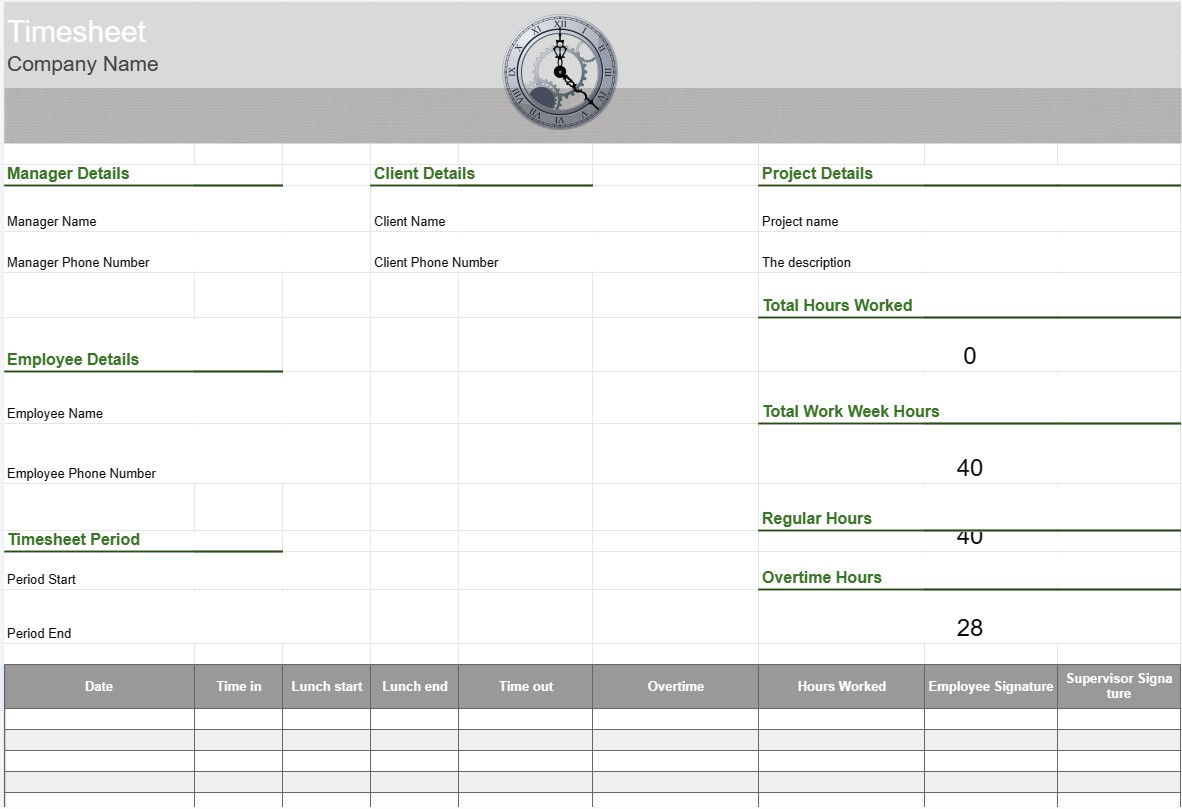
Werkurenstaat om het personeel te volgen om een overzicht te krijgen van wat de afdeling doet in de werkuren.


Een urenstaatsjabloon is een hulpmiddel dat door werknemers en organisaties wordt gebruikt om de tijd bij te houden en vast te leggen die aan verschillende taken, projecten of opdrachten wordt besteed. Urenstaten worden vaak gebruikt voor het bijhouden van werkuren, of het nu gaat om salarisadministratie, projectbeheer of het monitoren van factureerbare uren voor klanten. Urenstaatsjablonen zorgen voor nauwkeurige tijdregistratie en rapportage.
Belangrijkste componenten van een urenstaatsjabloon:
- Werknemersinformatie: De sjabloon bevat details over de werknemer, zoals hun naam, werknemers-ID, afdeling en contactgegevens.
- Datum en tijd: Een kalender- of tabelindeling toont datums en tijden waarop werknemers hun werkuren registreren . Dit kan worden georganiseerd op dagen, weken of maanden.
- Taak-/projectdetails: Werknemers voeren details in over de taken of projecten waaraan ze werken. Dit kunnen projectnamen, taakbeschrijvingen of projectcodes zijn.
- Time In en Time Out: Voor elke dag registreren medewerkers de tijd waarop ze met het werk begonnen en eindigden, evenals eventuele pauzes tijdens de werkdag.
- Totaal aantal uren: De sjabloon berekent het totale aantal gewerkte uren per dag, week of maand op basis van de ingevoerde tijd.
- Overuren bijhouden: Indien van toepassing kan de sjabloon secties bevatten voor het bijhouden van overuren, inclusief reguliere overuren, dubbele uren en eventuele toepasselijke tarieven.
- Klant of Klant: Als het werk verband houdt met klantprojecten, kan de sjabloon een veld bevatten waarin u de klant of klantnaam kunt opgeven.
- Goedkeuring en handtekening: Sommige urenstaten Voeg ruimte toe waar werknemers kunnen ondertekenen en waar supervisors of managers de geregistreerde uren kunnen goedkeuren.
- Notities of opmerkingen: Werknemers kunnen notities of opmerkingen toevoegen met betrekking tot specifieke taken of tijdsinvoer, zoals uitleg over overwerk of aanvullende context.
- Weekeinde: De urenstaat geeft doorgaans de einddatum van de werkweek of rapportageperiode aan.
Voordelen van het gebruik van een urenstaatsjabloon:
- Nauwkeurige urenregistratie: Zorgt ervoor dat de werkuren van werknemers nauwkeurig worden geregistreerd, wat essentieel is voor loonverwerking, projectfacturering en naleving van de arbeidsvoorwaarden wetten.
- Projectmanagement: Helpt projectmanagers en teams de tijd bij te houden die aan verschillende projecttaken wordt besteed, waardoor een betere projectplanning en toewijzing van middelen mogelijk wordt.
- Payrollverwerking: Vereenvoudigt het salarisproces door een gedetailleerd overzicht te geven van de gewerkte uren van werknemers, inclusief overuren en vrije tijd.
- Facturering aan klanten: Vergemakkelijkt de facturering aan klanten factureerbare gewerkte uren, waardoor het gemakkelijker wordt om nauwkeurig te factureren.
- Compliance: Helpt organisaties bij het naleven van arbeidsregelgeving en arbeidswetten met betrekking tot werktijden en overuren.
- Prestatieanalyse: levert gegevens voor het analyseren van de productiviteit van werknemers en de taakefficiëntie.
- Documentatie: dient als registratie van werkuren, wat nuttig kan zijn voor audits , geschillen of toekomstige verwijzingen.
- Transparantie: Bevordert transparantie in urenregistratie en werkrapportage, waardoor werknemers en werkgevers het vertrouwen kunnen behouden.
Kortom, een urenstaatsjabloon is een waardevol hulpmiddel voor het nauwkeurig bijhouden en documenteren van de werkuren en taken van werknemers. Het is essentieel voor verschillende doeleinden, waaronder loonverwerking, projectbeheer, facturering aan klanten en naleving van arbeidswet- en regelgeving.
Eenvoudig een spreadsheetsjabloon bekijken en downloaden
Bekijk de volledige versie van een spreadsheetsjabloon zonder beperkingen om te zien of u deze leuk vindt. Vervolgens kunt u de Excel-sjabloon downloaden om deze op uw apparaat op te slaan en gratis te gebruiken.
Krijg overal toegang tot de spreadsheetsjabloon
Dit werkt op alle populaire besturingssystemen zoals Windows, MacOS, Linux, iOS. U kunt de spreadsheetsjablonen bekijken en downloaden zonder extra programma's.
Hoe u een sjabloon gebruikt
Ontdek hoe u de spreadsheetsjabloon kunt bekijken, downloaden en vervolgens kunt gebruiken door de stappen te volgen die uiterst eenvoudig te volgen zijn
Meer vergelijkbare sjablonen
Bekijk meer spreadsheetsjablonen die onder dezelfde categorie vallen als de gekozen.













