
Time Cells
Categorie : Volgers
Manager must use this to manage the employees, this enable them to track their staffs more carefully.
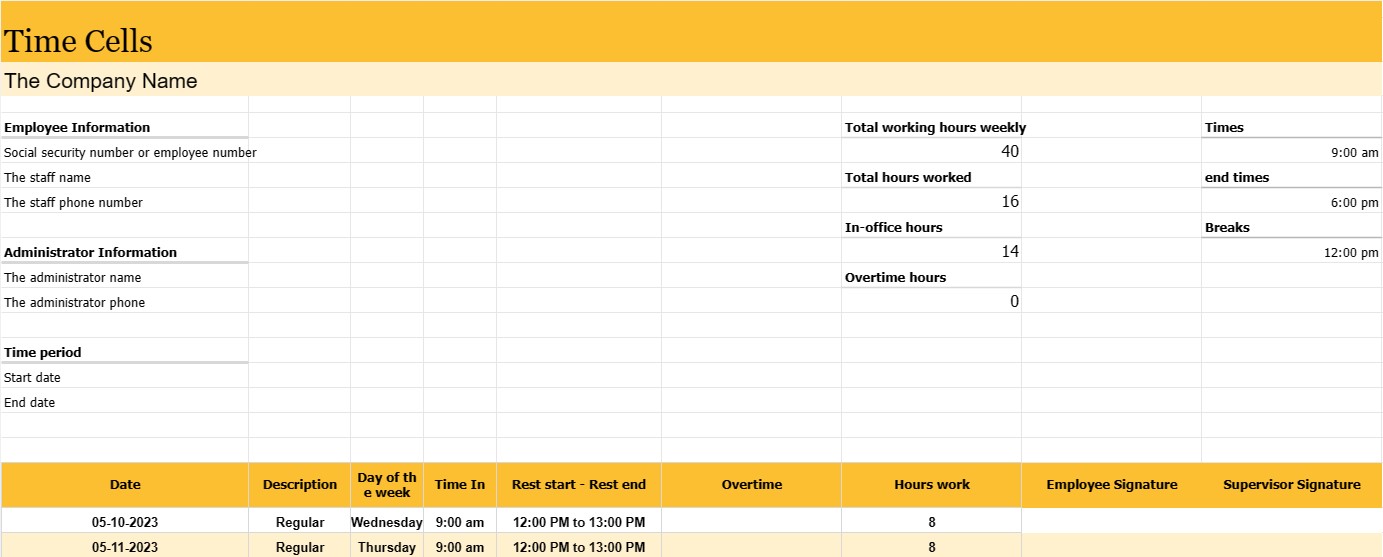
A time report is a record or document used to track an employee's time over a specific period of time, usually a work week or pay period. It is an essential tool for tracking and managing employee attendance, calculating payroll and ensuring compliance with labor laws and company policies.
Employee reports are commonly used in a variety of industries and workplaces, including businesses, government agencies, non-profit organizations, and many others.
The most important parts and information that can usually be found in an employee's employment journal are:
- Employee Information: The employee's name and, in some cases, social security number or employee number.
- Time period: A specific period of time covered by the time sheet, such as a week, bimonthly pay period, or month. Date: The date or dates of each business day within the specified time period.
- Day of the week: the corresponding day of the week for each date (eg Monday, Tuesday).
- Times and end times: the exact times when the employee starts and ends the shift for each working day. This information is usually stored in hours and minutes.
- Breaks: the time of the employee's breaks, if applicable, including the start and end time of meal and rest breaks. Total Hours Worked: The total hours worked by the employee for each working day and the cumulative total for the entire period.
- Overtime: If an employee worked overtime (generally defined as hours more than the normal work week or work day), they are reported separately.
- Employee and supervisor signatures: Many time sheets include spaces for the employee and supervisor to sign and verify the accuracy of the hours recorded.
Employee newsletters serve several important purposes:
- Salary: These are the basis for calculating employee wages, including regular wages, overtime and any fringe benefits.
- Labor Compliance: Time sheets help organizations comply with labor laws and regulations, especially those related to overtime pay and maximum hours.
- Attendance Tracking: They monitor the attendance and punctuality of employees which can be helpful in performance evaluation and attendance management.
- Project and Task Tracking: In some cases, time sheets are used to allocate hours to specific projects or tasks, making them valuable for project management and invoicing.
- Recording: Time sheets create a historical record of an employee's work hours, which can be important for audits, legal requirements and HR records.
- Resource Planning: Time sheets help companies plan and allocate resources by providing information about employee availability and workload.
While some organizations continue to use traditional paper-based time sheets, many companies have transitioned to electronic timekeeping systems that offer greater accuracy, convenience and efficiency. Electronic systems can automatically calculate work hours, process overtime calculations and generate reports, simplifying payroll and reducing the likelihood of errors.
Eenvoudig een spreadsheetsjabloon bekijken en downloaden
Bekijk de volledige versie van een spreadsheetsjabloon zonder beperkingen om te zien of u deze leuk vindt. Vervolgens kunt u de Excel-sjabloon downloaden om deze op uw apparaat op te slaan en gratis te gebruiken.
Krijg overal toegang tot de spreadsheetsjabloon
Dit werkt op alle populaire besturingssystemen zoals Windows, MacOS, Linux, iOS. U kunt de spreadsheetsjablonen bekijken en downloaden zonder extra programma's.
Hoe u een sjabloon gebruikt
Ontdek hoe u de spreadsheetsjabloon kunt bekijken, downloaden en vervolgens kunt gebruiken door de stappen te volgen die uiterst eenvoudig te volgen zijn
Meer vergelijkbare sjablonen
Bekijk meer spreadsheetsjablonen die onder dezelfde categorie vallen als de gekozen.













