
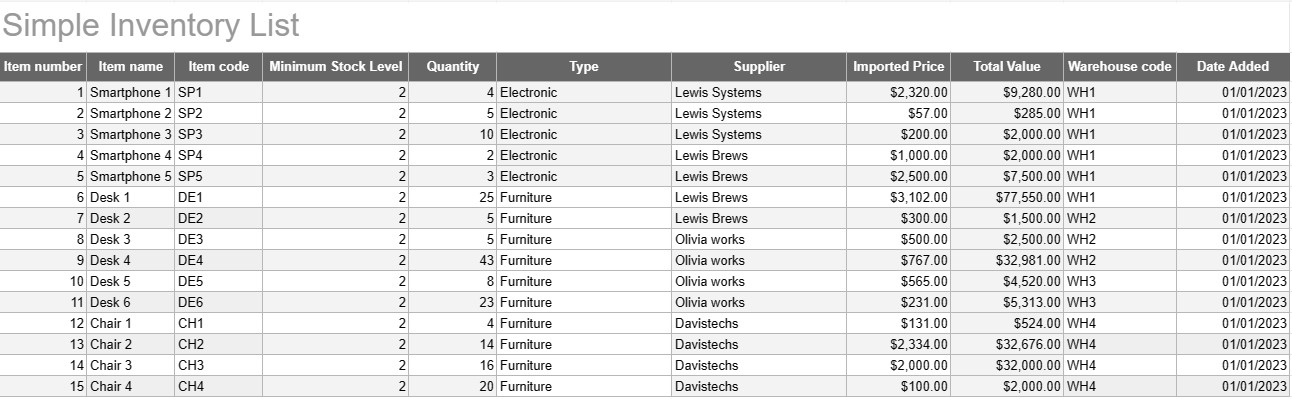
Eenvoudige inventarislijst
Categorie : Volgers
Schrijf al je inventarisnamen en beschrijvingen op, zodat je ze allemaal op één plek kunt zien.


Een eenvoudige inventarislijstsjabloon is een eenvoudige maar effectieve tool die door individuen en bedrijven wordt gebruikt om hun inventaris van goederen, producten of activa bij te houden en te beheren. Deze sjabloon biedt een gestructureerd formaat voor het vastleggen van artikeldetails, hoeveelheden, locaties en andere relevante informatie, waardoor het eenvoudiger wordt om de voorraadniveaus te controleren en een efficiënt beheer mogelijk te maken.
Belangrijkste componenten van een eenvoudige inventarislijstsjabloon:
- Artikeldetails: De sjabloon bevat kolommen of secties voor artikelspecifieke informatie, zoals de artikelnaam, beschrijving, unieke identificatie (bijvoorbeeld SKU of serienummer) en eventuele aanvullende opmerkingen.
- Aantal: Gebruikers kunnen het aantal of de eenheden van elk artikel in voorraad registreren. Deze kolom is essentieel voor het nauwkeurig bijhouden van de voorraadniveaus.
- Locatie: voor bedrijven met meerdere opslaglocaties of magazijnen kan de sjabloon een kolom bevatten om de fysieke locatie van elk item te specificeren. Dit helpt het ophalen en aanvullen te stroomlijnen.
- Eenheidsprijs: Gebruikers kunnen de eenheidsprijs of kosten van elk artikel invoeren. Deze informatie is waardevol voor het berekenen van de totale waarde van de inventaris.
- Totale waarde: Sommige sjablonen berekenen automatisch de totale waarde van elk artikel op basis van het aantal en de eenheidsprijs. Dit geeft een snel overzicht van de totale waarde van de inventaris.
- Datum toegevoegd/bijgewerkt: Om wijzigingen en updates van de inventaris bij te houden, kunnen gebruikers de datum registreren waarop elk item is toegevoegd of gewijzigd.
- Categorie/Type: Artikelen kunnen worden onderverdeeld in verschillende groepen of typen (bijvoorbeeld elektronica, kantoorbenodigdheden, kleding) voor een betere organisatie en rapportage.
- Minimaal voorraadniveau: Gebruikers kunnen voor elk artikel een minimaal voorraadniveau instellen. Wanneer het aantal onder dit niveau daalt, dient dit als trigger om het artikel opnieuw te bestellen of aan te vullen.
- Leveranciergegevens: In een zakelijke omgeving kunnen gebruikers leveranciersgegevens opnemen, zoals de naam van de leverancier, contactgegevens en bestelgegevens.
Voordelen van het gebruik van een eenvoudig inventarislijstsjabloon:
- Voorraad bijhouden: Biedt een duidelijke, actuele momentopname van voorraadniveaus, waardoor stockouts en overstocks worden voorkomen.
- Kostenbeheersing: Stelt bedrijven in staat de waarde van hun voorraad te monitoren en weloverwogen beslissingen te nemen over het aanvullen van voorraden en aankopen.
- Efficiëntie: Stroomlijnt voorraadbeheer door informatie te centraliseren en gemakkelijk toegankelijk te maken.
- Gegevensnauwkeurigheid: Vermindert het risico op fouten bij het bijhouden van de voorraad, omdat alle informatie systematisch wordt vastgelegd.
- Orderbeheer: Helpt bij het identificeren wanneer artikelen opnieuw moeten worden besteld en bij welke leveranciers, waardoor het beheer van de toeleveringsketen wordt verbeterd.
- Naleving: In sommige sectoren is het bijhouden van nauwkeurige inventarisgegevens essentieel voor naleving van de regelgeving en financiële rapportage.
- Optimalisatie van hulpbronnen: Stelt bedrijven in staat middelen effectiever toe te wijzen en de transportkosten te verlagen.
Kortom: een eenvoudige inventarislijstsjabloon is een praktisch hulpmiddel voor individuen en bedrijven die hun inventaris georganiseerd en nauwkeurig willen bijhouden. Of het nu wordt gebruikt voor een kleine woninginventaris of als onderdeel van een grotere bedrijfsvoering, deze sjabloon vereenvoudigt het voorraadbeheer, vermindert het risico op tekorten of overbevoorrading en draagt bij aan betere financiële controle en besluitvorming.
Eenvoudig een spreadsheetsjabloon bekijken en downloaden
Bekijk de volledige versie van een spreadsheetsjabloon zonder beperkingen om te zien of u deze leuk vindt. Vervolgens kunt u de Excel-sjabloon downloaden om deze op uw apparaat op te slaan en gratis te gebruiken.
Krijg overal toegang tot de spreadsheetsjabloon
Dit werkt op alle populaire besturingssystemen zoals Windows, MacOS, Linux, iOS. U kunt de spreadsheetsjablonen bekijken en downloaden zonder extra programma's.
Hoe u een sjabloon gebruikt
Ontdek hoe u de spreadsheetsjabloon kunt bekijken, downloaden en vervolgens kunt gebruiken door de stappen te volgen die uiterst eenvoudig te volgen zijn
Meer vergelijkbare sjablonen
Bekijk meer spreadsheetsjablonen die onder dezelfde categorie vallen als de gekozen.













