
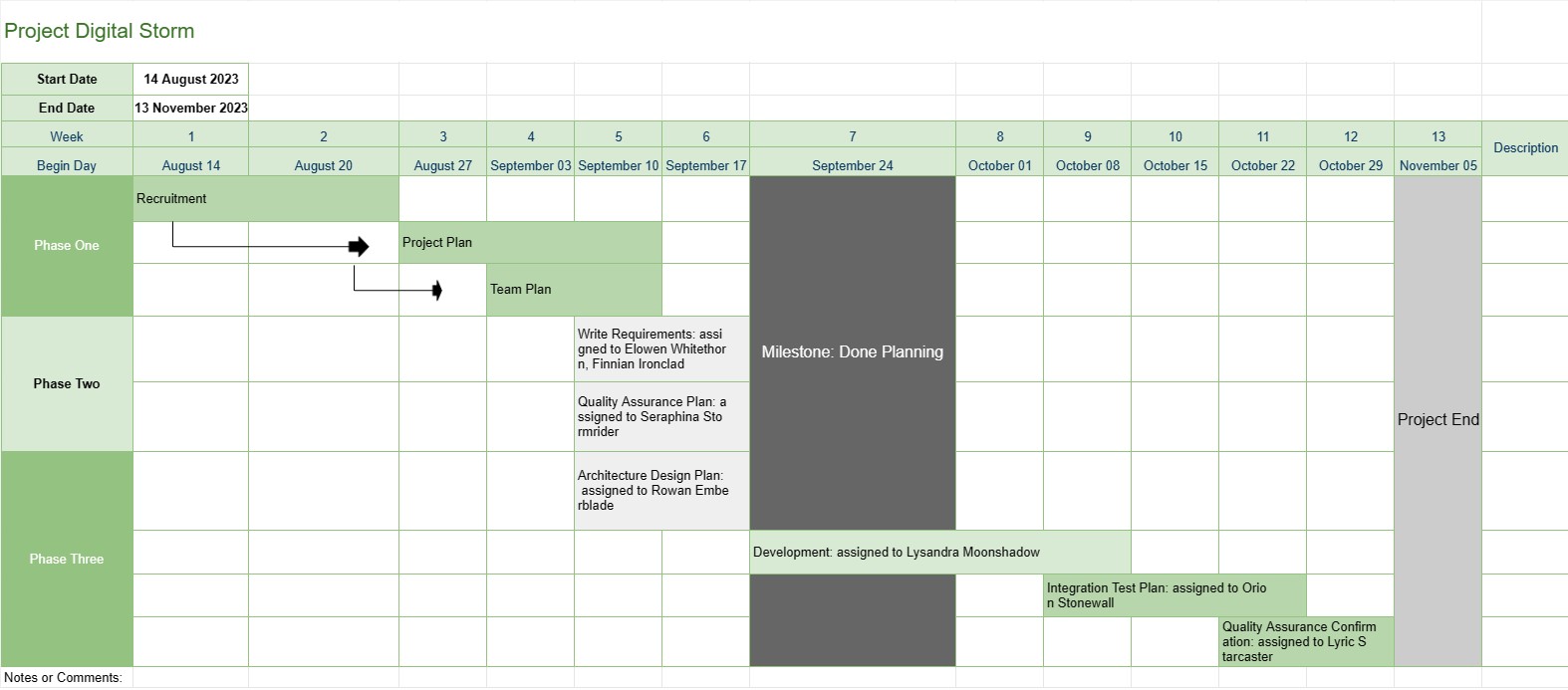
Project tijdlijn
Categorie : Volgers
Dit geeft de projectmanager een beter overzicht van een project, het omvat de fasen, de taken en de vervaldatum van de volledige ontwikkelingsvoortgang, plus alle gegevens zijn op een opvallende manier gevisualiseerd.
De Projecttijdlijn-sjabloon is een fundamentele projectmanagementtool die een visuele weergave biedt van de belangrijkste mijlpalen, taken en deadlines van het project gedurende een bepaalde periode. Het dient als routekaart voor projectteams en belanghebbenden en biedt een duidelijk en beknopt overzicht van de voortgang en planning van het project.
Dit zijn de belangrijkste componenten en functies die doorgaans in een projecttijdlijnsjabloon zijn opgenomen:
- Projectnaam: De sjabloon begint met de naam of titel van het project voor gemakkelijke identificatie.
- Projectduur: Het specificeert de start datum en einddatum van het project, waarin het tijdsbestek wordt gedefinieerd waarin het project zal worden voltooid.
- Mijlpalen: Mijlpalen zijn belangrijke gebeurtenissen of prestaties binnen het project die belangrijke voortgangspunten markeren. Ze worden meestal weergegeven als specifieke datums op de tijdlijn en dienen als referentiepunten voor het volgen van de voortgang van het project.
- Taken of activiteiten: De sjabloon schetst de verschillende betrokken taken, activiteiten of fasen. in het project. Elke taak is gekoppeld aan een startdatum en een geschatte duur.
- Afhankelijkheden: Sommige projecttijdlijnsjablonen bevatten pijlen of lijnen die taken verbinden om taakafhankelijkheden te illustreren. Hierdoor begrijpen projectteams de volgorde waarin taken moeten worden voltooid.
- Toegewezen bronnen: Projectmanagers kunnen aangeven welke teamleden of bronnen verantwoordelijk zijn voor elke taak. Dit vergemakkelijkt de toewijzing van middelen en taaktoewijzing.
- Taakduur: De geschatte duur voor elke taak wordt vaak weergegeven, zodat teams kunnen inschatten hoe lang elke activiteit zal duren.
- Voortgang bijhouden: De sjabloon kan visuele indicatoren bevatten om de voltooiing van taken en de algehele voortgang van het project bij te houden.
- Kritiek pad: in een meer geavanceerde projecttijdlijn sjablonen kan het kritieke pad worden geïdentificeerd, dat de reeks taken vertegenwoordigt die de minimale duur van het project bepalen.
- Opmerkingen of opmerkingen: Gebruikers kunnen opmerkingen, opmerkingen of beschrijvingen toevoegen om aanvullende context of details te bieden voor specifieke taken of mijlpalen.
De projecttijdlijnsjabloon speelt een cruciale rol in projectmanagement door verschillende belangrijke voordelen te bieden:
- Visualisatie: Het biedt een visuele weergave van het project, waardoor het voor projectteams en belanghebbenden gemakkelijker wordt om de reikwijdte, tijdlijn en belangrijkste resultaten van het project te begrijpen.
- Communicatie: De tijdlijn dient als communicatiemiddel waarmee projectmanagers de voortgang en status van het project kunnen overbrengen aan teamleden, klanten en leidinggevenden.
- Planning en coördinatie: Projectteams kunnen de tijdlijn gebruiken om taken te plannen, middelen toe te wijzen en activiteiten te coördineren om ervoor te zorgen dat het project op koers blijft.
- Risicobeheer: Door taakafhankelijkheden en kritieke paden te identificeren, kunnen projectmanagers proactief potentiële risico's en knelpunten beheren.
- Documentatie: De tijdlijn biedt een historisch overzicht van de voortgang van het project, wat helpt bij analyse en documentatie na het project.
Samengevat is de projecttijdlijnsjabloon een onmisbare tool voor projectmanagement die de planning, uitvoering en monitoring van projecten verbetert. Het zorgt ervoor dat projectteams een duidelijk inzicht hebben in de projectdoelstellingen, tijdlijnen en afhankelijkheden, wat uiteindelijk bijdraagt aan een succesvolle afronding van het project.
Eenvoudig een spreadsheetsjabloon bekijken en downloaden
Bekijk de volledige versie van een spreadsheetsjabloon zonder beperkingen om te zien of u deze leuk vindt. Vervolgens kunt u de Excel-sjabloon downloaden om deze op uw apparaat op te slaan en gratis te gebruiken.
Krijg overal toegang tot de spreadsheetsjabloon
Dit werkt op alle populaire besturingssystemen zoals Windows, MacOS, Linux, iOS. U kunt de spreadsheetsjablonen bekijken en downloaden zonder extra programma's.
Hoe u een sjabloon gebruikt
Ontdek hoe u de spreadsheetsjabloon kunt bekijken, downloaden en vervolgens kunt gebruiken door de stappen te volgen die uiterst eenvoudig te volgen zijn
Meer vergelijkbare sjablonen
Bekijk meer spreadsheetsjablonen die onder dezelfde categorie vallen als de gekozen.














