
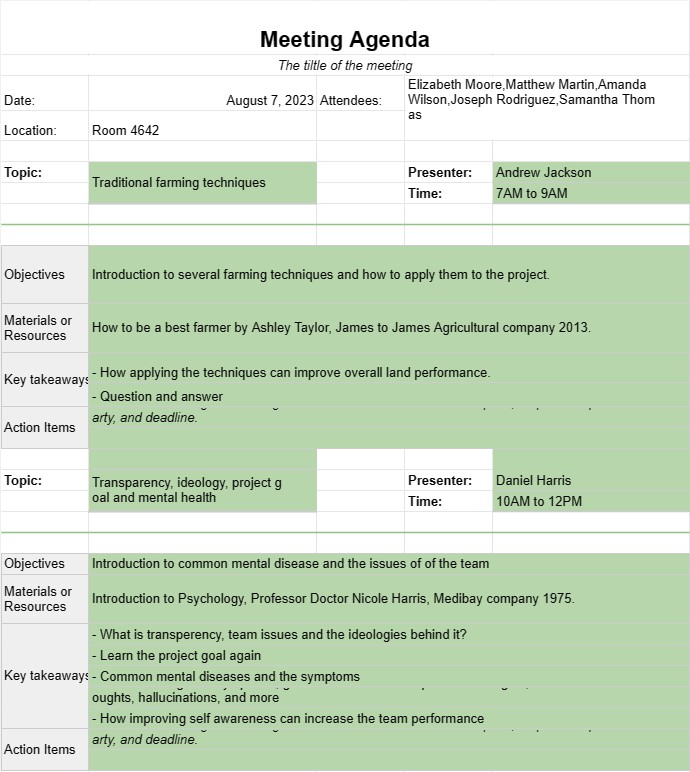
Vergadering agenda
Categorie : Planners
Beheer de timing en het onderwerp van de vergaderingen met behulp van deze eenvoudige sjablonen.
Een sjabloon voor een vergaderagenda is een gestructureerd document dat wordt gebruikt om de onderwerpen, doelstellingen en activiteiten te schetsen die tijdens een vergadering moeten worden besproken en bereikt. Het dient als leidraad voor de deelnemers en zorgt ervoor dat de vergadering op koers blijft, de doelen worden bereikt en de tijd effectief wordt beheerd. Vergaderagenda's zijn essentieel voor zowel formele zakelijke bijeenkomsten als informele teambijeenkomsten.
Belangrijkste componenten van een sjabloon voor een vergaderagenda:
- Vergaderdetails: De sjabloon bevat doorgaans de titel van de vergadering, datum, tijd, locatie (fysiek of virtueel) en de namen van deelnemers of aanwezigen.
- Agendapunten: elk agendapunt wordt vermeld met een duidelijke titel of onderwerp. De onderwerpen moeten in een logische volgorde worden geordend en de volgorde van de discussie kan worden geprioriteerd op basis van belangrijkheid of tijdgevoeligheid.
- Duur: Voor elk agendapunt wordt de geschatte tijdsbesteding gespecificeerd. om de totale duur van de vergadering te helpen beheren. Dit zorgt ervoor dat de discussies niet overhaast verlopen en dat er voldoende tijd is voor elk onderwerp.
- Presentator: De naam van de persoon die verantwoordelijk is voor het presenteren of leiden van de discussie over elk agendapunt is vermeld.
- Doelstellingen: Voor elk agendapunt wordt een korte beschrijving gegeven van de doelen of doelstellingen die moeten worden bereikt. Dit helpt de deelnemers gefocust te houden op de beoogde resultaten.
- Materialen of bronnen: Als er documenten, rapporten, presentaties of bronnen zijn die verband houden met een agendapunt, kan er naar worden verwezen in deze sectie.
- Actiepunten: Een speciale sectie aan het einde van de agenda vermeldt actiepunten, besluiten of vervolgtaken die tijdens de vergadering naar voren komen. Elk actiepunt bevat een beschrijving, verantwoordelijke partij en deadline.
- Vergadering verdagen: Er is een slotverklaring of samenvatting opgenomen om de vergadering officieel te verdagen, waarbij de deelnemers worden bedankt voor hun aanwezigheid en bijdragen .
Voordelen van het gebruik van een sjabloon voor een vergaderagenda:
- Focus: Houdt de vergadering gefocust op specifieke onderwerpen en doelen, waardoor er minder de kans dat u van het onderwerp afdwaalt.
- Time Management: Helpt tijd efficiënt toe te wijzen aan elk agendapunt, voorkomt overschrijdingen en zorgt voor een goed tempo van de vergadering.
- Voorbereiding: Stelt deelnemers in staat zich van tevoren voor te bereiden door agendapunten en relevant materiaal door te nemen.
- Verantwoording: Documenteert actiepunten en verantwoordelijkheden en zorgt ervoor dat beslissingen worden genomen gevolgd.
- Duidelijkheid: Biedt een duidelijke structuur voor de vergadering, waardoor het voor deelnemers gemakkelijker wordt om de stroom van discussies te begrijpen.
- Betrokkenheid : Moedigt actieve deelname van deelnemers aan door hun rollen en verantwoordelijkheden duidelijk te schetsen.
- Het bijhouden van gegevens: Dient als een verslag van wat er is besproken, besloten en toegewezen tijdens de vergadering, die nuttig kan zijn voor toekomstig gebruik.
- Professionalisme: toont organisatorische vaardigheden en inzet voor effectieve communicatie binnen het team of de organisatie.
Concluderend: een vergaderagendasjabloon is een waardevol hulpmiddel voor het plannen en uitvoeren van productieve vergaderingen. Het zorgt ervoor dat vergaderingen goed georganiseerd, doelgericht en resultaatgericht zijn, waardoor uiteindelijk tijd wordt bespaard en de communicatie tussen de deelnemers wordt verbeterd.
Eenvoudig een spreadsheetsjabloon bekijken en downloaden
Bekijk de volledige versie van een spreadsheetsjabloon zonder beperkingen om te zien of u deze leuk vindt. Vervolgens kunt u de Excel-sjabloon downloaden om deze op uw apparaat op te slaan en gratis te gebruiken.
Krijg overal toegang tot de spreadsheetsjabloon
Dit werkt op alle populaire besturingssystemen zoals Windows, MacOS, Linux, iOS. U kunt de spreadsheetsjablonen bekijken en downloaden zonder extra programma's.
Hoe u een sjabloon gebruikt
Ontdek hoe u de spreadsheetsjabloon kunt bekijken, downloaden en vervolgens kunt gebruiken door de stappen te volgen die uiterst eenvoudig te volgen zijn
Meer vergelijkbare sjablonen
Bekijk meer spreadsheetsjablonen die onder dezelfde categorie vallen als de gekozen.













