
Factuur 1
Categorie : Planners
Een factuursjabloon om naar de klanten te sturen nadat een klus is geklaard
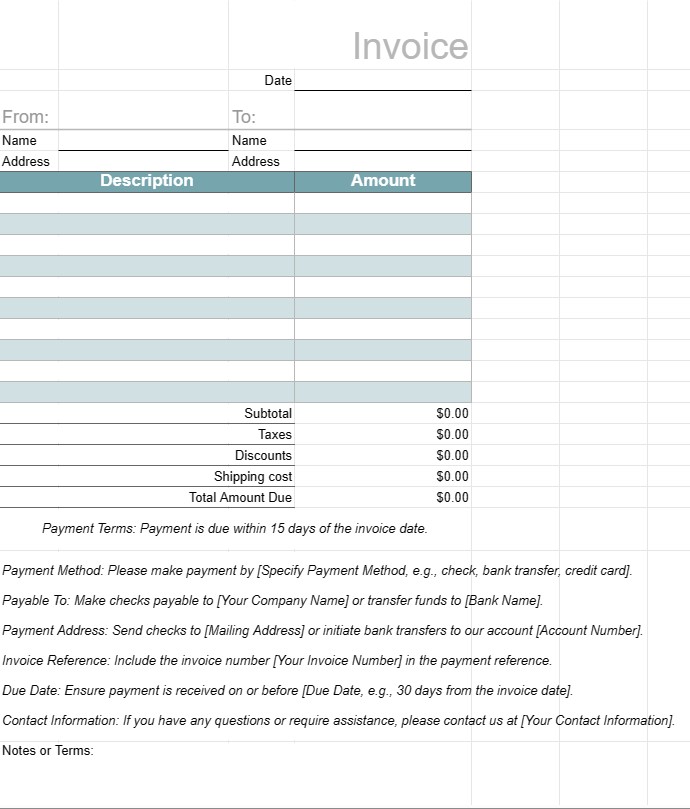
Een factuursjabloon is een gestandaardiseerd document dat door bedrijven wordt gebruikt om hun klanten of klanten te factureren voor geleverde goederen of diensten. Het dient als een formeel betalingsverzoek en bevat details over de producten of diensten, de kosten ervan, de betalingsvoorwaarden en contactgegevens van zowel het bedrijf als de klant. Facturen zijn essentieel voor het volgen van transacties, het beheren van de cashflow en het bijhouden van financiële gegevens.
Belangrijkste componenten van een factuursjabloon:
- Koptekst: De Het bovenste gedeelte van de factuur bevat doorgaans de naam, het logo en de contactgegevens van het bedrijf, evenals het factuurnummer en de uitgiftedatum.
- Klantgegevens: Dit gedeelte bevat de gegevens van de klant naam, bedrijf (indien van toepassing), factuuradres en contactgegevens.
- Factuurgegevens: In dit gedeelte vindt u een overzicht van de geleverde producten of diensten. Elk regelitem bevat een beschrijving, aantal, eenheidsprijs en totaalbedrag.
- Subtotaal: Het subtotaal is de som van alle regelitems vóór belastingen of extra kosten.
- Belastingen: Indien van toepassing worden omzetbelasting, BTW of andere belastingen afzonderlijk gespecificeerd.
- Kortingen: Alle toepasselijke kortingen, coupons , of promotie-aanbiedingen worden in deze sectie vermeld.
- Verzending en afhandeling: Als op de factuur kosten voor verzending of administratie zijn vermeld, worden deze afzonderlijk gespecificeerd.
- Totaal verschuldigd bedrag: Dit is het eindtotaal van de factuur, inclusief alle kosten, belastingen, kortingen en toeslagen.
- Betalingsvoorwaarden: De betaling De voorwaarden specificeren de vervaldatum, geaccepteerde betalingsmethoden (bijvoorbeeld bankoverschrijving, cheque, creditcard) en eventuele boetes voor te late betaling.
- Betalingsinstructies: Bankrekeninggegevens of betalingsinstructies worden verstrekt om het betalingsproces te vergemakkelijken.
- Opmerkingen of voorwaarden: Eventuele aanvullende voorwaarden, instructies of speciale opmerkingen die relevant zijn voor de factuur of transactie kunnen worden opgenomen.
- Factuurvoettekst: Sommige facturen bevatten een voettekst met aanvullende contactgegevens of een bedankbericht.
Voordelen van het gebruik van een factuursjabloon:
- Professionalisme: Geeft klanten een professioneel imago en laat zien dat het bedrijf efficiënt en systematisch opereert.
- Duidelijkheid: Geeft duidelijk een overzicht van de geleverde producten of diensten , hun kosten en betalingsgegevens, waardoor het risico op geschillen of misverstanden wordt verminderd.
- Registratie: Helpt bedrijven nauwkeurige gegevens bij te houden van financiële transacties voor boekhoudkundige, belasting- en auditdoeleinden.
- Efficiëntie: Bespaart tijd door een gestandaardiseerd formaat te bieden dat voor elke klant of transactie kan worden aangepast.
- Juridische bescherming: Biedt een formeel overzicht van de overeenkomst tussen het bedrijf en de klant, wat handig kan zijn in geval van geschillen.
- Snelle betaling: Moedigt klanten aan om snel te betalen door vervaldata op te geven en betalingsinstructies.
- Consistentie: Zorgt ervoor dat facturen consistent zijn qua formaat en inhoud, wat belangrijk is voor bedrijven die met meerdere klanten te maken hebben.
Kortom, een factuursjabloon is een essentieel hulpmiddel voor bedrijven om op een gestructureerde en professionele manier aan klanten en klanten te factureren. Het helpt het betalingsproces te stroomlijnen, financiële gegevens bij te houden en duidelijke verwachtingen te scheppen met betrekking tot betalingen en voorwaarden.
Eenvoudig een spreadsheetsjabloon bekijken en downloaden
Bekijk de volledige versie van een spreadsheetsjabloon zonder beperkingen om te zien of u deze leuk vindt. Vervolgens kunt u de Excel-sjabloon downloaden om deze op uw apparaat op te slaan en gratis te gebruiken.
Krijg overal toegang tot de spreadsheetsjabloon
Dit werkt op alle populaire besturingssystemen zoals Windows, MacOS, Linux, iOS. U kunt de spreadsheetsjablonen bekijken en downloaden zonder extra programma's.
Hoe u een sjabloon gebruikt
Ontdek hoe u de spreadsheetsjabloon kunt bekijken, downloaden en vervolgens kunt gebruiken door de stappen te volgen die uiterst eenvoudig te volgen zijn
Meer vergelijkbare sjablonen
Bekijk meer spreadsheetsjablonen die onder dezelfde categorie vallen als de gekozen.













