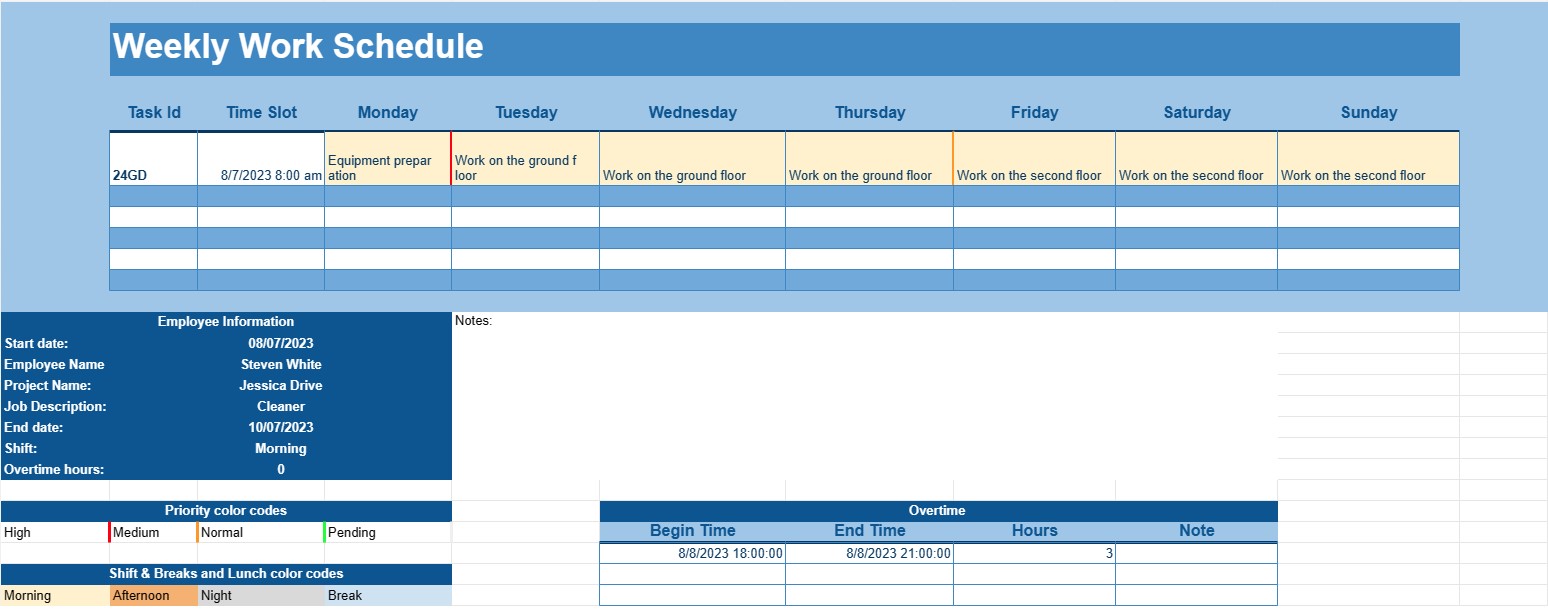
Wekelijks werkschema
Categorie : Kalenders
Als u precies wilt weten wat u week na week moet doen, moet u dit gebruiken omdat u hiermee de taken kunt opschrijven.
Een wekelijkse werkschemasjabloon is een gestructureerd document dat individuen of bedrijven helpt bij het plannen en organiseren van hun werkverplichtingen en opdrachten voor een specifieke week. Deze sjabloon is een waardevol hulpmiddel om uw tijd effectief te beheren, ervoor te zorgen dat taken efficiënt worden toegewezen en werkgerelateerde verantwoordelijkheden bij te houden.
Belangrijkste componenten van een sjabloon voor een wekelijks werkschema:
- Dagen en uren: De sjabloon toont doorgaans alle dagen van de week, beginnend bij maandag en eindigend op zondag. Het is onderverdeeld in uren of tijdvakken, waardoor gebruikers voor elke dag taken of afspraken kunnen toewijzen.
- Werknemersinformatie: Voor bedrijven bevat de sjabloon vaak secties of kolommen waarin de namen van werknemers of teamleden worden vermeld. Dit helpt bij het toewijzen van taken aan specifieke personen.
- Taak of opdracht: Gebruikers kunnen de details invoeren van taken of opdrachten die gedurende de week moeten worden voltooid. Dit kunnen projectnamen, functiebeschrijvingen of specifieke activiteiten zijn.
- Prioriteit of deadline: Sommige sjablonen bevatten een kolom Prioriteit of Deadline, waarmee gebruikers taken kunnen prioriteren op basis van hun belang of vervaldatums kunnen instellen.
- Ploeken: Op werkplekken met op ploegendiensten gebaseerde schema's kan de sjabloon secties bevatten voor ochtend-, middag- en nachtdiensten, samen met werknemerstoewijzingen voor elke ploegendienst.
- Pauzes en lunch: Gebruikers kunnen pauzetijden en lunchperioden plannen om ervoor te zorgen dat werknemers tijdens hun werkdagen voldoende rust- en maaltijdpauzes hebben.
- Overuren: Indien van toepassing kan er een sectie zijn voor het registreren van door werknemers gewerkte overuren.
- Opmerkingen of opmerkingen: Gebruikers kunnen opmerkingen of opmerkingen toevoegen om aanvullende informatie of instructies te geven met betrekking tot specifieke taken of opdrachten.
Voordelen van het gebruik van een sjabloon voor een wekelijks werkschema:
- Efficiënt tijdbeheer: Helpt individuen en bedrijven tijd en middelen effectief toe te wijzen om werkgerelateerde doelen en deadlines te halen.
- Toewijzing van middelen: Zorgt ervoor dat taken gelijkmatig worden verdeeld onder werknemers of teamleden, waardoor overwerk of onderbenutting van middelen wordt voorkomen.
- Visuele planning: Biedt een visuele weergave van het weekschema, waardoor het gemakkelijker wordt om potentiële conflicten of overlappingen op te merken.
- Verbeterde communicatie: Vergemakkelijkt de communicatie binnen teams door een gecentraliseerd schema te bieden waar iedereen toegang toe heeft en naar kan verwijzen.
- Verbeterde productiviteit: Stelt individuen in staat zich te concentreren op taken zonder de noodzaak van voortdurend plannen en opnieuw plannen.
- Flexibiliteit: Maakt aanpassingen aan de planning mogelijk als dat nodig is om tegemoet te komen aan veranderende prioriteiten of onverwachte gebeurtenissen.
- Naleving: In sommige sectoren is het hebben van een goed gedocumenteerd werkschema essentieel voor de naleving van arbeidswetten en -regelgeving.
Concluderend: een sjabloon voor een wekelijks werkschema is een hulpmiddel van onschatbare waarde voor bedrijven, managers en individuen die hun wekelijkse werkverplichtingen op een georganiseerde en efficiënte manier willen benaderen. Het helpt bij tijdmanagement, toewijzing van middelen en effectieve communicatie binnen teams, wat uiteindelijk leidt tot verbeterde productiviteit en een betere balans tussen werk en privéleven. Of u deze sjabloon nu gebruikt in een zakelijke omgeving of voor persoonlijk tijdbeheer, het is een praktische oplossing voor het plannen en organiseren van wekelijkse taken en verantwoordelijkheden.
Eenvoudig een spreadsheetsjabloon bekijken en downloaden
Bekijk de volledige versie van een spreadsheetsjabloon zonder beperkingen om te zien of u deze leuk vindt. Vervolgens kunt u de Excel-sjabloon downloaden om deze op uw apparaat op te slaan en gratis te gebruiken.
Krijg overal toegang tot de spreadsheetsjabloon
Dit werkt op alle populaire besturingssystemen zoals Windows, MacOS, Linux, iOS. U kunt de spreadsheetsjablonen bekijken en downloaden zonder extra programma's.
Hoe u een sjabloon gebruikt
Ontdek hoe u de spreadsheetsjabloon kunt bekijken, downloaden en vervolgens kunt gebruiken door de stappen te volgen die uiterst eenvoudig te volgen zijn
Meer vergelijkbare sjablonen
Bekijk meer spreadsheetsjablonen die onder dezelfde categorie vallen als de gekozen.