Dagelijkse afsprakenkalender
Categorie : Kalenders
Uw dagindeling wordt overzichtelijker als u hiermee alle afspraken van de dag aanwijst.
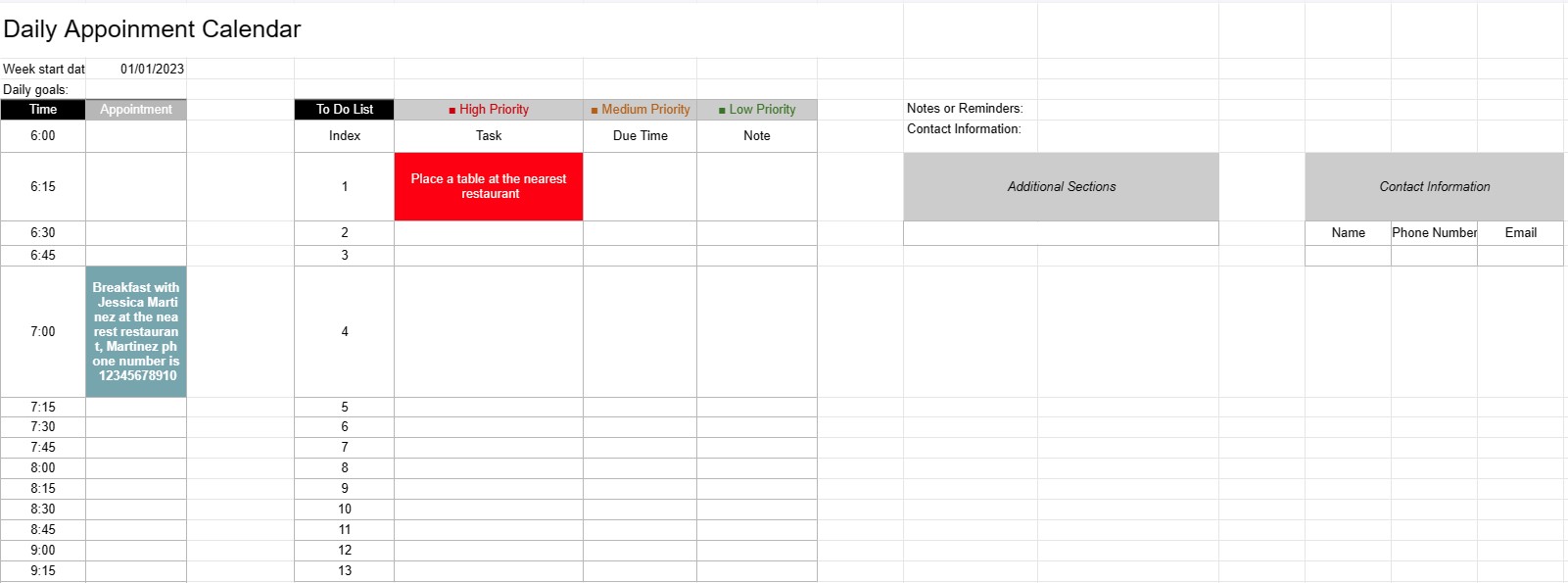
Een kalendersjabloon voor dagelijkse afspraken is een planningstool die door individuen, professionals en bedrijven wordt gebruikt om hun dagelijkse afspraken, vergaderingen en taken te plannen en te beheren. Het biedt een gestructureerde lay-out voor het organiseren van dagelijkse activiteiten, het stellen van prioriteiten en het garanderen dat tijd efficiënt wordt toegewezen.
Belangrijkste componenten van een kalendersjabloon voor dagelijkse afspraken:
- Datum: De sjabloon geeft doorgaans de datum bovenaan elke dagelijkse pagina weer, zodat gebruikers door verschillende dagen kunnen navigeren.
- Tijdvakken: De dag is verdeeld in tijdvakken of uren, meestal beginnend in de ochtend en eindigend in de avond. Elk tijdslot vertegenwoordigt een specifieke periode gedurende de dag.
- Afspraakdetails: Gebruikers kunnen binnen elk tijdslot afspraakgegevens invoeren, waaronder:
- Tijdstip van de afspraak
- Titel of beschrijving van de afspraak
- Locatie of vergaderruimte
- Contactgegevens van de betrokken personen
- Takenlijst: Sommige sjablonen bevatten een sectie voor het opsommen van taken of to-do-items die gedurende de dag moeten worden voltooid. Deze kunnen worden gecategoriseerd op prioriteit of op tijd.
- Notities of herinneringen: Onderaan de pagina kan ruimte worden voorzien voor algemene notities of herinneringen.
- Prioriteiten of doelen: Sommige sjablonen kunnen een sectie bevatten voor het instellen van dagelijkse prioriteiten of doelen, zodat gebruikers zich kunnen concentreren op essentiële taken.
- Contactgegevens: Contactgegevens van belangrijke personen of klanten kunnen worden opgenomen voor snelle referentie.
- Aanvullende secties: Afhankelijk van de sjabloon kunnen extra secties voor het bijhouden van uitgaven, kilometers of andere specifieke informatie worden toegevoegd. worden opgenomen.
Voordelen van het gebruik van een kalendersjabloon voor dagelijkse afspraken:
- Tijdbeheer: Helpt gebruikers hun tijd effectief in te delen afspraken en taken plannen.
- Organisatie: Biedt een gestructureerde manier om dagelijkse verplichtingen bij te houden, waardoor het risico op overboeking of het missen van afspraken wordt verkleind.
- Prioritisering: Hiermee kunnen gebruikers taken en afspraken prioriteren, zodat de belangrijkste items als eerste worden behandeld.
- Productiviteit: Faciliteert beter tijdbeheer en verhoogde productiviteit door het bieden van een visueel overzicht van de dagelijkse activiteiten.
- Communicatie: Zorgt ervoor dat gebruikers goed voorbereid zijn op vergaderingen en afspraken door alle relevante informatie binnen handbereik te hebben.
- Tijdregistratie: Kan worden gebruikt om factureerbare uren bij te houden voor professionals die per uur factureren.
- Referentie: Dient als referentiepunt voor het bekijken van eerdere afspraken en taken.
- Efficiëntie: Verbetert de efficiëntie door tijdverspilling door ongeorganiseerde planning en planning te verminderen.
Samenvattend: een dagelijkse afsprakenkalender Sjabloon is een waardevol hulpmiddel voor het efficiënt beheren van dagelijkse planningen, afspraken en taken. Het helpt individuen en professionals georganiseerd te blijven, hun activiteiten te prioriteren en hun tijd optimaal te benutten.
Eenvoudig een spreadsheetsjabloon bekijken en downloaden
Bekijk de volledige versie van een spreadsheetsjabloon zonder beperkingen om te zien of u deze leuk vindt. Vervolgens kunt u de Excel-sjabloon downloaden om deze op uw apparaat op te slaan en gratis te gebruiken.
Krijg overal toegang tot de spreadsheetsjabloon
Dit werkt op alle populaire besturingssystemen zoals Windows, MacOS, Linux, iOS. U kunt de spreadsheetsjablonen bekijken en downloaden zonder extra programma's.
Hoe u een sjabloon gebruikt
Ontdek hoe u de spreadsheetsjabloon kunt bekijken, downloaden en vervolgens kunt gebruiken door de stappen te volgen die uiterst eenvoudig te volgen zijn
Meer vergelijkbare sjablonen
Bekijk meer spreadsheetsjablonen die onder dezelfde categorie vallen als de gekozen.