Conferentie- of trainingsweekkalender
Categorie : Kalenders
Je hebt veel vergaderingen en agenda's, hoe krijg je het voor elkaar om ze allemaal te doen? Dit is waar dit spreadsheetsjabloon om de hoek komt kijken en u kunt het gebruiken om de periode te beheren.
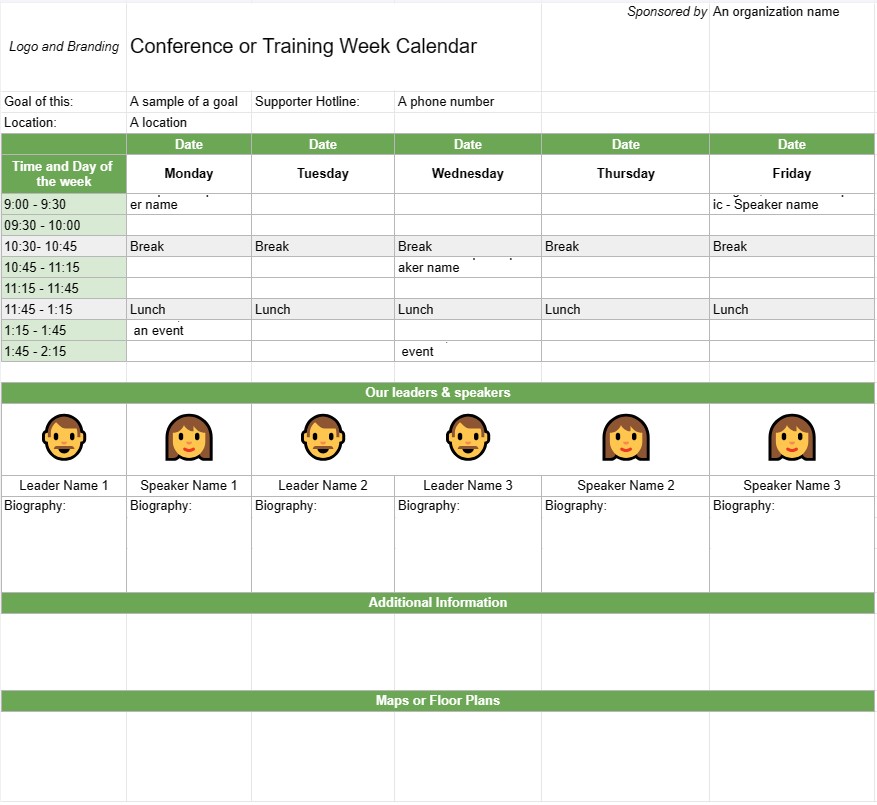
Een conferentie- of trainingsweekkalendersjabloon is een planningstool die door organisaties en evenementenplanners wordt gebruikt voor het plannen en organiseren van conferenties, trainingssessies of workshops die meerdere dagen of een volledige week beslaan. Het helpt bij het schetsen van de dagelijkse agenda van het evenement, inclusief sessieonderwerpen, sprekers, locaties en andere relevante details. Deze sjabloon zorgt ervoor dat alle deelnemers goed op de hoogte zijn van het schema en de logistiek van het evenement.
Belangrijkste componenten van een kalendersjabloon voor een conferentie- of trainingsweek:
- Evenementtitel : De sjabloon bevat doorgaans bovenaan de naam van de conferentie of trainingsgebeurtenis.
- Datumbereik: Specificeert de begin- en einddatum van de conferentie of trainingsweek .
- Locatie: Biedt informatie over de locatie of locaties van het evenement, inclusief adressen en kamernamen.
- Dagelijkse agenda:elk De dag van het evenement wordt beschreven met details zoals:
- Datum en dag van de week
- Schema van sessies, workshops of activiteiten
- Begin- en eindtijden voor elke sessie
- Sessietitels, onderwerpen of thema's
- Namen van sprekers, trainers of facilitators
- Kamer- of locatietoewijzingen
- Pauzes en maaltijden
- Speciale evenementen of netwerkmogelijkheden
- Sessiebeschrijvingen:Geeft korte beschrijvingen of doelstellingen voor elke sessie of workshop , zodat deelnemers de inhoud en het doel kunnen begrijpen.
- Sprekersbiografieën: Bevat biografische informatie over de sprekers of trainers, waarbij hun expertise en kwalificaties worden benadrukt.
- Aanvullende informatie: Dit gedeelte kan details bevatten over registratie, incheckprocedures, contactgegevens voor organisatoren van evenementen en contactnummers voor noodgevallen.
- Kaarten of plattegronden: Indien nodig kan de sjabloon kaarten of plattegronden van de evenementenlocatie(s) bevatten om deelnemers te helpen bij het navigeren door de locatie.
- Logo en branding: Bevat het logo en de branding van het evenement , of thema om consistentie en herkenning te behouden.
Voordelen van het gebruik van een kalendersjabloon voor conferentie- of trainingsweek:
- Organisatie: Helpt organisatoren bij het plannen en structureer meerdaagse evenementen met duidelijkheid en efficiëntie.
- Communicatie: Biedt een gedetailleerd schema voor deelnemers, sprekers en personeel, zodat iedereen op één lijn zit.
- Efficiëntie: Vermindert verwarring en logistieke uitdagingen door de dagelijkse agenda van het evenement duidelijk te schetsen.
- Toewijzing van middelen: Zorgt ervoor dat kamers, apparatuur en materialen worden op de juiste manier toegewezen voor elke sessie of workshop.
- Betrokkenheid van deelnemers: Hiermee kunnen deelnemers hun aanwezigheid plannen en vooraf interessante sessies selecteren.
- Professionalisme: Verbetert de professionaliteit van het evenement door een goed georganiseerd en visueel aantrekkelijk schema te presenteren.
- Netwerken: Helpt deelnemers netwerkmogelijkheden en sociale evenementen te identificeren tijdens het evenement conferentie- of trainingsweek.
- Referentie: Dient als referentiedocument waar deelnemers naar kunnen verwijzen tijdens het evenement.
Sluiterend: een Conferentie- of trainingsweekkalendersjabloon is een essentieel hulpmiddel voor het plannen en uitvoeren van meerdaagse evenementen. Het biedt een gestructureerd en georganiseerd schema, waardoor deelnemers het meeste uit hun ervaring kunnen halen en ervoor zorgen dat de evenementenlogistiek soepel verloopt.
Eenvoudig een spreadsheetsjabloon bekijken en downloaden
Bekijk de volledige versie van een spreadsheetsjabloon zonder beperkingen om te zien of u deze leuk vindt. Vervolgens kunt u de Excel-sjabloon downloaden om deze op uw apparaat op te slaan en gratis te gebruiken.
Krijg overal toegang tot de spreadsheetsjabloon
Dit werkt op alle populaire besturingssystemen zoals Windows, MacOS, Linux, iOS. U kunt de spreadsheetsjablonen bekijken en downloaden zonder extra programma's.
Hoe u een sjabloon gebruikt
Ontdek hoe u de spreadsheetsjabloon kunt bekijken, downloaden en vervolgens kunt gebruiken door de stappen te volgen die uiterst eenvoudig te volgen zijn
Meer vergelijkbare sjablonen
Bekijk meer spreadsheetsjablonen die onder dezelfde categorie vallen als de gekozen.