
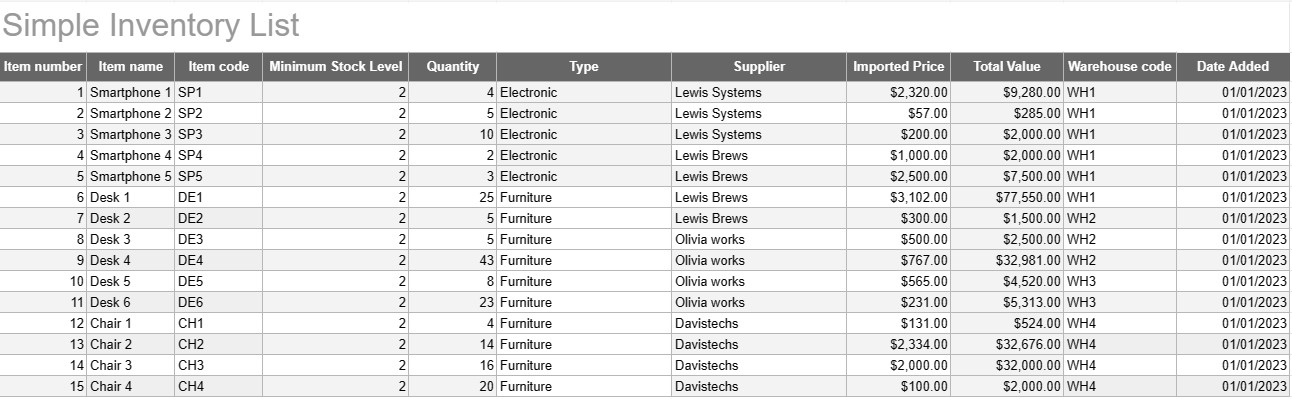
Senarai Inventori Mudah
kategori : Penjejak
Tulis semua nama inventori dan perihalan anda supaya anda boleh melihat kesemuanya di satu tempat.
Templat Senarai Inventori Ringkas ialah alat asas namun berkesan yang digunakan oleh individu dan perniagaan untuk menjejak dan mengurus inventori barangan, produk atau aset mereka. Templat ini menyediakan format berstruktur untuk merekod butiran item, kuantiti, lokasi dan maklumat lain yang berkaitan, menjadikannya lebih mudah untuk memantau tahap inventori dan memudahkan pengurusan yang cekap.
Komponen Utama Templat Senarai Inventori Ringkas:
- Butiran Item: Templat termasuk lajur atau bahagian untuk maklumat khusus item, seperti nama item, perihalan, pengecam unik (cth, SKU atau nombor siri), dan sebarang nota tambahan.
- Kuantiti: Pengguna boleh merekodkan kuantiti atau unit setiap item dalam stok. Lajur ini penting untuk menjejak tahap inventori dengan tepat.
- Lokasi: Untuk perniagaan yang mempunyai berbilang lokasi storan atau gudang, templat mungkin termasuk lajur untuk menentukan lokasi fizikal setiap item. Ini membantu menyelaraskan pengambilan dan penyimpanan semula.
- Harga Seunit: Pengguna boleh memasukkan harga unit atau kos setiap item. Maklumat ini berharga untuk mengira jumlah nilai inventori.
- Jumlah Nilai: Sesetengah templat mengira jumlah nilai setiap item secara automatik berdasarkan kuantiti dan harga unit. Ini memberikan gambaran ringkas tentang jumlah nilai inventori.
- Tarikh Ditambah/Dikemas kini: Untuk menjejak perubahan dan kemas kini pada inventori, pengguna boleh merekodkan tarikh setiap item ditambah atau diubah suai.
- Kategori/Jenis: Item boleh dikategorikan kepada kumpulan atau jenis yang berbeza (cth, elektronik, bekalan pejabat, pakaian) untuk organisasi dan pelaporan yang lebih baik.
- Tahap Stok Minimum: Pengguna boleh menetapkan tahap stok minimum untuk setiap item. Apabila kuantiti jatuh di bawah paras ini, ia berfungsi sebagai pencetus untuk memesan semula atau menyimpan semula item.
- Maklumat Pembekal: Dalam tetapan perniagaan, pengguna boleh memasukkan butiran pembekal, seperti nama pembekal, maklumat hubungan dan maklumat pesanan semula.
Faedah Menggunakan Templat Senarai Inventori Mudah:
- Penjejakan Inventori: Menyediakan petikan yang jelas dan terkini tahap inventori, membantu mencegah kehabisan stok dan lebihan stok.
- Kawalan Kos: Membolehkan perniagaan memantau nilai inventori mereka dan membuat keputusan termaklum tentang penyimpanan semula dan pembelian.
- Kecekapan: Memperkemas pengurusan inventori dengan memusatkan maklumat dan menjadikannya mudah diakses.
- Ketepatan Data: Mengurangkan risiko ralat dalam menjejak inventori, kerana semua maklumat direkodkan secara sistematik.
- Pengurusan Pesanan: Membantu dalam mengenal pasti masa untuk memesan semula item dan daripada pembekal mana, menambah baik pengurusan rantaian bekalan.
- Pematuhan: Dalam sesetengah industri, mengekalkan rekod inventori yang tepat adalah penting untuk pematuhan peraturan dan pelaporan kewangan.
- Pengoptimuman Sumber: Membolehkan perniagaan memperuntukkan sumber dengan lebih berkesan dan mengurangkan kos pembawaan.
Kesimpulannya, Templat Senarai Inventori Mudah ialah alat praktikal untuk individu dan perniagaan yang ingin mengekalkan rekod inventori mereka yang teratur dan tepat. Sama ada digunakan untuk inventori rumah yang kecil atau sebagai sebahagian daripada operasi perniagaan yang lebih besar, templat ini memudahkan pengurusan inventori, mengurangkan risiko kekurangan atau lebihan stok dan menyumbang kepada kawalan kewangan dan membuat keputusan yang lebih baik.
Pratonton Mudah dan Muat Turun Templat Hamparan
Lihat versi penuh templat hamparan tanpa had untuk melihat sama ada anda menyukainya kemudian anda boleh memuat turun templat excel untuk menyimpannya pada peranti anda dan menggunakannya secara percuma.
Akses Templat Hamparan dari Mana-mana
Ini berfungsi pada semua sistem pengendalian popular seperti Windows, MacOS, Linux, iOS. Anda boleh melihat templat hamparan dan memuat turunnya tanpa program tambahan.
Cara menggunakan templat
Ketahui cara untuk pratonton, muat turun dan kemudian gunakan templat hamparan dengan mengikuti langkah-langkah yang sangat mudah diikuti
Lebih banyak templat serupa
Lihat lebih banyak templat hamparan yang berada di bawah kategori yang sama dengan yang dipilih.













