
Kotak Eisenhower
kategori : Perancang
Ini ialah templat hamparan meniru model saintifik terkenal yang boleh anda gunakan untuk projek atau tujuan peribadi anda.
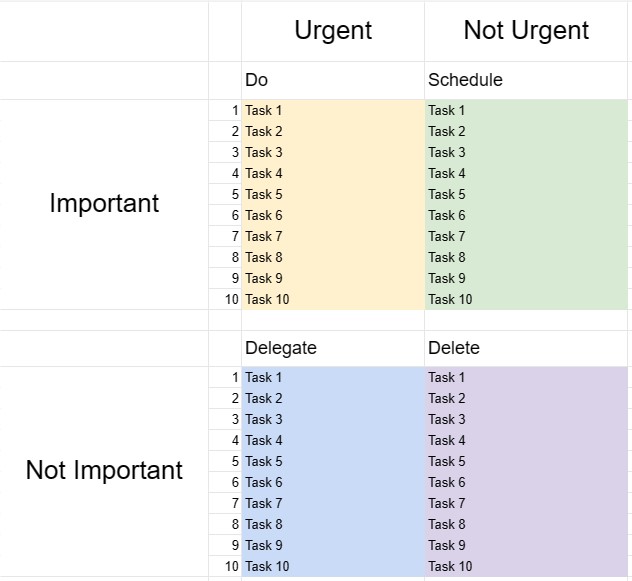
Kotak Eisenhower, juga dikenali sebagai Matriks Eisenhower atau Matriks Penting-Segera, ialah alat membuat keputusan dan pengurusan masa yang diilhamkan oleh petikan yang dikaitkan dengan Presiden Dwight D. Eisenhower: Apa yang penting adalah jarang mendesak, dan apa yang urgent jarang penting. Templat ini direka bentuk untuk membantu individu mengutamakan tugas dan membuat keputusan tentang cara memperuntukkan masa dan sumber mereka dengan berkesan.
Komponen Utama Templat Kotak Eisenhower:
- Empat Kuadran: Templat dibahagikan kepada empat kuadran, setiap satu mewakili kategori tugas yang berbeza berdasarkan kesegeraan dan kepentingannya.
- Kuadran I - Mendesak dan Penting: Tugasan dalam kuadran ini adalah mendesak dan penting. Ia memerlukan perhatian segera dan harus ditangani sebagai keutamaan.
- Kuadran II - Tidak Mendesak tetapi Penting: Tugasan dalam kuadran ini adalah penting tetapi tidak mendesak. Mereka mewakili aktiviti proaktif dan jangka panjang yang menyumbang kepada pertumbuhan dan kejayaan peribadi dan profesional. Merancang dan menjadualkan tugasan ini adalah penting.
- Kuadran III - Mendesak tetapi Tidak Penting: Tugasan dalam kuadran ini adalah mendesak tetapi tidak begitu penting. Ia mungkin termasuk gangguan, gangguan atau tugas yang boleh diagihkan atau diminimumkan untuk meluangkan masa untuk perkara yang lebih penting.
- Kuadran IV - Tidak Mendesak dan Tidak Penting: Tugasan dalam ini kuadran tidak mendesak dan tidak penting. Ia selalunya merupakan aktiviti membuang masa dan harus diminimumkan atau dihapuskan.
- Senarai Tugas: Pengguna menyenaraikan tugas mereka dalam kuadran yang sesuai berdasarkan mereka penilaian tentang kesegeraan dan kepentingan setiap tugas.
- Pelan Tindakan: Untuk tugasan dalam Kuadran I dan II, pengguna boleh membuat pelan tindakan, menetapkan tarikh akhir dan menentukan langkah yang diperlukan untuk menyelesaikannya .
- Semak dan Kemas Kini: Menyemak dan mengemas kini Kotak Eisenhower secara kerap membantu individu kekal fokus pada perkara yang benar-benar penting dan menyesuaikan keutamaan mereka mengikut keperluan.
Faedah Menggunakan Templat Kotak Eisenhower:
- Tetapan Keutamaan: Menyediakan rangka kerja berstruktur untuk mengutamakan tugas dan membuat keputusan tentang tempat untuk memperuntukkan masa dan usaha.
- Pengurusan Masa: Membantu pengguna menumpukan pada tugas yang menyumbang kepada matlamat jangka panjang dan mengurangkan masa yang dihabiskan untuk aktiviti yang tidak penting atau reaktif.
- Produktiviti: Meningkatkan produktiviti dengan menekankan tugas penting dan mengurangkan masa yang terbuang untuk tugas yang kurang penting.
- Pengurangan Tekanan: Membolehkan pengguna menangani perkara yang mendesak dengan segera sambil memperuntukkan masa kepada yang penting tetapi tidak -tugas mendesak, mengurangkan tekanan dan perasaan sentiasa bertindak balas terhadap krisis.
- Pencapaian Matlamat: Menyokong kemajuan ke arah matlamat jangka panjang dan pembangunan peribadi dengan menekankan tugas penting.
- Kecekapan: Membantu individu bekerja lebih bijak dengan mengenal pasti tugas yang boleh diagihkan, dihapuskan atau diminimumkan.
- Kesedaran Masa: Menggalakkan kesedaran tentang bagaimana masa dibelanjakan dan menggalakkan penggunaan masa yang lebih disengajakan.
Kesimpulannya, Templat Kotak Eisenhower ialah alat yang berharga untuk individu yang ingin menguruskan masa mereka dengan berkesan, mengutamakan tugas dan membuat keputusan termaklum. tentang di mana untuk melaburkan usaha mereka. Dengan mengkategorikan tugasan berdasarkan kesegeraan dan kepentingannya, pengguna boleh meningkatkan produktiviti, mengurangkan tekanan dan berusaha ke arah mencapai matlamat mereka dengan lebih cekap.
Pratonton Mudah dan Muat Turun Templat Hamparan
Lihat versi penuh templat hamparan tanpa had untuk melihat sama ada anda menyukainya kemudian anda boleh memuat turun templat excel untuk menyimpannya pada peranti anda dan menggunakannya secara percuma.
Akses Templat Hamparan dari Mana-mana
Ini berfungsi pada semua sistem pengendalian popular seperti Windows, MacOS, Linux, iOS. Anda boleh melihat templat hamparan dan memuat turunnya tanpa program tambahan.
Cara menggunakan templat
Ketahui cara untuk pratonton, muat turun dan kemudian gunakan templat hamparan dengan mengikuti langkah-langkah yang sangat mudah diikuti
Lebih banyak templat serupa
Lihat lebih banyak templat hamparan yang berada di bawah kategori yang sama dengan yang dipilih.













