
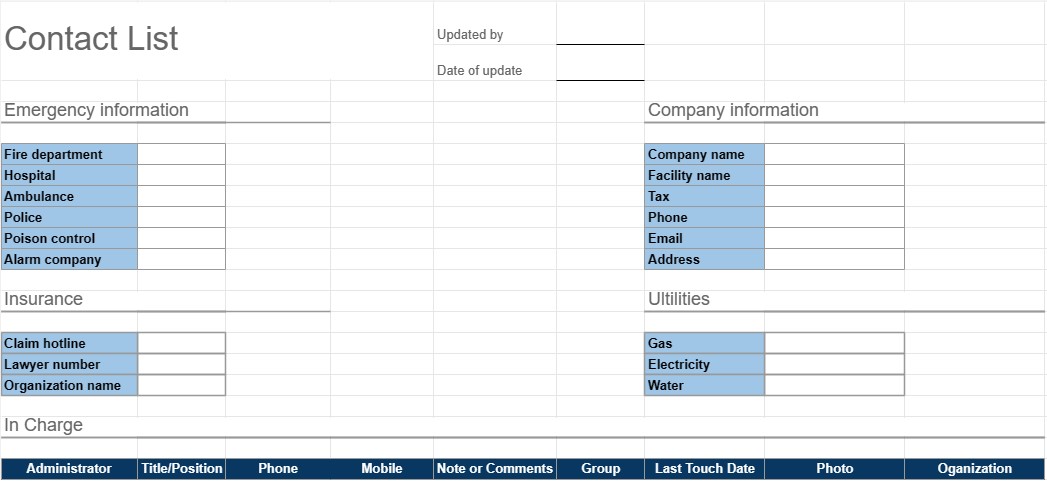
Senarai kenalan
kategori : Perancang
Ini serupa dengan buku nombor telefon anda tetapi lebih khusus untuk anda gunakan untuk mengurus kenalan anda sendiri.
Templat Senarai Kenalan ialah alat praktikal dan tersusun yang digunakan untuk menyusun dan mengurus maklumat hubungan untuk individu atau kumpulan. Ia biasanya digunakan untuk tujuan peribadi dan profesional, menjadikannya lebih mudah untuk mengakses dan mengekalkan senarai kenalan yang komprehensif. Templat ini amat berguna untuk kekal berhubung, rangkaian dan mengurus kenalan penting dengan cekap.
Komponen Utama Templat Senarai Kenalan:
- Nama: Templat termasuk ruang untuk memasukkan nama penuh setiap kenalan. Ia juga mungkin membenarkan kemasukan berasingan nama pertama dan nama keluarga.
- Maklumat Hubungan: Bahagian ini biasanya termasuk medan untuk pelbagai butiran hubungan, yang mungkin termasuk nombor telefon, alamat e-mel, alamat fizikal dan nombor faks.
- Organisasi: Pengguna boleh mencatatkan organisasi atau syarikat milik kenalan itu. Ini amat berguna untuk kenalan perniagaan.
- Tajuk/Jawatan: Untuk kenalan profesional, jawatan atau jawatan individu dalam organisasi boleh ditambah.
- Nota atau Komen: Bahagian untuk menambah nota, ulasan atau maklumat tambahan tentang setiap kenalan, seperti sifat perhubungan atau sebarang butiran khusus.
- Kategori atau Kumpulan: Pengguna boleh mengkategorikan atau mengumpulkan kenalan berdasarkan kriteria seperti kenalan perniagaan, kenalan peribadi, rakan, keluarga atau projek atau minat tertentu.
- Foto: Beberapa templat boleh membenarkan pengguna menambah foto kenalan, menjadikannya lebih mudah untuk mengenali individu.
- Tarikh Ditambah/Dikemas kini: Tarikh apabila kenalan itu ditambahkan atau apabila maklumat mereka terakhir dikemas kini boleh direkodkan.
- Isih dan Penapisan: Banyak templat menawarkan pilihan pengisihan dan penapisan untuk menyusun kenalan mengikut abjad, mengikut kategori atau berdasarkan kriteria lain.
Faedah Menggunakan Templat Senarai Kenalan:
- Organisasi: Menyimpan semua maklumat hubungan dalam satu lokasi terpusat, menjadikannya mudah untuk mencari dan mengemas kini butiran sebagai diperlukan.
- Kebolehaksesan: Menyediakan akses pantas kepada butiran hubungan penting, mengurangkan masa yang dihabiskan untuk mencari nombor telefon atau alamat e-mel.
- Kecekapan: Memperkemas komunikasi dan membantu pengguna kekal berhubung dengan rakan sekerja, rakan dan keluarga.
- Rangkaian: Berguna untuk tujuan rangkaian, membolehkan individu mengekalkan senarai kenalan profesional dan rakan perniagaan.
- Sandaran: Berfungsi sebagai sandaran maklumat hubungan penting sekiranya peranti kehilangan atau kerosakan data.
- Pengurusan Perhubungan: Membantu pengguna mengekalkan rekod perhubungan dan interaksi dengan kenalan, yang boleh menjadi bernilai untuk tindakan susulan.
- Penyesuaian: Pengguna boleh menyesuaikan templat untuk memenuhi keperluan khusus mereka dan keutamaan.
Ringkasnya, Templat Senarai Kenalan ialah alat praktikal untuk mengatur dan mengurus maklumat hubungan dengan cekap. Sama ada digunakan untuk tujuan peribadi atau profesional, ia memudahkan proses menyimpan, mengakses dan mengemas kini butiran hubungan, akhirnya memudahkan pengurusan komunikasi dan perhubungan.
Pratonton Mudah dan Muat Turun Templat Hamparan
Lihat versi penuh templat hamparan tanpa had untuk melihat sama ada anda menyukainya kemudian anda boleh memuat turun templat excel untuk menyimpannya pada peranti anda dan menggunakannya secara percuma.
Akses Templat Hamparan dari Mana-mana
Ini berfungsi pada semua sistem pengendalian popular seperti Windows, MacOS, Linux, iOS. Anda boleh melihat templat hamparan dan memuat turunnya tanpa program tambahan.
Cara menggunakan templat
Ketahui cara untuk pratonton, muat turun dan kemudian gunakan templat hamparan dengan mengikuti langkah-langkah yang sangat mudah diikuti
Lebih banyak templat serupa
Lihat lebih banyak templat hamparan yang berada di bawah kategori yang sama dengan yang dipilih.













