
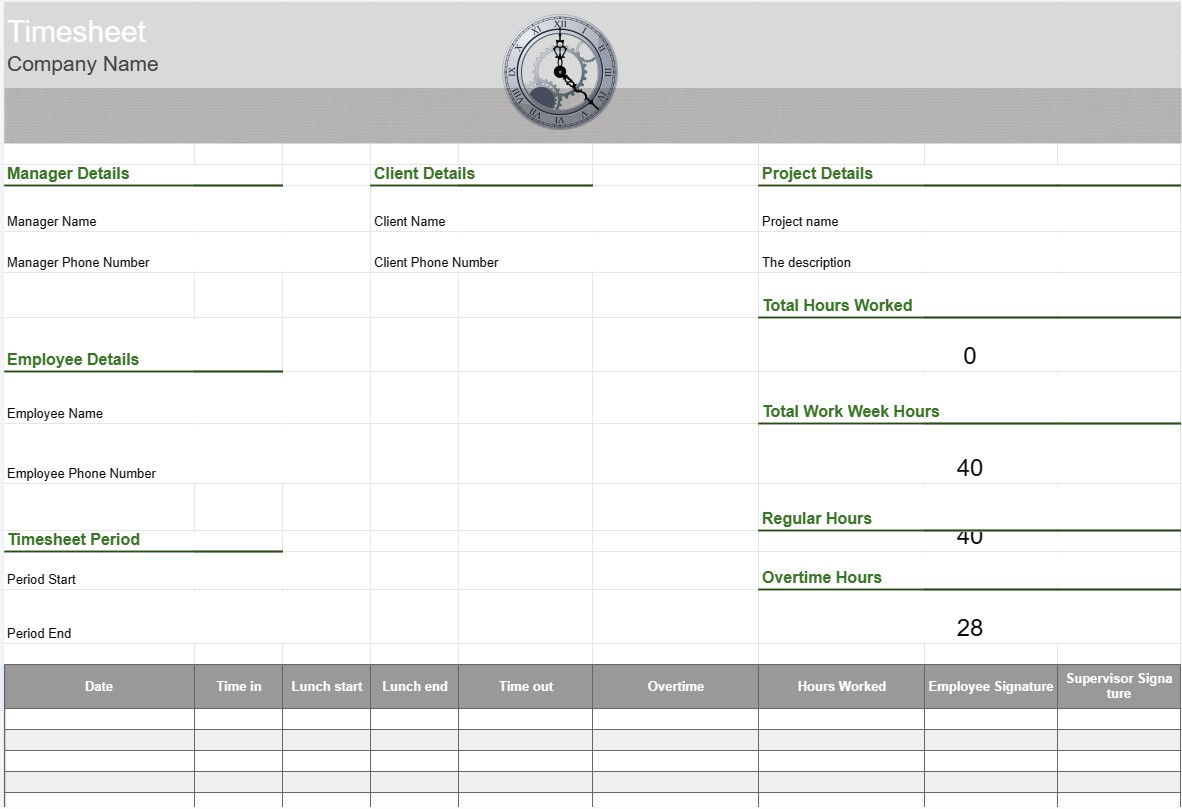
Darbo laiko apskaitos žiniaraštis
Kategorija : Trackeriai
Darbo laiko apskaitos žiniaraštis, skirtas sekti personalą, kad būtų galima peržiūrėti, ką skyrius veikia darbo valandomis.
Laiko apskaitos žiniaraščio šablonas yra įrankis, kurį naudoja darbuotojai ir organizacijos, norėdami sekti ir įrašyti laiką, praleistą atliekant įvairias užduotis, projektus ar užduotis. Darbo laiko apskaitos žiniaraščiai dažniausiai naudojami darbo valandų stebėjimui, nesvarbu, ar tai būtų darbo užmokestis, projektų valdymas ar klientų apmokestinamų valandų stebėjimas. Darbo laiko apskaitos žiniaraščio šablonai padeda užtikrinti tikslų laiko stebėjimą ir ataskaitų teikimą.
Pagrindiniai darbo laiko apskaitos žiniaraščio šablono komponentai:
- Darbuotojo informacija: šablone pateikiama išsami informacija apie darbuotojas, pvz., jo vardas, pavardė, darbuotojo ID, skyrius ir kontaktinė informacija.
- Data ir laikas: kalendoriaus arba lentelės formatu rodomos datos ir laikai, kuriais darbuotojai registruoja savo darbo valandas. . Tai gali būti suskirstyta pagal dienas, savaites ar mėnesius.
- Išsami užduoties / projekto informacija: darbuotojai įveda išsamią informaciją apie užduotis arba projektus, su kuriais jie dirba. Tai gali būti projektų pavadinimai, užduočių aprašymai arba projektų kodai.
- Tik laikas ir laikas: kiekvieną dieną darbuotojai įrašo laiką, kada pradėjo ir baigė darbą, taip pat pertraukos, padarytos per darbo dieną.
- Visos valandos: šablonas apskaičiuoja bendrą dirbtų valandų skaičių kiekvieną dieną, savaitę ar mėnesį pagal laiko įrašus.
- Viršvalandžių stebėjimas: jei taikoma, šablone gali būti skilčių, skirtų viršvalandžiams stebėti, įskaitant įprastus viršvalandžius, dvigubą darbo laiką ir visus taikomus įkainius.
- Klientas. arba klientas: jei darbas susijęs su kliento projektais, šablone gali būti laukas, kuriame nurodomas kliento arba kliento vardas.
- Patvirtinimas ir parašas: kai kurie darbo laiko apskaitos žiniaraščiai įtraukite vietas darbuotojams pasirašyti, o vadovams ar vadovams – patvirtinti įrašytas valandas.
- Pastabos arba komentarai: darbuotojai gali pridėti pastabų ar komentarų, susijusių su konkrečiomis užduotimis arba laiko įrašais, pvz., paaiškinimai dėl viršvalandžių ar papildomo konteksto.
- Savaitės pabaiga: darbo laiko apskaitos žiniaraštyje paprastai nurodoma darbo savaitės arba ataskaitinio laikotarpio pabaigos data.
Privalumai. Darbo laiko apskaitos žiniaraščio šablono naudojimas:
- Tikslus laiko stebėjimas: užtikrina, kad darbuotojo darbo valandos būtų tiksliai fiksuojamos, o tai būtina norint apdoroti darbo užmokestį, išrašyti sąskaitas už projektą ir laikytis darbo reikalavimų. įstatymai.
- Projektų valdymas: padeda projektų vadovams ir komandoms sekti laiką, praleistą atliekant įvairias projekto užduotis, todėl galima geriau planuoti projektą ir paskirstyti išteklius.
- Darbo užmokesčio apskaičiavimas: supaprastina darbo užmokesčio apskaičiavimo procesą, nes pateikiamas išsamus darbuotojų dirbtų valandų įrašas, įskaitant viršvalandžius ir laisvalaikį.
- Klientų atsiskaitymas: palengvina atsiskaitymą klientams už apmokestinamos dirbtos valandos, todėl būtų lengviau tiksliai išrašyti sąskaitas faktūras.
- Atitiktis: padeda organizacijoms laikytis darbo taisyklių ir darbo įstatymų, susijusių su darbo valandomis ir viršvalandžiais.
- Našumo analizė: teikia duomenis darbuotojų produktyvumui ir užduočių efektyvumui analizuoti.
- Dokumentacija: naudojama kaip darbo valandų įrašas, kuris gali būti naudingas atliekant auditą. , ginčai ar būsimos nuorodos.
- Skaidrumas: skatina skaidrumą stebint laiką ir teikiant darbo ataskaitas, padedant darbuotojams ir darbdaviams išlaikyti pasitikėjimą.
Apibendrinant galima pasakyti, kad darbo laiko apskaitos žiniaraščio šablonas yra vertingas įrankis, leidžiantis tiksliai sekti ir dokumentuoti darbuotojų darbo valandas ir užduotis. Tai būtina įvairiems tikslams, įskaitant darbo užmokesčio apskaičiavimą, projektų valdymą, klientų atsiskaitymą ir darbo įstatymų bei taisyklių laikymąsi.
Lengva peržiūrėti ir atsisiųsti skaičiuoklės šabloną
Peržiūrėkite visą skaičiuoklės šablono versiją be jokių apribojimų, kad sužinotumėte, ar jis jums patinka, tada galite atsisiųsti „Excel“ šabloną, išsaugoti jį savo įrenginyje ir naudoti jį nemokamai.
Pasiekite skaičiuoklės šabloną iš bet kur
Tai veikia visose populiariose operacinėse sistemose, tokiose kaip Windows, MacOS, Linux, iOS. Skaičiuoklių šablonus galite pamatyti ir atsisiųsti be papildomų programų.
Kaip naudoti šabloną
Išsiaiškinkite, kaip peržiūrėti, atsisiųsti ir naudoti skaičiuoklės šabloną, atlikdami veiksmus, kuriuos atlikti labai paprasta
Daugiau panašių šablonų
Peržiūrėkite daugiau skaičiuoklės šablonų, kurie yra toje pačioje kategorijoje su pasirinktu.













