
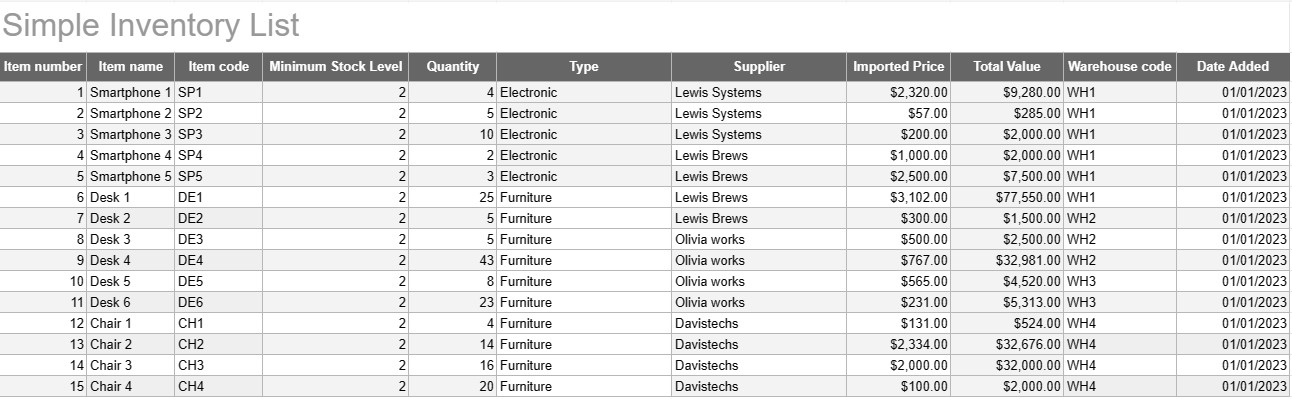
Paprastas inventoriaus sąrašas
Kategorija : Trackeriai
Užsirašykite visus savo inventoriaus pavadinimus ir aprašymus, kad galėtumėte juos matyti vienoje vietoje.
Paprastas atsargų sąrašo šablonas yra pagrindinis, bet veiksmingas įrankis, kurį asmenys ir įmonės naudoja prekių, produktų ar turto atsargoms stebėti ir valdyti. Šiame šablone pateikiamas struktūrizuotas prekių detalių, kiekių, vietų ir kitos svarbios informacijos įrašymo formatas, todėl lengviau stebėti atsargų lygius ir palengvinti efektyvų valdymą.
Pagrindiniai paprasto atsargų sąrašo šablono komponentai:
- Išsami elemento informacija: šablone yra stulpelių arba skilčių, skirtų konkrečios prekės informacijai, tokiai kaip prekės pavadinimas, aprašas, unikalus identifikatorius (pvz., SKU arba serijos numeris) ir bet kokios papildomos pastabos.
- Kiekis: vartotojai gali įrašyti kiekvienos sandėlyje esančios prekės kiekį arba vienetus. Šis stulpelis yra būtinas norint tiksliai sekti atsargų lygius.
- Vieta: įmonėms, turinčioms kelias saugojimo vietas arba sandėlius, šablone gali būti stulpelis, nurodantis kiekvienos prekės fizinę vietą. Tai padeda supaprastinti išgavimą ir atsargų papildymą.
- Vieneto kaina: naudotojai gali įvesti kiekvienos prekės vieneto kainą arba kainą. Ši informacija yra vertinga apskaičiuojant bendrą atsargų vertę.
- Bendra vertė: kai kurie šablonai automatiškai apskaičiuoja bendrą kiekvienos prekės vertę pagal kiekį ir vieneto kainą. Tai suteikia greitą bendros atsargų vertės apžvalgą.
- Pridėjimo / atnaujinimo data: norėdami stebėti atsargų pakeitimus ir atnaujinimus, vartotojai gali įrašyti kiekvienos prekės pridėjimo arba modifikavimo datą.
- Kategorija / tipas: prekes galima suskirstyti į skirtingas grupes arba tipus (pvz., elektronika, biuro reikmenys, drabužiai), kad būtų geriau organizuoti ir teikti ataskaitas.
- Minimalus atsargų lygis: vartotojai gali nustatyti minimalų kiekvienos prekės atsargų lygį. Kai kiekis nukrenta žemiau šio lygio, jis yra veiksnys, persakantis arba papildantis prekę.
- Tiekėjo informacija: verslo aplinkoje naudotojai gali įtraukti išsamią tiekėjo informaciją, pvz., tiekėjo vardą, pavardę, kontaktinę informaciją ir informaciją apie pakartotinį užsakymą.
Paprasto atsargų sąrašo šablono naudojimo pranašumai:
- Atsargų stebėjimas: suteikia aiškų, naujausią momentinį vaizdą atsargų lygis, padedantis išvengti atsargų pertekliaus ir atsargų pertekliaus.
- Išlaidų kontrolė: leidžia įmonėms stebėti savo atsargų vertę ir priimti pagrįstus sprendimus dėl atsargų papildymo ir pirkimo.
- Efektyvumas: supaprastina atsargų valdymą centralizuojant informaciją ir padarant ją lengvai pasiekiamą.
- Duomenų tikslumas: sumažina klaidų riziką stebint atsargas, nes visa informacija įrašoma sistemingai.
- Užsakymų valdymas: padeda nustatyti, kada persakyti prekes ir iš kurių tiekėjų, gerinant tiekimo grandinės valdymą.
- Atitiktis: kai kuriose pramonės šakose tikslių atsargų įrašų tvarkymas yra būtinas siekiant atitikties teisės aktams ir teikti finansines ataskaitas.
- Išteklių optimizavimas: leidžia įmonėms efektyviau paskirstyti išteklius ir sumažinti nešiojimo išlaidas.
Apibendrinant galima pasakyti, kad paprastas atsargų sąrašo šablonas yra praktiškas įrankis asmenims ir įmonėms, norintiems tvarkyti tvarkingus ir tikslius savo inventoriaus įrašus. Nesvarbu, ar šis šablonas naudojamas nedideliam namų inventoriui, ar kaip didesnės verslo operacijos dalis, šis šablonas supaprastina atsargų valdymą, sumažina atsargų trūkumo ar pertekliaus riziką ir prisideda prie geresnės finansų kontrolės ir sprendimų priėmimo.
Lengva peržiūrėti ir atsisiųsti skaičiuoklės šabloną
Peržiūrėkite visą skaičiuoklės šablono versiją be jokių apribojimų, kad sužinotumėte, ar jis jums patinka, tada galite atsisiųsti „Excel“ šabloną, išsaugoti jį savo įrenginyje ir naudoti jį nemokamai.
Pasiekite skaičiuoklės šabloną iš bet kur
Tai veikia visose populiariose operacinėse sistemose, tokiose kaip Windows, MacOS, Linux, iOS. Skaičiuoklių šablonus galite pamatyti ir atsisiųsti be papildomų programų.
Kaip naudoti šabloną
Išsiaiškinkite, kaip peržiūrėti, atsisiųsti ir naudoti skaičiuoklės šabloną, atlikdami veiksmus, kuriuos atlikti labai paprasta
Daugiau panašių šablonų
Peržiūrėkite daugiau skaičiuoklės šablonų, kurie yra toje pačioje kategorijoje su pasirinktu.













