
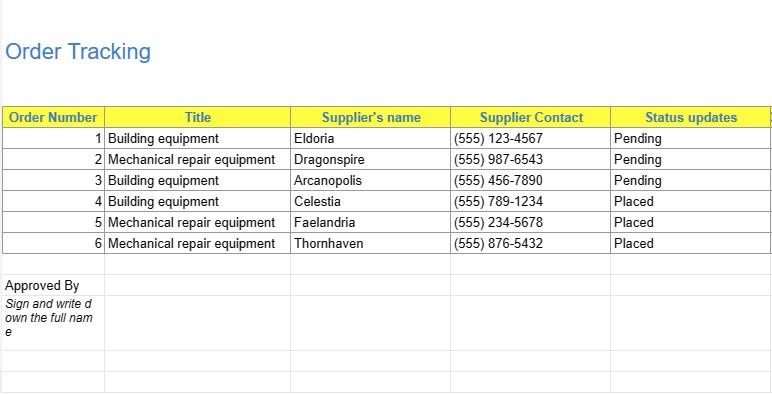
Construction Site Order Tracking
Kategorija : Trackeriai
This excel template is a useful tool for future reference, preventing misunderstandings and conflicts. Keeping detailed records of all actions, materials utilised, and modifications made during a project is made possible by the documentation of orders on a building site.
The Construction Site Order Tracking template is a valuable tool in the construction industry, specifically designed to streamline and manage the ordering process for materials, equipment, and supplies at a construction site. This template plays a pivotal role in ensuring that construction projects progress smoothly by keeping track of all orders, deliveries, and related details.
Construction sites are dynamic environments with multiple moving parts, and efficient order tracking is critical to avoid delays, cost overruns, and operational bottlenecks. The Construction Site Order Tracking template simplifies this complex task by providing a structured framework for managing orders.
Here are the key components and functions of this template:
- Order Details: The template captures essential information about each order, including the supplier's name, contact information, order date, expected delivery date, and order status. This helps project managers and site supervisors have a real-time overview of pending and completed orders.
- Itemized Inventory: It allows for the detailed listing of all materials, equipment, or supplies being ordered. This includes descriptions, quantities, unit costs, and total costs. Having this granular data ensures that the right items are ordered in the correct quantities.
- Delivery Tracking: The template includes a section to record delivery information, such as the date and time of delivery, the condition of delivered items, and the individuals responsible for receiving the items. This helps in verifying the accuracy and quality of deliveries.
- Payment Records: Tracking financial aspects, the template includes fields for recording payment details, such as the payment method, amount, and payment status. This ensures that invoices are accurately processed and payments are made promptly.
- Status Updates: The template allows for the updating of order statuses, indicating whether an order is pending, in progress, or completed. This real-time status tracking is essential for coordinating work on the construction site.
- Notes and Comments: There is typically space for notes and comments where users can add any relevant information or special instructions related to orders.
- Supplier Contacts: Some versions of the template may include a section with supplier contact details for quick reference.
The Construction Site Order Tracking template streamlines construction site management by centralizing order-related data, minimizing errors, and improving communication among project stakeholders. It is especially useful for project managers, site supervisors, and procurement teams who need to oversee and coordinate the procurement of materials and equipment essential for construction projects. By ensuring that orders are efficiently tracked and managed, this template contributes to on-time project completion, cost control, and overall project success.
Lengva peržiūrėti ir atsisiųsti skaičiuoklės šabloną
Peržiūrėkite visą skaičiuoklės šablono versiją be jokių apribojimų, kad sužinotumėte, ar jis jums patinka, tada galite atsisiųsti „Excel“ šabloną, išsaugoti jį savo įrenginyje ir naudoti jį nemokamai.
Pasiekite skaičiuoklės šabloną iš bet kur
Tai veikia visose populiariose operacinėse sistemose, tokiose kaip Windows, MacOS, Linux, iOS. Skaičiuoklių šablonus galite pamatyti ir atsisiųsti be papildomų programų.
Kaip naudoti šabloną
Išsiaiškinkite, kaip peržiūrėti, atsisiųsti ir naudoti skaičiuoklės šabloną, atlikdami veiksmus, kuriuos atlikti labai paprasta
Daugiau panašių šablonų
Peržiūrėkite daugiau skaičiuoklės šablonų, kurie yra toje pačioje kategorijoje su pasirinktu.














