
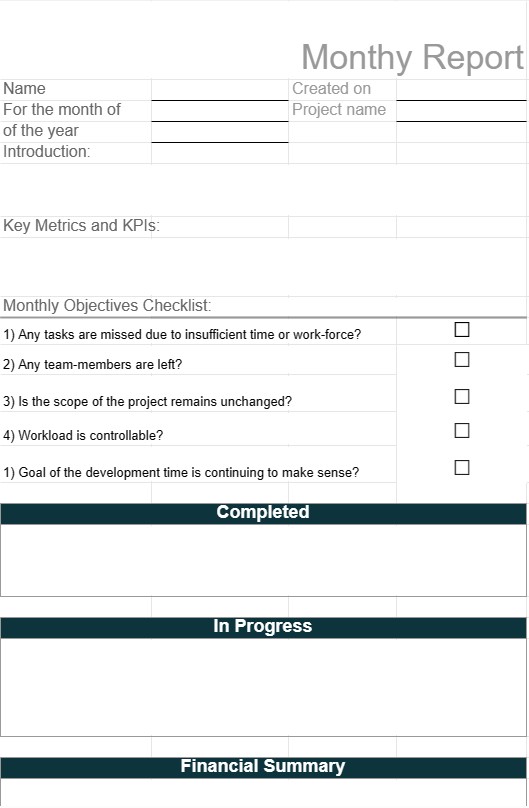
Mėnesio ataskaita
Kategorija : Planuotojai
Vadovas priskiria šį šabloną komandos nariams, kad jie praneštų apie mėnesinę veiklą savo vadovams.
Mėnesinės ataskaitos šablonas yra struktūrinis dokumentas, kurį naudoja asmenys, įmonės ir organizacijos, norėdami apibendrinti pagrindinę konkretaus mėnesio veiklą, pasiekimus ir metriką. Šios ataskaitos yra skirtos įvairiems tikslams, įskaitant veiklos vertinimą, projekto atnaujinimus, finansines santraukas ir bendravimą su suinteresuotosiomis šalimis. Mėnesinės ataskaitos padeda suinteresuotosioms šalims gauti informaciją ir palengvina duomenimis pagrįstų sprendimų priėmimą.
Pagrindiniai mėnesinės ataskaitos šablono komponentai:
- Viršelis: Kai kurios ataskaitos prasideda viršeliu, kuriame nurodomas ataskaitos pavadinimas, mėnuo ir metai, autoriaus vardas ir pavardė bei kontaktinė informacija.
- Vykdomoji santrauka: šioje skiltyje pateikiama trumpa apžvalga. iš pagrindinių ataskaitos išvadų ir svarbiausių dalykų. Jame pateikiama pagrindinių laimėjimų, iššūkių ir tikslų apžvalga.
- Įvadas: gali būti įtrauktas trumpas įvadas, kad būtų pateiktas ataskaitos kontekstas ir apibūdintas jos tikslas bei uždaviniai.
- Pagrindinė metrika ir KPI: ataskaitose dažnai yra skyrius, skirtas pagrindiniams veiklos rodikliams (KPI) ir metrikai, susijusiai su ataskaitos akcentu, pvz., pardavimo skaičiais, pajamomis, klientų pasitenkinimu ar projektu. gairės.
- Pažangos atnaujinimai: atsižvelgiant į ataskaitos tikslą, šioje skiltyje išsamiai aprašoma pažanga, padaryta per mėnesį tokiose srityse kaip projektų kūrimas, rinkodaros kampanijos ar veiklos patobulinimai.
- Finansinė suvestinė: finansinių ataskaitų atveju šioje skiltyje pateikiama finansinių rezultatų apžvalga, įskaitant pajamas, išlaidas, pelno maržas ir visus svarbius finansinius įvykius.
- Iššūkiai ir problemos: ataskaitose gali būti akcentuojami iššūkiai, problemos ar kliūtys, su kuriomis susidūrėte per mėnesį, kartu pateikiami siūlomi sprendimai ar veiksmų planai.
- Galimybės: nustatomos galimos galimybės. augimui, tobulėjimui ar optimizavimui, remiantis mėnesio veikla ir rezultatais.
- Išvada: išvadų skiltyje gali būti pateikta pagrindinių ataskaitos punktų santrauka ir baigiamasis teiginys.
- Rekomendacijos: ataskaitose dažnai pateikiamos rekomendacijos dėl veiksmų ar strategijų, kaip spręsti iššūkius, pasinaudoti galimybėmis arba pasiekti konkrečius tikslus.
- Priedai: Papildoma informacija, diagramos, grafikai arba išsamūs duomenys gali būti įtraukti į priedus, kad būtų pateikti patvirtinamieji dokumentai arba kontekstas.
- Nuorodos: jei ataskaitoje pateikiamos nuorodos į išorinius šaltinius arba mokslinius tyrimus. , gali būti įtraukta nuorodų skiltis.
Mėnesinės ataskaitos šablono naudojimo pranašumai:
- Bendravimas: palengvina aiškią ir struktūrizuotą informavimas apie pažangą, pasiekimus ir iššūkius suinteresuotosioms šalims.
- Atskaitomybė: nustato, kad asmenys ar komandos yra atsakingi už tikslų ir uždavinių įgyvendinimą dokumentuodami veiklos rezultatus.
- Duomenimis pagrįstas sprendimų priėmimas: teikia duomenis ir įžvalgas, kurios padeda priimti pagrįstus sprendimus dėl būsimų veiksmų ir strategijų.
- Veiklos vertinimas: leidžia įvertinti našumą ir atlikti lyginamąją analizę. laikui bėgant padeda nustatyti tendencijas ir tobulinimo sritis.
- Skaidrumas: parodo operacijų, finansų ar projekto būsenos skaidrumą, kad būtų galima pasitikėti suinteresuotosiomis šalimis.
- Dokumentavimas: sukuriamas istorinis veiklos ir etapų įrašas, vertingas nuorodai ir auditams.
- Planavimas: padeda planuoti ir koreguoti būsimus tikslus ir tikslus, pagrįstus ankstesniais rezultatais.
Apibendrinant galima pasakyti, kad mėnesinės ataskaitos šablonas yra vertingas įrankis svarbiai informacijai, našumui ir konkretaus mėnesio rezultatams apibendrinti ir perduoti. Šios ataskaitos yra priemonė pažangai dokumentuoti, suinteresuotosioms šalims informuoti ir priimti duomenimis pagrįstus sprendimus, siekiant pagerinti veiklą, projektus ar finansinius rezultatus.
Lengva peržiūrėti ir atsisiųsti skaičiuoklės šabloną
Peržiūrėkite visą skaičiuoklės šablono versiją be jokių apribojimų, kad sužinotumėte, ar jis jums patinka, tada galite atsisiųsti „Excel“ šabloną, išsaugoti jį savo įrenginyje ir naudoti jį nemokamai.
Pasiekite skaičiuoklės šabloną iš bet kur
Tai veikia visose populiariose operacinėse sistemose, tokiose kaip Windows, MacOS, Linux, iOS. Skaičiuoklių šablonus galite pamatyti ir atsisiųsti be papildomų programų.
Kaip naudoti šabloną
Išsiaiškinkite, kaip peržiūrėti, atsisiųsti ir naudoti skaičiuoklės šabloną, atlikdami veiksmus, kuriuos atlikti labai paprasta
Daugiau panašių šablonų
Peržiūrėkite daugiau skaičiuoklės šablonų, kurie yra toje pačioje kategorijoje su pasirinktu.













