
1 sąskaita faktūra
Kategorija : Planuotojai
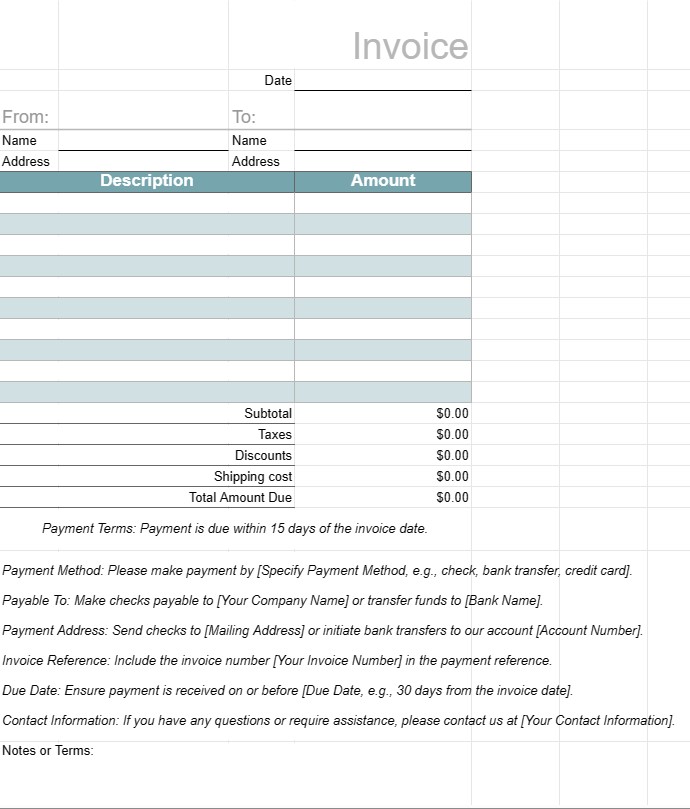
Sąskaitos faktūros šablonas, kurį reikia išsiųsti klientams atlikus darbą
Sąskaitos faktūros šablonas yra standartizuotas dokumentas, kurį įmonės naudoja atsiskaitydamos savo klientams arba klientams už suteiktas prekes ar paslaugas. Jis naudojamas kaip oficialus mokėjimo prašymas ir apima išsamią informaciją apie produktus ar paslaugas, jų išlaidas, mokėjimo sąlygas ir įmonės ir kliento kontaktinę informaciją. Sąskaitos faktūros yra būtinos norint sekti operacijas, valdyti pinigų srautus ir tvarkyti finansinius įrašus.
Pagrindiniai sąskaitos faktūros šablono komponentai:
- Antraštė: viršutinėje sąskaitos faktūros skiltyje paprastai pateikiamas įmonės pavadinimas, logotipas ir kontaktinė informacija, taip pat sąskaitos faktūros numeris ir išrašymo data.
- Kliento informacija: šioje skiltyje yra kliento pavadinimas, įmonė (jei taikoma), atsiskaitymo adresas ir kontaktinė informacija.
- Išsami sąskaitos faktūros informacija: šioje skiltyje pateikiamas teikiamų produktų ar paslaugų suskirstymas. Kiekviename eilutės elemente yra aprašas, kiekis, vieneto kaina ir bendra suma.
- Tarpinė suma: tarpinė suma yra visų eilučių straipsnių suma prieš mokesčius ar papildomus mokesčius.
- Mokesčiai: jei taikoma, visi pardavimo mokesčiai, PVM ar kiti mokesčiai nurodomi atskirai.
- Nuolaidos: visos taikomos nuolaidos, kuponai , arba reklaminiai pasiūlymai yra išvardyti šioje skiltyje.
- Pristatymas ir tvarkymas: jei sąskaitoje faktūroje yra pristatymo ar tvarkymo mokesčiai, jie nurodomi atskirai.
- Bendra mokėtina suma: tai bendra sąskaitos faktūros suma, įskaitant visus mokesčius, mokesčius, nuolaidas ir rinkliavas.
- Mokėjimo sąlygos: mokėjimas sąlygose nurodoma mokėjimo data, priimtini mokėjimo būdai (pvz., banko pavedimas, čekis, kredito kortelė) ir visos delspinigiai.
- Mokėjimo instrukcijos: banko sąskaitos informacija arba mokėjimo instrukcijos. pateikiami siekiant palengvinti mokėjimo procesą.
- Pastabos arba sąlygos: gali būti įtrauktos visos papildomos sąlygos, instrukcijos ar specialios pastabos, susijusios su sąskaita faktūra arba operacija.
- Sąskaitos faktūros poraštė: kai kuriose sąskaitose faktūrose yra poraštė su papildoma kontaktine informacija arba padėkos pranešimas.
Sąskaitos faktūros šablono naudojimo pranašumai:
- Profesionalumas: klientams suteikiamas profesionalus įvaizdis, parodantis, kad verslas veikia efektyviai ir sistemingai.
- Aiškumas: aiškiai apibūdinami teikiami produktai ar paslaugos. , jų išlaidas ir mokėjimo informaciją, todėl sumažėja ginčų ar nesusipratimų rizika.
- Įrašų saugojimas: padeda įmonėms tvarkyti tikslius finansinių operacijų įrašus apskaitos, mokesčių ir audito tikslais.
- Efektyvumas: taupo laiką, nes suteikia standartizuotą formatą, kurį galima pritaikyti kiekvienam klientui ar operacijai.
- Teisinė apsauga: Pateikiamas oficialus įmonės ir kliento susitarimo įrašas, kuris gali būti naudingas kilus ginčams.
- Skubus mokėjimas: skatina klientus mokėti nedelsiant, nurodant mokėjimo terminus ir mokėjimo instrukcijos.
- Nuoseklumas: užtikrina, kad sąskaitų faktūrų formatas ir turinys būtų nuoseklūs, o tai svarbu įmonėms, dirbančioms su keliais klientais.
Apibendrinant galima pasakyti, kad sąskaitos faktūros šablonas yra esminis įrankis įmonėms, norint struktūriškai ir profesionaliai atsiskaityti su klientais ir klientais. Tai padeda supaprastinti mokėjimo procesą, tvarkyti finansinius įrašus ir nustatyti aiškius lūkesčius, susijusius su mokėjimais ir sąlygomis.
Lengva peržiūrėti ir atsisiųsti skaičiuoklės šabloną
Peržiūrėkite visą skaičiuoklės šablono versiją be jokių apribojimų, kad sužinotumėte, ar jis jums patinka, tada galite atsisiųsti „Excel“ šabloną, išsaugoti jį savo įrenginyje ir naudoti jį nemokamai.
Pasiekite skaičiuoklės šabloną iš bet kur
Tai veikia visose populiariose operacinėse sistemose, tokiose kaip Windows, MacOS, Linux, iOS. Skaičiuoklių šablonus galite pamatyti ir atsisiųsti be papildomų programų.
Kaip naudoti šabloną
Išsiaiškinkite, kaip peržiūrėti, atsisiųsti ir naudoti skaičiuoklės šabloną, atlikdami veiksmus, kuriuos atlikti labai paprasta
Daugiau panašių šablonų
Peržiūrėkite daugiau skaičiuoklės šablonų, kurie yra toje pačioje kategorijoje su pasirinktu.













