
Attendance Record
범주 : 추적기
Teacher, profesor and trainer usually use this to track the attendants. Simply print this and write the names on it and do the work much more efficiently.
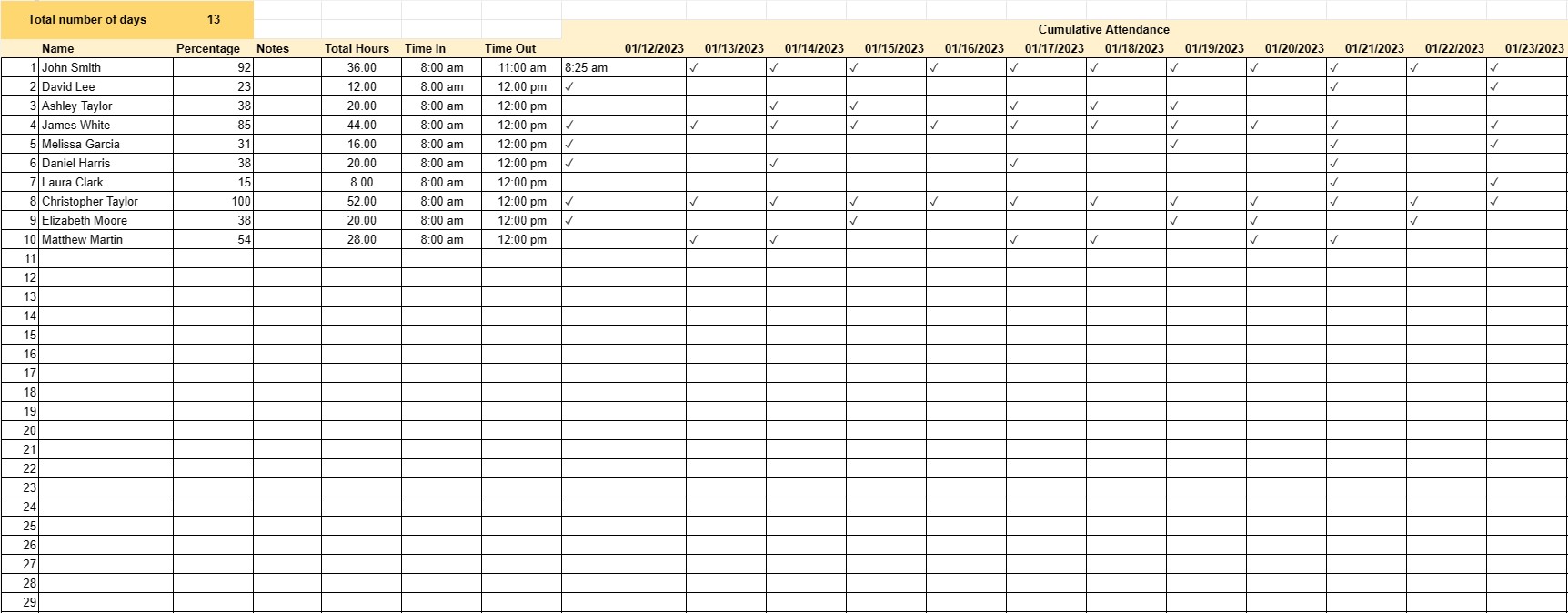
An Attendance Record Template is a document used to track and record the attendance of individuals, such as employees, students, or event participants. This template helps organizations and institutions maintain accurate attendance records, monitor attendance trends, and assess the reliability of individuals in meeting their attendance obligations.
Key Components of an Attendance Record Template:
- Date: The template includes a date column to record the specific date of the event, class, or workday for which attendance is being tracked.
- Name or ID: For employees or students, there is typically a column to enter their names, employee IDs, or student IDs. This helps identify individuals easily.
- Status: A column to mark attendance status, such as Present, Absent, Late, or other relevant statuses.
- Time In and Time Out: In a work or school setting, this column may include the time individuals arrive (time in) and leave (time out) for each attendance record.
- Total Hours: If applicable, the template may calculate and display the total number of hours an individual was present.
- Notes or Comments: A section for adding comments or notes related to attendance, such as reasons for absences or tardiness.
- Signatures: In some cases, there may be space for authorized individuals to sign or approve the attendance record.
- Cumulative Attendance: For tracking long-term attendance, the template may include a section to record cumulative attendance over a specified period.
Benefits of Using an Attendance Record Template:
- Accuracy: Ensures accurate and systematic recording of attendance, reducing the risk of errors.
- Accountability: Holds individuals accountable for their attendance obligations, whether in the workplace or in an educational setting.
- Tracking Trends: Allows organizations to identify patterns and trends in attendance, which can inform decision-making and interventions.
- Legal Documentation: Provides a record that can be used for legal or compliance purposes in cases where attendance is a requirement.
- Performance Assessment: Helps assess employee or student performance and reliability in terms of attendance.
- Communication: Can serve as a communication tool to inform relevant parties (e.g., parents, supervisors) about attendance issues.
- Resource Allocation: In workforce management, it helps with resource allocation and shift scheduling.
- Evaluation: Provides data that can be used for performance evaluations, particularly in educational settings.
In conclusion, an Attendance Record Template is a valuable tool for organizations, educational institutions, and event organizers to maintain accurate attendance records. It promotes accountability, facilitates trend analysis, and serves various administrative and managerial purposes, ultimately contributing to better decision-making and efficient resource allocation.
간편한 미리보기 및 스프레드시트 템플릿 다운로드
제한 없이 스프레드시트 템플릿의 전체 버전을 보고 마음에 드는지 확인한 다음 Excel 템플릿을 다운로드하여 장치에 저장하고 무료로 사용할 수 있습니다.
어디서나 스프레드시트 템플릿에 액세스
이는 Windows, MacOS, Linux, iOS와 같은 널리 사용되는 모든 운영 체제에서 작동합니다. 별도의 프로그램 없이 스프레드시트 템플릿을 확인하고 다운로드할 수 있습니다.
템플릿을 사용하는 방법
따라하기 매우 쉬운 단계에 따라 스프레드시트 템플릿을 미리 보고, 다운로드하고, 사용하는 방법을 알아보세요.
더 유사한 템플릿
선택한 것과 동일한 카테고리에 있는 더 많은 스프레드시트 템플릿을 확인하세요.













