
Weekly Meal planner
범주 : 기획자
Meal organization is a good thing to do if you manage to live a healthy life style, this is the reason why the template is here to help you.
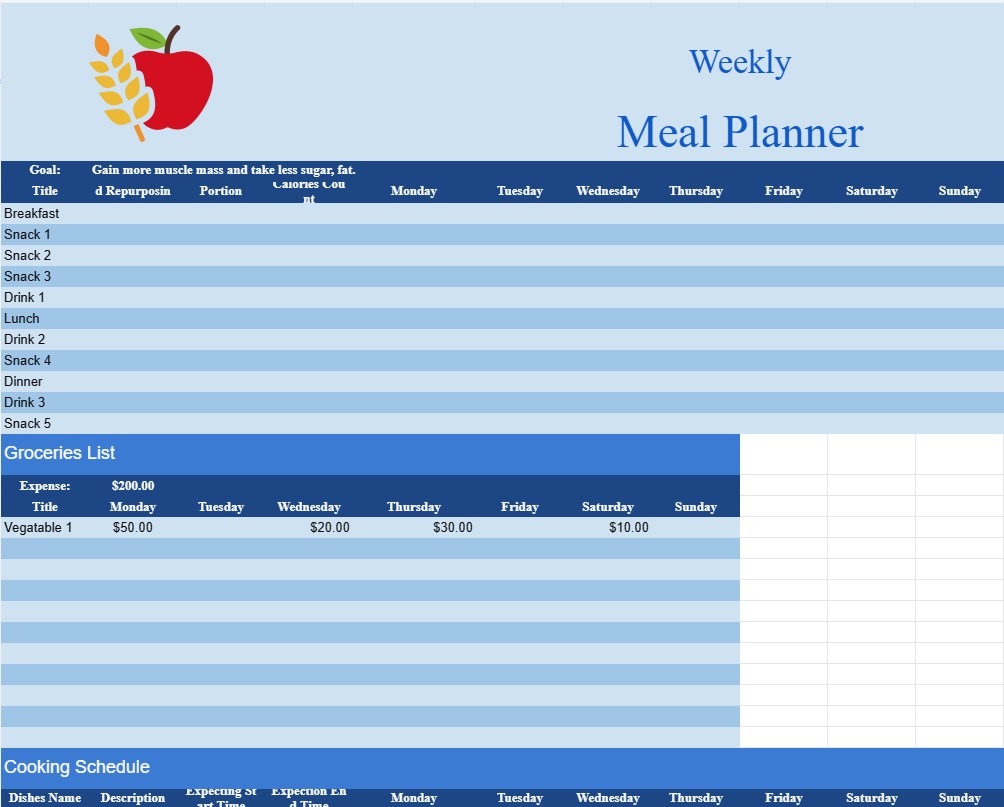
A Weekly Meal Planner template document is a practical and organized tool used by individuals and families to plan and manage their meals for a week. It offers a structured framework for designing a balanced and nutritious meal schedule, making grocery lists, and streamlining meal preparation.
Here are the key components and purposes of a Weekly Meal Planner template document:
- Calendar Format: The document typically features a calendar-style layout, with each day of the week represented. Users can input meal details for each day, including breakfast, lunch, dinner, and snacks.
- Meal Ideas: Users can jot down meal ideas or recipes they plan to prepare for the week. This section helps in brainstorming and ensuring variety in meals.
- Grocery List: A key feature of the template is the ability to generate a grocery list based on the planned meals. As users input the ingredients needed for each recipe, the template compiles a comprehensive shopping list, making it easy to stock up on necessary items.
- Nutritional Information: Some templates offer space to include nutritional information, such as calorie counts, macronutrient breakdowns, and dietary notes. This is especially useful for those who are mindful of their dietary intake.
- Special Diets and Allergies: Users with specific dietary requirements or allergies can customize their meal plans accordingly. The template can accommodate gluten-free, vegetarian, vegan, or other special diets.
- Portion Control: For individuals concerned about portion sizes and calorie intake, the template may include sections for tracking portion sizes and serving sizes.
- Leftovers and Repurposing: Users can plan to repurpose leftovers to minimize food waste. The template can include a section for recording leftover ingredients and ideas for their reuse in subsequent meals.
- Cooking Schedule: To manage time efficiently, some templates allow users to create a cooking schedule. This outlines the steps and timing for meal preparation, ensuring that all components of a meal are ready simultaneously.
- Budget Planning: Users can set budgets for their weekly groceries and track expenses. This helps in cost-effective meal planning and grocery shopping.
- Goal Setting: For those with dietary or health goals, the template can include sections for setting weekly meal-related goals, such as consuming a certain amount of vegetables or meeting protein targets.
- Recipe Storage: Users can store favorite recipes within the template or link to external sources for quick reference.
- Customization: Weekly Meal Planner templates are highly customizable. Users can adapt them to suit their preferences, including adding or removing meal categories, adjusting serving sizes, or incorporating specific dietary guidelines.
In summary, a Weekly Meal Planner template document is a practical tool for individuals and families looking to simplify meal planning, improve dietary choices, and optimize grocery shopping. It encourages healthier eating habits, reduces food waste, and makes meal preparation a more organized and enjoyable process.
간편한 미리보기 및 스프레드시트 템플릿 다운로드
제한 없이 스프레드시트 템플릿의 전체 버전을 보고 마음에 드는지 확인한 다음 Excel 템플릿을 다운로드하여 장치에 저장하고 무료로 사용할 수 있습니다.
어디서나 스프레드시트 템플릿에 액세스
이는 Windows, MacOS, Linux, iOS와 같은 널리 사용되는 모든 운영 체제에서 작동합니다. 별도의 프로그램 없이 스프레드시트 템플릿을 확인하고 다운로드할 수 있습니다.
템플릿을 사용하는 방법
따라하기 매우 쉬운 단계에 따라 스프레드시트 템플릿을 미리 보고, 다운로드하고, 사용하는 방법을 알아보세요.
더 유사한 템플릿
선택한 것과 동일한 카테고리에 있는 더 많은 스프레드시트 템플릿을 확인하세요.













