
✕︎
LANGUAGE ▼︎
Svenska
فارسی
Italiano
Tiếng Việt
Català
Türk
हिन्दी
Čeština
Lietuvis
Ελληνικά
Dansk
Magyar
Български
Deutsch
Bahasa Melayu
Nederlands
Русский
English
Український
Español
Polskie
ภาษาไทย
Português
ქართველი
Français
Română
한국어
Slovák
繁體中文
日本語
Indonesia
العربية
简体中文
English
▾︎
Svenska
فارسی
Italiano
Tiếng Việt
Català
Türk
हिन्दी
Čeština
Lietuvis
Ελληνικά
Dansk
Magyar
Български
Deutsch
Bahasa Melayu
Nederlands
Русский
English
Український
Español
Polskie
ภาษาไทย
Português
ქართველი
Français
Română
한국어
Slovák
繁體中文
日本語
Indonesia
العربية
简体中文
Team Event Planning

Team Event Planning

범주 : 기획자

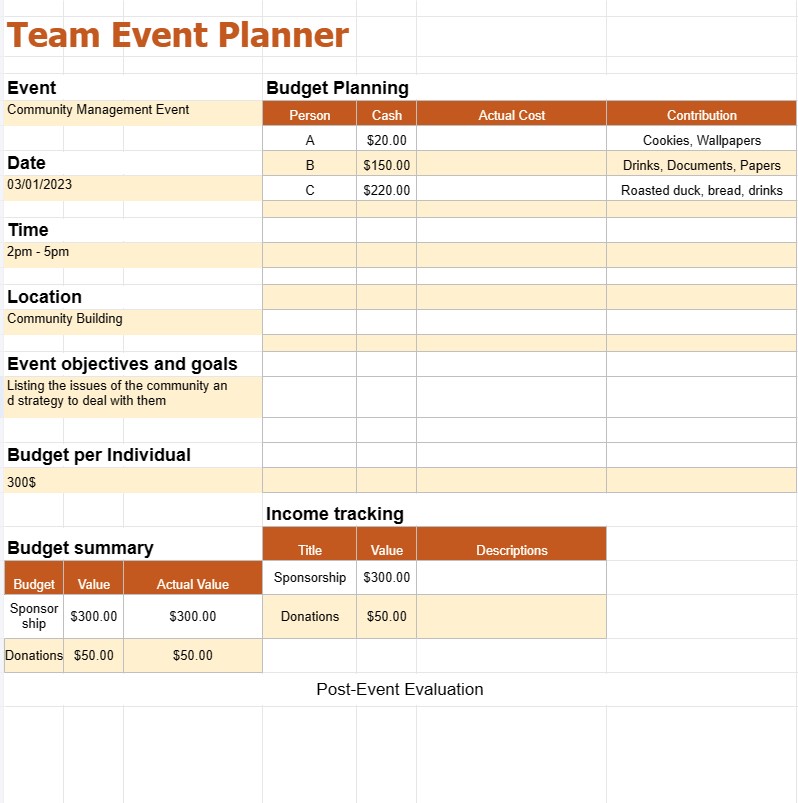
This spreadsheet is helping leader to plan event more thoroughly.

템플릿 보기
↓︎ 지금 다운로드
설명
0
⌨︎
코멘트
252
⤓︎
0
☆︎

A Team Event Planning Template is a pre-designed document or digital file that serves as a starting point for teams or event planners to create a structured plan for organizing and managing an event. These templates are readily available and can be customized to meet the specific needs of an event, whether it's a corporate meeting, conference, wedding, party, or any other type of gathering.

Event planning templates are designed to simplify the planning process, provide a framework for tasks and responsibilities, and help teams stay organized and on track. Here are the common components and sections you might find in a Team Event Planning Template:

  • Event Details:
    • Event name, date, time, and location.
    • Event type or theme.
    • Event objectives and goals.
  • Task Checklist:
    • A list of tasks that need to be completed before, during, and after the event.
    • Task assignments:Assign specific tasks to team members or responsible parties.
    • Due dates: Set deadlines for task completion.
    • Status updates: Monitor the progress of tasks.
  • Budget Planning:
    • Budget allocation: Define the overall event budget and allocate funds to different categories (e.g., venue, catering, decorations).
    • Expense tracking: Record and track all event-related expenses, including estimates and actual costs.
    • Income tracking: Log income sources, such as ticket sales, sponsorships, or donations.
    • Budget summary: Calculate and display the budget balance and variances between estimates and actuals.
  • Guest List:
    • List of invited guests or attendees, including names, contact information, and RSVP status.
    • Special requirements or notes for specific guests.
  • Post-Event Evaluation:
    • Evaluation criteria and surveys for collecting feedback from attendees.
    • Analysis of event success and areas for improvement.

Team Event Planning Templates can be found in various formats, including Word documents, Excel spreadsheets, Google Docs, and specialized event management software. Using a template saves time, ensures consistency, and provides a structured framework for successful event planning and execution. Teams can customize these templates to suit their specific event requirements and collaborate effectively throughout the planning process.

간편한 미리보기 및 스프레드시트 템플릿 다운로드

제한 없이 스프레드시트 템플릿의 전체 버전을 보고 마음에 드는지 확인한 다음 Excel 템플릿을 다운로드하여 장치에 저장하고 무료로 사용할 수 있습니다.

어디서나 스프레드시트 템플릿에 액세스

이는 Windows, MacOS, Linux, iOS와 같은 널리 사용되는 모든 운영 체제에서 작동합니다. 별도의 프로그램 없이 스프레드시트 템플릿을 확인하고 다운로드할 수 있습니다.

템플릿을 사용하는 방법

따라하기 매우 쉬운 단계에 따라 스프레드시트 템플릿을 미리 보고, 다운로드하고, 사용하는 방법을 알아보세요.

👁
1
송장, 예산, 달력, 기타 플래너 및 기타 추적기와 같은 카테고리를 선택하고 스프레드시트 템플릿을 클릭하여 온라인으로 확인하세요.
2
스프레드시트 템플릿을 미리 본 후 귀하의 목적에 적합하다고 생각되는 템플릿을 다운로드할 수 있습니다
🗎
3
한 번 장치에 파일이 있으면 간단히 데이터를 입력하거나 사용 사례에 맞게 수정할 수 있습니다.
🗂
4
스프레드시트 템플릿 작업이 완료되면 원하는 방식으로 사용할 수 있습니다.

더 유사한 템플릿

선택한 것과 동일한 카테고리에 있는 더 많은 스프레드시트 템플릿을 확인하세요.









