Yearly Calendar 2
범주 : 달력
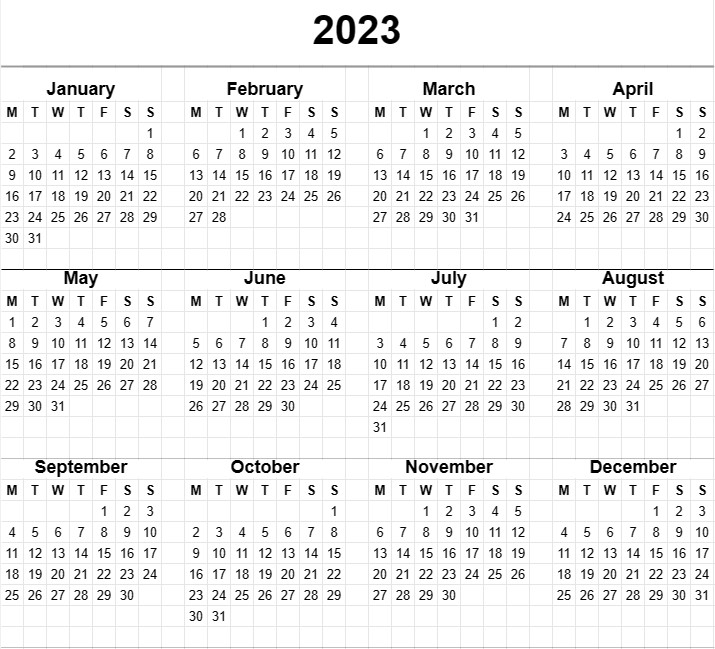
Auto-generated month blocks using this calendar is amazing, simply modify the huge year section within this template and the blocks will be there. This featuring with a professional and clean design which can serve multiple purposes.
The Yearly Calendar Template is a versatile and essential tool that provides an overview of an entire year on a single page. This template is widely used for personal, professional, and organizational planning, helping individuals and groups to visualize important dates, events, holidays, and deadlines over the course of a year. Whether it's for personal scheduling, project planning, or coordinating activities, the Yearly Calendar Template offers a comprehensive view of the year ahead.
Let's explore the key components and elements typically included in a Yearly Calendar Template:
- Year: The template prominently displays the year for which the calendar is created, allowing users to quickly identify and reference the specific year they are interested in.
- Months: The calendar typically divides the year into twelve months, with each month represented by a separate section or column. Each month includes the name of the month and the corresponding days and dates.
- Weekdays: The days of the week (Monday, Tuesday, Wednesday, etc.) are listed across the top of the calendar, making it easy to identify which days certain dates fall on.
- Date Grid: The primary feature of the template is the date grid, where each day of the month is represented by a numbered cell. Users can enter events, appointments, or other important information in the cells corresponding to specific dates.
- Holidays and Special Dates: Some templates include markers or indicators for public holidays, special observances, or other significant dates. This helps users plan around holidays and special events.
- Notes or Memo Section: Space is often provided at the bottom or side of the template for users to jot down notes, goals, or reminders for the year.
- Highlighted or Customizable Dates: Users may have the option to highlight or customize certain dates to draw attention to specific events, milestones, or deadlines.
- Color Coding: To aid in organization, some users employ color-coding schemes to categorize and differentiate types of events or commitments.
- Printing Options: The template is designed to be printer-friendly, allowing users to easily print a hard copy for reference or to share with others.
The Yearly Calendar Template offers several key advantages for individuals and organizations:
- Year-Long Planning: It provides a comprehensive view of the entire year, allowing users to plan and schedule events and commitments well in advance.
- Organization: Users can keep track of important dates, deadlines, and appointments, reducing the risk of forgetting or overlooking them.
- Time Management: The calendar facilitates effective time management by providing a visual representation of how time is allocated throughout the year.
- Goal Setting: It supports goal setting and tracking, enabling users to set objectives and allocate time for achieving them.
- Communication: Yearly calendars can be shared with family members, colleagues, or team members to coordinate schedules and activities.
- Holiday Planning: Users can plan vacations and activities around public holidays and special occasions.
In summary, the Yearly Calendar Template is a versatile and user-friendly tool for planning and organizing the year ahead. It enhances time management, facilitates goal setting, and promotes effective scheduling for both personal and professional use.
간편한 미리보기 및 스프레드시트 템플릿 다운로드
제한 없이 스프레드시트 템플릿의 전체 버전을 보고 마음에 드는지 확인한 다음 Excel 템플릿을 다운로드하여 장치에 저장하고 무료로 사용할 수 있습니다.
어디서나 스프레드시트 템플릿에 액세스
이는 Windows, MacOS, Linux, iOS와 같은 널리 사용되는 모든 운영 체제에서 작동합니다. 별도의 프로그램 없이 스프레드시트 템플릿을 확인하고 다운로드할 수 있습니다.
템플릿을 사용하는 방법
따라하기 매우 쉬운 단계에 따라 스프레드시트 템플릿을 미리 보고, 다운로드하고, 사용하는 방법을 알아보세요.
더 유사한 템플릿
선택한 것과 동일한 카테고리에 있는 더 많은 스프레드시트 템플릿을 확인하세요.