Daily Calendar
범주 : 달력
What you are going to do today? Hapily use this to write down all of the tasks and show it to your self or introduce it to your friends.
A Daily Calendar Template is a structured tool designed to help individuals plan and organize their daily activities, tasks, appointments, and events. It serves as a visual representation of a single day, allowing users to manage their time effectively and stay on top of their responsibilities.
Key Components of a Daily Calendar Template:
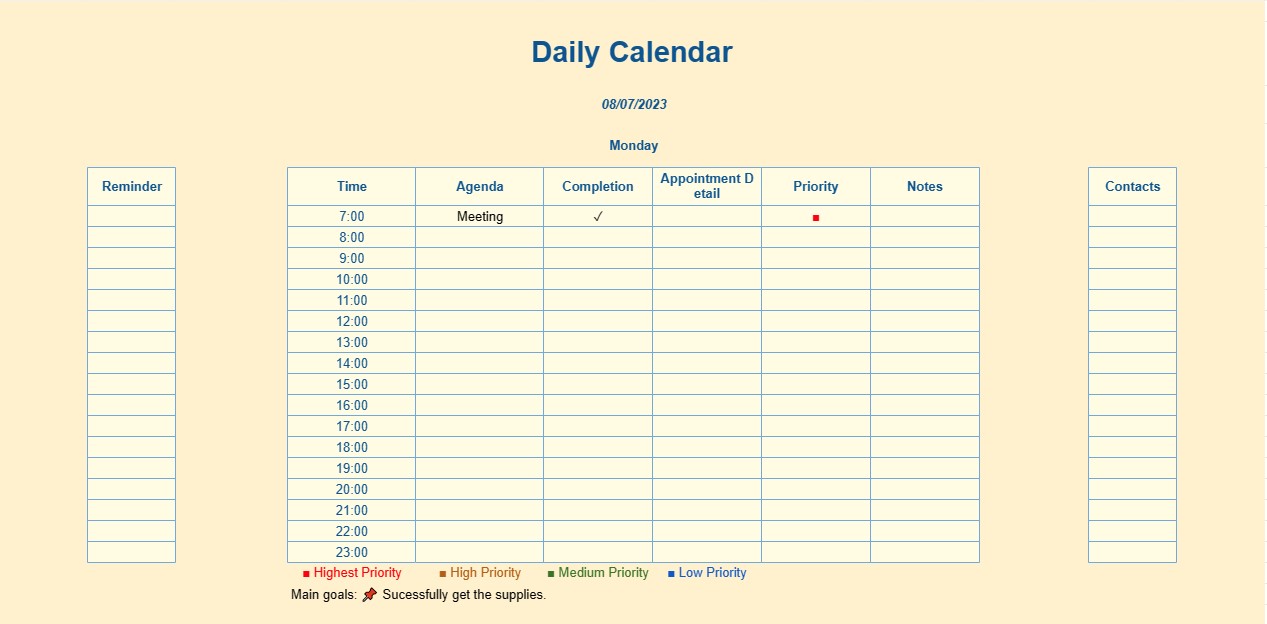
- Date and Day of the Week: The template prominently displays the date and the corresponding day of the week at the top. This provides users with a quick reference point.
- Time Slots or Hours: A typical daily calendar is divided into time slots or hours, starting from early morning and extending into the evening. These slots allow users to allocate specific time for tasks and appointments.
- Task/Event Entry: Users can enter details of their tasks, appointments, and events for the day within the corresponding time slots. This includes descriptions of the tasks, meeting locations, and any additional notes.
- Priority: Some templates include a priority designation, allowing users to categorize tasks or events based on their importance or urgency.
- Checkboxes or Status: To track task completion, checkboxes or status indicators may be included, enabling users to mark tasks as completed or in progress.
- To-Do Lists: In addition to timed events, many daily calendar templates provide space for creating to-do lists. Users can list tasks that need to be completed during the day, even if they don't have specific time slots.
- Notes Section: A notes section allows users to jot down additional information, reminders, or thoughts relevant to their day.
- Appointment Details: For scheduled appointments or meetings, users can include additional details such as the purpose of the meeting, attendees, and contact information.
- Goals and Priorities: Some templates include sections to set daily goals and priorities, helping users focus on their most important tasks.
Benefits of Using a Daily Calendar Template:
- Time Management: Provides a structured framework for managing time efficiently and ensuring that tasks and appointments are not overlooked.
- Organization: Helps users keep track of daily commitments, reducing the risk of double-booking or missing important events.
- Productivity: Encourages users to prioritize tasks and stay focused on their goals for the day.
- Flexibility: Allows for adjustments to the schedule as the day unfolds or as new tasks and events arise.
- Improved Memory: Provides a visual aid for remembering and planning tasks, reducing the mental burden of trying to recall everything.
- Stress Reduction: By having a clear plan for the day, users can reduce stress and anxiety related to time management and task completion.
- Accountability: The template serves as a record of how time is spent and tasks are completed, making it easier to evaluate productivity and make improvements.
In summary, a Daily Calendar Template is a valuable tool for individuals seeking to structure their daily routines, prioritize tasks, and stay organized. Whether used for personal time management, work-related planning, or a combination of both, this template assists in making the most of each day and ensuring that important commitments are met.
간편한 미리보기 및 스프레드시트 템플릿 다운로드
제한 없이 스프레드시트 템플릿의 전체 버전을 보고 마음에 드는지 확인한 다음 Excel 템플릿을 다운로드하여 장치에 저장하고 무료로 사용할 수 있습니다.
어디서나 스프레드시트 템플릿에 액세스
이는 Windows, MacOS, Linux, iOS와 같은 널리 사용되는 모든 운영 체제에서 작동합니다. 별도의 프로그램 없이 스프레드시트 템플릿을 확인하고 다운로드할 수 있습니다.
템플릿을 사용하는 방법
따라하기 매우 쉬운 단계에 따라 스프레드시트 템플릿을 미리 보고, 다운로드하고, 사용하는 방법을 알아보세요.
더 유사한 템플릿
선택한 것과 동일한 카테고리에 있는 더 많은 스프레드시트 템플릿을 확인하세요.