
ყოველკვირეული კვების დამგეგმავი
კატეგორია : დამგეგმავები
კვების ორგანიზება კარგია, თუ ახერხებთ ჯანსაღი ცხოვრების წესის დაცვას, ეს არის მიზეზი იმისა, რომ შაბლონი აქ არის დაგეხმაროთ.
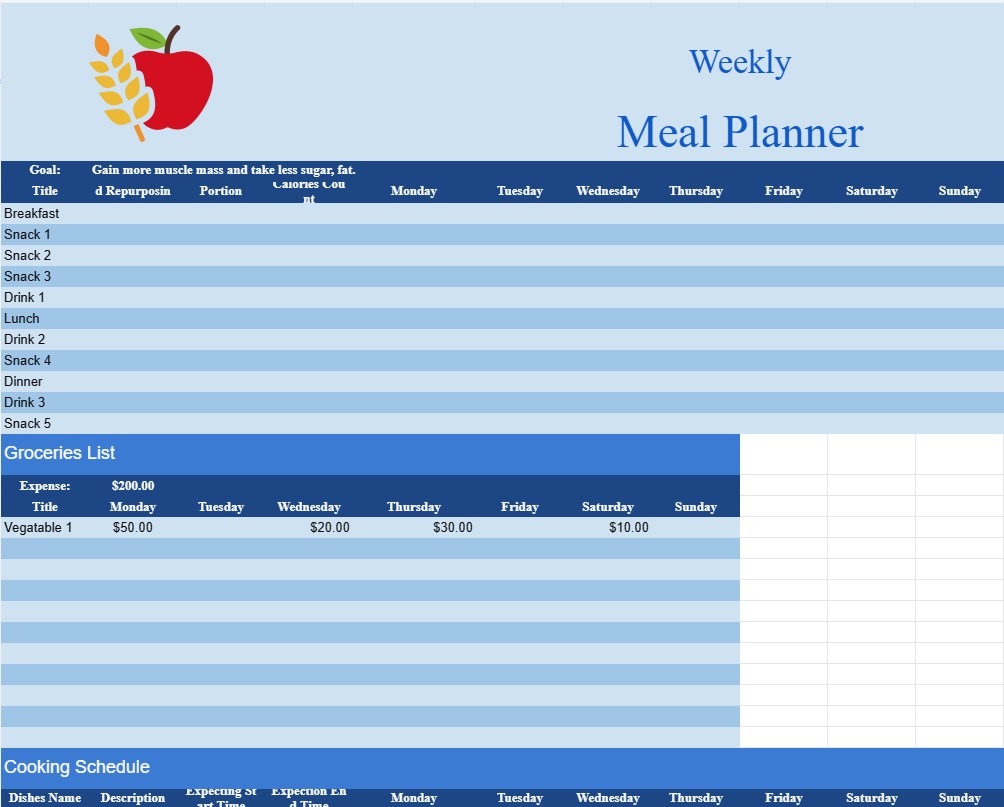
კვირეული კვების დამგეგმავი შაბლონის დოკუმენტი არის პრაქტიკული და ორგანიზებული ინსტრუმენტი, რომელსაც იყენებენ ინდივიდები და ოჯახები, რათა დაგეგმონ და მართონ თავიანთი კვება ერთი კვირის განმავლობაში. ის გთავაზობთ სტრუქტურირებულ ჩარჩოს დაბალანსებული და მკვებავი კვების განრიგის შესაქმნელად, სასურსათო სიების შესაქმნელად და საჭმლის მომზადების გამარტივებისთვის.
აქ არის Weekly Meal Planner-ის შაბლონის დოკუმენტის ძირითადი კომპონენტები და მიზნები:
- კალენდრის ფორმატი: დოკუმენტი, როგორც წესი, შეიცავს კალენდრის სტილის განლაგებას, სადაც წარმოდგენილია კვირის ყოველი დღე. მომხმარებლებს შეუძლიათ შეიყვანონ საკვების დეტალები ყოველი დღისთვის, მათ შორის საუზმე, ლანჩი, ვახშამი და საჭმელები.
- კვების იდეები: მომხმარებლებს შეუძლიათ ჩაწერონ კერძების იდეები ან რეცეპტები, რომელთა მომზადებასაც გეგმავენ. კვირა. ეს განყოფილება გეხმარებათ გონების შტურმში და კერძების მრავალფეროვნების უზრუნველყოფაში.
- სასურსათო პროდუქტების სია: შაბლონის მთავარი მახასიათებელია დაგეგმილი კერძების საფუძველზე სასურსათო სიის გენერირების შესაძლებლობა. როდესაც მომხმარებლები შეაქვთ თითოეული რეცეპტისთვის საჭირო ინგრედიენტებს, შაბლონი აგროვებს ყოვლისმომცველ სავაჭრო სიას, რაც აადვილებს საჭირო ნივთების მარაგს.
- კვებითი ინფორმაცია: ზოგიერთი შაბლონი გთავაზობთ ადგილს მოიცავს კვების ინფორმაციას, როგორიცაა კალორიების რაოდენობა, მაკროელემენტების დაშლა და დიეტური შენიშვნები. ეს განსაკუთრებით სასარგებლოა მათთვის, ვინც ყურადღებას ამახვილებს დიეტურ მიღებაზე.
- სპეციალური დიეტები და ალერგიები: სპეციფიკური დიეტური მოთხოვნების ან ალერგიის მქონე მომხმარებლებს შეუძლიათ თავიანთი კვების გეგმის შესაბამისად მორგება. შაბლონი შეიძლება მოიცავდეს უგლუტენო, ვეგეტარიანულ, ვეგანურ ან სხვა სპეციალურ დიეტებს.
- პორციის კონტროლი: იმ პირებისთვის, რომლებიც დაინტერესებულნი არიან პორციის ზომისა და კალორიების მიღებაზე, შაბლონი შეიძლება შეიცავდეს სექციებს. თვალყური ადევნეთ პორციების ზომას და ულუფების ზომას.
- ნარჩენები და ხელახალი დანიშნულება: მომხმარებლებს შეუძლიათ დაგეგმონ ნარჩენების ხელახალი გამოყენება, რათა მინიმუმამდე დაიყვანონ საკვების ნარჩენები. შაბლონი შეიძლება შეიცავდეს განყოფილებას დარჩენილი ინგრედიენტების ჩასაწერად და იდეების შემდგომ კერძებში მათი ხელახალი გამოყენებისთვის.
- სამზარეულო განრიგი: დროის ეფექტურად სამართავად, ზოგიერთი შაბლონი მომხმარებლებს საშუალებას აძლევს შექმნან სამზარეულოს განრიგი. . ეს ასახავს საჭმლის მომზადების ნაბიჯებსა და ვადებს, რაც უზრუნველყოფს საჭმლის ყველა კომპონენტის ერთდროულად მზადყოფნას.
- ბიუჯეტის დაგეგმვა: მომხმარებლებს შეუძლიათ დაადგინონ ბიუჯეტი მათი ყოველკვირეული სასურსათო პროდუქტებისთვის და თვალყური ადევნონ ხარჯებს. ეს გეხმარებათ კვების ხარჯების დაგეგმვასა და სასურსათო საყიდლებზე.
- მიზნის დაყენება: მათთვის, ვისაც აქვს დიეტური ან ჯანმრთელობის მიზნები, შაბლონი შეიძლება შეიცავდეს სექციებს ყოველკვირეული კვებასთან დაკავშირებული მიზნების დასაყენებლად, როგორიცაა ბოსტნეულის გარკვეული რაოდენობის მოხმარება ან ცილის მიზნების დაკმაყოფილება.
- რეცეპტის შენახვა: მომხმარებლებს შეუძლიათ შეინახონ საყვარელი რეცეპტები შაბლონში ან ბმული გარე წყაროებზე სწრაფი მითითებისთვის.
- მორგება: Weekly Meal Planner შაბლონები უაღრესად კონფიგურირებადია. მომხმარებლებს შეუძლიათ შეცვალონ ისინი თავიანთ პრეფერენციებზე, მათ შორის კერძების კატეგორიების დამატება ან წაშლა, პორციების ზომის კორექტირება ან დიეტური მითითებების ჩართვა.
შეჯამებით, Weekly Meal Planner-ის შაბლონი პრაქტიკული ინსტრუმენტია. ინდივიდებისა და ოჯახებისთვის, რომლებიც ცდილობენ გაამარტივონ კვების დაგეგმვა, გააუმჯობესონ დიეტური არჩევანი და გააუმჯობესონ სასურსათო საყიდლები. ის ხელს უწყობს ჯანსაღი კვების ჩვევებს, ამცირებს საკვების ნარჩენებს და ხდის საჭმლის მომზადებას უფრო ორგანიზებულ და სასიამოვნო პროცესად.
ელცხრილის შაბლონის მარტივი გადახედვა და ჩამოტვირთვა
იხილეთ ელცხრილის შაბლონის სრული ვერსია შეზღუდვების გარეშე, რომ ნახოთ მოგწონთ თუ არა, შემდეგ შეგიძლიათ ჩამოტვირთოთ Excel-ის შაბლონი თქვენს მოწყობილობაში შესანახად და უფასოდ გამოიყენოთ.
წვდომა ცხრილების შაბლონზე ნებისმიერი ადგილიდან
ის მუშაობს ყველა პოპულარულ ოპერაციულ სისტემაზე, როგორიცაა Windows, MacOS, Linux, iOS. შეგიძლიათ იხილოთ ცხრილების შაბლონები და ჩამოტვირთოთ ისინი დამატებითი პროგრამების გარეშე.
როგორ გამოვიყენოთ შაბლონი
გაარკვიეთ, როგორ გადახედოთ, ჩამოტვირთოთ და შემდეგ გამოიყენოთ ელცხრილის შაბლონი, მიჰყევით ნაბიჯებს, რომელთა შესრულებაც ძალიან მარტივია
მეტი მსგავსი შაბლონები
იხილეთ ელცხრილების მეტი შაბლონები, რომლებიც იმავე კატეგორიაშია არჩეული.













