
✕︎
Svenska
فارسی
Italiano
Tiếng Việt
Català
Türk
हिन्दी
Čeština
Lietuvis
Ελληνικά
Dansk
Magyar
Български
Deutsch
Bahasa Melayu
Nederlands
Русский
English
Український
Español
Polskie
ภาษาไทย
Português
ქართველი
Français
Română
한국어
Slovák
繁體中文
日本語
Indonesia
العربية
简体中文
単純な問題の追跡
カテゴリー : トラッカー
このスプレッドシート テンプレートを使用すると、生活上の問題やプロジェクトの問題を簡単に追跡できます。
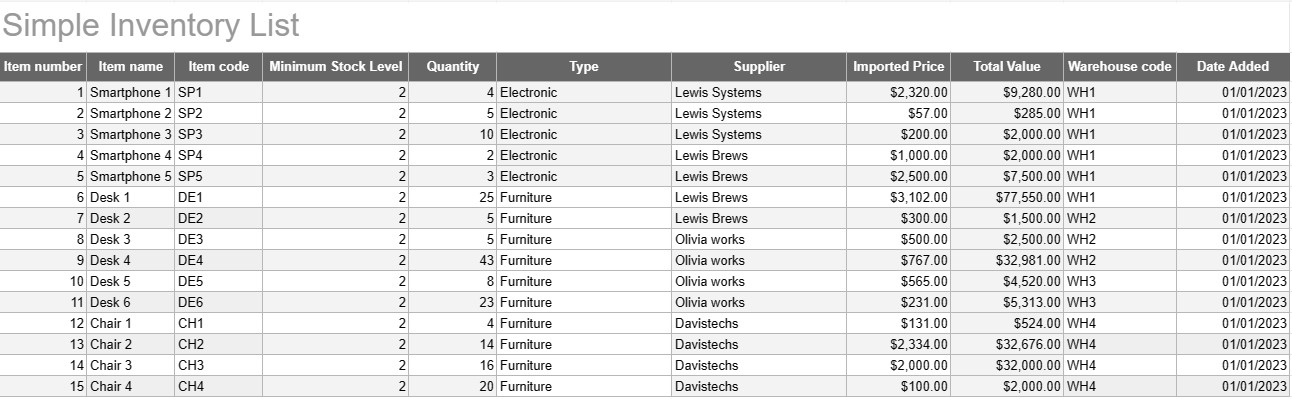
シンプルな在庫リスト テンプレートは、個人や企業が商品、製品、資産の在庫を追跡および管理するために使用する基本的かつ効果的なツールです。このテンプレートは、品目の詳細、数量、場所、その他の関連情報を記録するための構造化された形式を提供するため、在庫レベルの監視が容易になり、効率的な管理が容易になります。
シンプルな在庫リスト テンプレートの主要コンポーネント:
- アイテムの詳細: テンプレートには、アイテム名、説明、一意の識別子 (SKU やシリアル番号など) などのアイテム固有の情報の列またはセクションが含まれています。追加のメモ。
- 数量: ユーザーは、在庫のある各アイテムの数量または単位を記録できます。この列は、在庫レベルを正確に追跡するために不可欠です。
- 場所: 複数の保管場所または倉庫がある企業の場合、テンプレートに各アイテムの物理的な場所を指定する列が含まれる場合があります。これにより、取り出しと補充が効率化されます。
- 単価: ユーザーは各アイテムの単価またはコストを入力できます。この情報は、在庫の合計額を計算するのに役立ちます。
- 合計金額: 一部のテンプレートでは、数量と単価に基づいて各アイテムの合計金額が自動的に計算されます。これにより、在庫の総額の概要が簡単にわかります。
- 追加/更新日: インベントリへの変更と更新を追跡するために、ユーザーは各アイテムが追加または変更された日付を記録できます。
- カテゴリ/タイプ: アイテムをさまざまなグループまたはタイプ (電子機器、事務用品、衣料品など) に分類して、整理とレポートを改善できます。
- 最低在庫レベル: ユーザーはアイテムごとに最低在庫レベルを設定できます。数量がこのレベルを下回ると、商品の再注文または補充のトリガーとして機能します。
- サプライヤー情報: ビジネス環境では、ユーザーはサプライヤーの名前、連絡先情報、再注文情報などのサプライヤーの詳細を含めることができます。
シンプルな在庫リスト テンプレートを使用する利点:
- 在庫追跡: 明確な最新のスナップショットを提供します。在庫レベルを把握し、在庫切れや過剰在庫を防ぎます。
- コスト管理: 企業は在庫の価値を監視し、在庫の補充と購入について情報に基づいた意思決定を行うことができます。
- 効率: 情報を一元化し、簡単にアクセスできるようにすることで、在庫管理を合理化します。
- データの精度: すべての情報が体系的に記録されるため、在庫追跡におけるエラーのリスクが軽減されます。
- 注文管理: アイテムをいつ再注文するか、どのサプライヤーに注文するかを特定し、サプライ チェーン管理を改善します。
- コンプライアンス: 一部の業界では、正確な在庫記録を維持することが規制遵守と財務報告に不可欠です。
- リソースの最適化: 企業はリソースをより効果的に割り当て、維持コストを削減できます。
結論として、シンプルな在庫リスト テンプレートは、在庫の組織的かつ正確な記録を維持したいと考えている個人や企業にとって実用的なツールです。このテンプレートは、小規模な家庭在庫に使用する場合でも、大規模な事業運営の一部として使用する場合でも、在庫管理を簡素化し、欠品や過剰在庫のリスクを軽減し、財務管理と意思決定の向上に貢献します。
スプレッドシートのテンプレートを簡単にプレビューしてダウンロード
制限なしでスプレッドシート テンプレートのフル バージョンを表示して気に入るかどうかを確認し、Excel テンプレートをダウンロードしてデバイスに保存し、無料で使用できます。
どこからでもスプレッドシート テンプレートにアクセス
これは、Windows、MacOS、Linux、iOS などのすべての一般的なオペレーティング システムで動作します。スプレッドシート テンプレートを表示し、追加のプログラムを必要とせずにダウンロードできます。
テンプレートの使用方法
非常に簡単な手順に従って、スプレッドシート テンプレートをプレビュー、ダウンロード、使用する方法を理解します。
1
請求書、予算、カレンダー、その他のプランナー、その他のトラッカーなどのカテゴリを選択し、スプレッドシート テンプレートをクリックしてオンラインで表示します
2
スプレッドシート テンプレートをプレビューした後、目的に合っていると思われるものをダウンロードできます
3
1 回デバイス上にファイルがある場合は、そのファイルにデータを入力するか、ユースケースに合わせて変更するだけです
4
スプレッドシート テンプレートの作成が完了したら、選択した方法で使用できます
さらに類似したテンプレート
選択したものと同じカテゴリにあるスプレッドシート テンプレートをさらに表示します。













