
✕︎
LANGUAGE ▼︎
Svenska
فارسی
Italiano
Tiếng Việt
Català
Türk
हिन्दी
Čeština
Lietuvis
Ελληνικά
Dansk
Magyar
Български
Deutsch
Bahasa Melayu
Nederlands
Русский
English
Український
Español
Polskie
ภาษาไทย
Português
ქართველი
Français
Română
한국어
Slovák
繁體中文
日本語
Indonesia
العربية
简体中文
Svenska
فارسی
Italiano
Tiếng Việt
Català
Türk
हिन्दी
Čeština
Lietuvis
Ελληνικά
Dansk
Magyar
Български
Deutsch
Bahasa Melayu
Nederlands
Русский
English
Український
Español
Polskie
ภาษาไทย
Português
ქართველი
Français
Română
한국어
Slovák
繁體中文
日本語
Indonesia
العربية
简体中文
Contractor Invoice

Contractor Invoice

カテゴリー : プランナー

Working independently is never going to be so hard, at the end of the work if you need to send an invoice then this is for you to use.

テンプレートを見る
↓︎ ダウンロード中
上のボタンを使用してダウンロードできませんか?このリンクをクリックして、ファイルをダウンロードします。
説明
0
⌨︎
コメント
226
⤓︎
0
☆︎

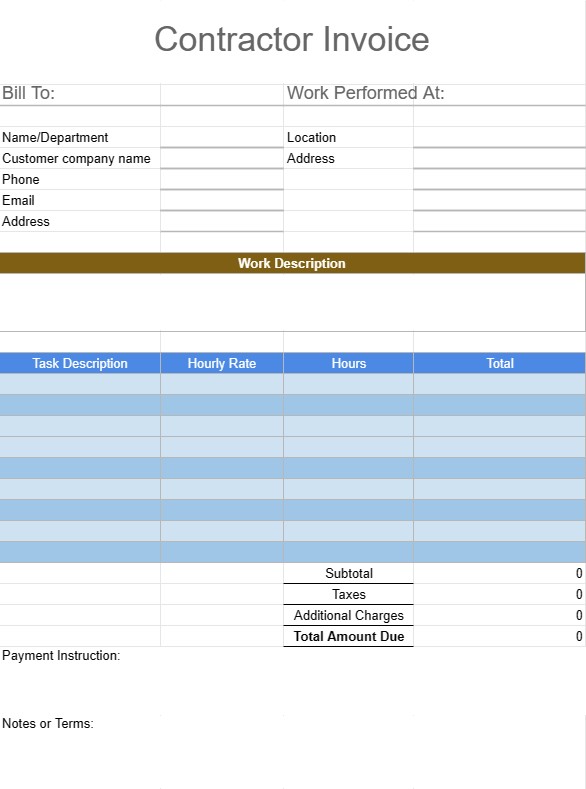
A Contractor Invoice Template is a document used by independent contractors, freelancers, and service providers to bill their clients for services rendered. This template helps ensure that contractors are compensated for their work in a professional and organized manner. It typically includes details about the services provided, payment terms, and contact information for both the contractor and the client.

Key Components of a Contractor Invoice Template:

  • Invoice Header: The top of the invoice typically includes the contractor's business name, logo (if applicable), and contact information, as well as the invoice number and date.
  • Client Information: This section includes the client's name, company (if applicable), billing address, and contact information.
  • Invoice Details: A breakdown of services or items provided is included, along with the quantity, unit price, and total amount for each line item. This may also include a description of the services or products delivered.
  • Subtotal: The subtotal is the sum of all line items before taxes or additional charges.
  • Taxes: If applicable, any sales tax, VAT, or other taxes are itemized separately.
  • Additional Charges: Any additional charges, such as shipping fees or late payment penalties, are included in this section.
  • Total Amount Due: This is the grand total of the invoice, including all charges, taxes, and fees.
  • Payment Terms: The payment terms specify the due date, payment methods accepted (e.g., bank transfer, credit card), and any late payment penalties or discounts for early payment.
  • Payment Instructions: Bank account details or payment instructions are provided to facilitate the payment process.
  • Notes or Terms: Any additional terms, instructions, or special notes relevant to the invoice or project may be included.
  • Signature: Some invoices include a space for the contractor and client to sign, acknowledging the receipt of services and agreement on payment terms.

Benefits of Using a Contractor Invoice Template:

  • Professionalism: Presents a professional and organized image to clients, enhancing the contractor's reputation.
  • Clarity: Clearly outlines the services provided and the associated costs, reducing misunderstandings or disputes.
  • Record Keeping: Helps contractors maintain accurate records of their invoicing and payments for accounting and tax purposes.
  • Efficiency: Saves time by providing a standardized format that can be easily customized for each client or project.
  • Legal Protection: Provides a formal record of the agreement between the contractor and the client, which can be useful in case of disputes.
  • Prompt Payment: Encourages clients to pay promptly by specifying due dates and payment instructions.
  • Consistency: Ensures that invoices are consistent in format and content, which is especially important for contractors who work with multiple clients.

In conclusion, a Contractor Invoice Template is a crucial tool for independent contractors and freelancers to bill their clients professionally and efficiently. It helps streamline the payment process, maintain records, and establish clear expectations between the contractor and the client regarding services rendered and payment terms.

スプレッドシートのテンプレートを簡単にプレビューしてダウンロード

制限なしでスプレッドシート テンプレートのフル バージョンを表示して気に入るかどうかを確認し、Excel テンプレートをダウンロードしてデバイスに保存し、無料で使用できます。

どこからでもスプレッドシート テンプレートにアクセス

これは、Windows、MacOS、Linux、iOS などのすべての一般的なオペレーティング システムで動作します。スプレッドシート テンプレートを表示し、追加のプログラムを必要とせずにダウンロードできます。

テンプレートの使用方法

非常に簡単な手順に従って、スプレッドシート テンプレートをプレビュー、ダウンロード、使用する方法を理解します。

👁
1
請求書、予算、カレンダー、その他のプランナー、その他のトラッカーなどのカテゴリを選択し、スプレッドシート テンプレートをクリックしてオンラインで表示します
2
スプレッドシート テンプレートをプレビューした後、目的に合っていると思われるものをダウンロードできます
🗎
3
1 回デバイス上にファイルがある場合は、そのファイルにデータを入力するか、ユースケースに合わせて変更するだけです
🗂
4
スプレッドシート テンプレートの作成が完了したら、選択した方法で使用できます

さらに類似したテンプレート

選択したものと同じカテゴリにあるスプレッドシート テンプレートをさらに表示します。









