✕︎
Svenska
فارسی
Italiano
Tiếng Việt
Català
Türk
हिन्दी
Čeština
Lietuvis
Ελληνικά
Dansk
Magyar
Български
Deutsch
Bahasa Melayu
Nederlands
Русский
English
Український
Español
Polskie
ภาษาไทย
Português
ქართველი
Français
Română
한국어
Slovák
繁體中文
日本語
Indonesia
العربية
简体中文
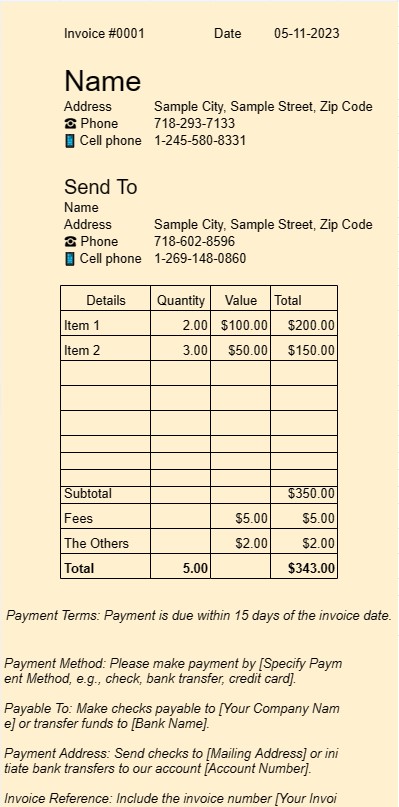
請求書 1
カテゴリー : 請求書
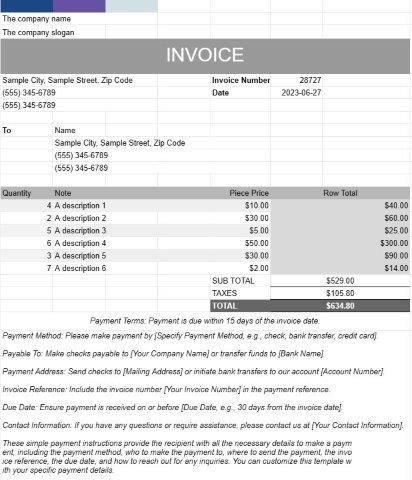
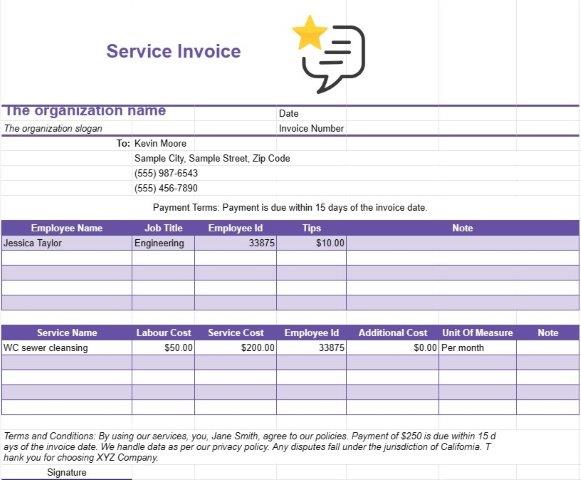
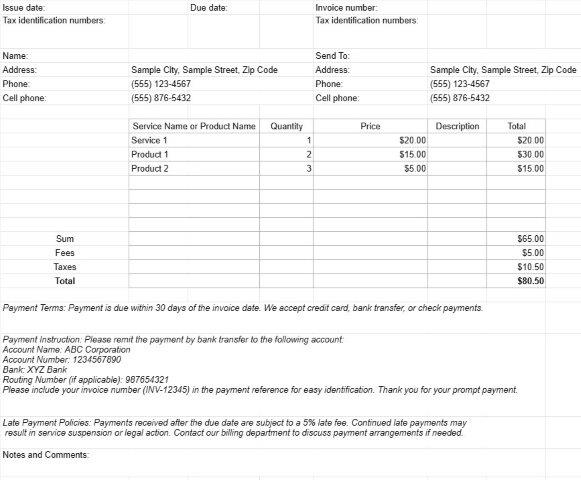
これは請求書として使用するテンプレートです。ユーザーは請求書にサービスや商品をリストできます。
Invoice One テンプレート ドキュメントは、さまざまなビジネス環境で請求書を生成するために使用される標準化された専門的な形式です。これは、フリーランサー、中小企業、大企業にとって同様に重要なツールです。
Invoice One テンプレート ドキュメントの主な目的は、販売された製品または提供されたサービスに対するクライアントまたは顧客への請求を容易にすることです。 Invoice One テンプレート ドキュメントの主な要素と機能は次のとおりです。
- クライアント情報: 通常、クライアントの名前または会社名、連絡先情報、および請求先住所。これにより、請求書が適切な受信者に確実に届くようになります。
- 請求書の詳細: このセクションでは、請求書番号、発行日、期日など、請求書の詳細について説明します。一意の請求書番号により、送信者と受信者の両方が請求書を簡単に参照できます。
- 料金明細: 請求書の中心は、提供される製品またはサービスの明細リストにあります。各項目には、製品またはサービスの説明、数量、単価、および総コストが含まれます。この詳細レベルにより、請求プロセスの透明性と明確さが確保されます。
- 小計と合計: テンプレートは、個々の品目の小計を自動的に計算し、合計して未払い総額を表示します。 。取引の性質に応じて、税金、割引、配送料のフィールドが含まれる場合もあります。
- 支払い条件: Invoice One テンプレートには、支払い条件を指定するセクションが含まれることがよくあります。 、期日や利用可能な支払い方法など。明確な支払い条件は、混乱を避け、確実にタイムリーに支払いを行うのに役立ちます。
- 追加メモ: 通常、追加のメモやコメントを追加するためのスペースがあり、送信者は必要なコンテキストや指示を提供できます。
- ビジネス ロゴ: 多くの企業は、ブランド化の目的で請求書に会社のロゴを含めることを選択します。これにより、請求書の専門性が強化されます。
- 連絡先情報: テンプレートには通常、請求書を送信する企業または個人の連絡先情報が表示されます。これにより、受信者は質問や説明があれば簡単に連絡できるようになります。
- 記録の保持: Invoice One テンプレート ドキュメントを使用して生成された請求書は、送信者と送信者の両方にとって重要な記録として機能します。受信者。取引の詳細が文書化され、会計、税務、紛争解決に役立ちます。
- カスタマイズ: テンプレートを使用する利点の 1 つは、テンプレートをカスタマイズできることです。特定のビジネスニーズに対応します。ユーザーは、ブランドに合わせてテンプレートを調整したり、必要に応じてフィールドを追加または削除したり、さまざまな種類の取引に合わせてカスタマイズしたりできます。
結論として、Invoice One テンプレート ドキュメントは請求プロセスを合理化します。プロフェッショナリズムを強化し、企業やフリーランサーが製品やサービスの対価を迅速に受け取るのに役立ちます。これは、あらゆるビジネスの財務面を管理するために不可欠なツールです。
スプレッドシートのテンプレートを簡単にプレビューしてダウンロード
制限なしでスプレッドシート テンプレートのフル バージョンを表示して気に入るかどうかを確認し、Excel テンプレートをダウンロードしてデバイスに保存し、無料で使用できます。
どこからでもスプレッドシート テンプレートにアクセス
これは、Windows、MacOS、Linux、iOS などのすべての一般的なオペレーティング システムで動作します。スプレッドシート テンプレートを表示し、追加のプログラムを必要とせずにダウンロードできます。
テンプレートの使用方法
非常に簡単な手順に従って、スプレッドシート テンプレートをプレビュー、ダウンロード、使用する方法を理解します。
1
請求書、予算、カレンダー、その他のプランナー、その他のトラッカーなどのカテゴリを選択し、スプレッドシート テンプレートをクリックしてオンラインで表示します
2
スプレッドシート テンプレートをプレビューした後、目的に合っていると思われるものをダウンロードできます
3
1 回デバイス上にファイルがある場合は、そのファイルにデータを入力するか、ユースケースに合わせて変更するだけです
4
スプレッドシート テンプレートの作成が完了したら、選択した方法で使用できます
さらに類似したテンプレート
選択したものと同じカテゴリにあるスプレッドシート テンプレートをさらに表示します。