
Scheda attività
Categoria : Tracker
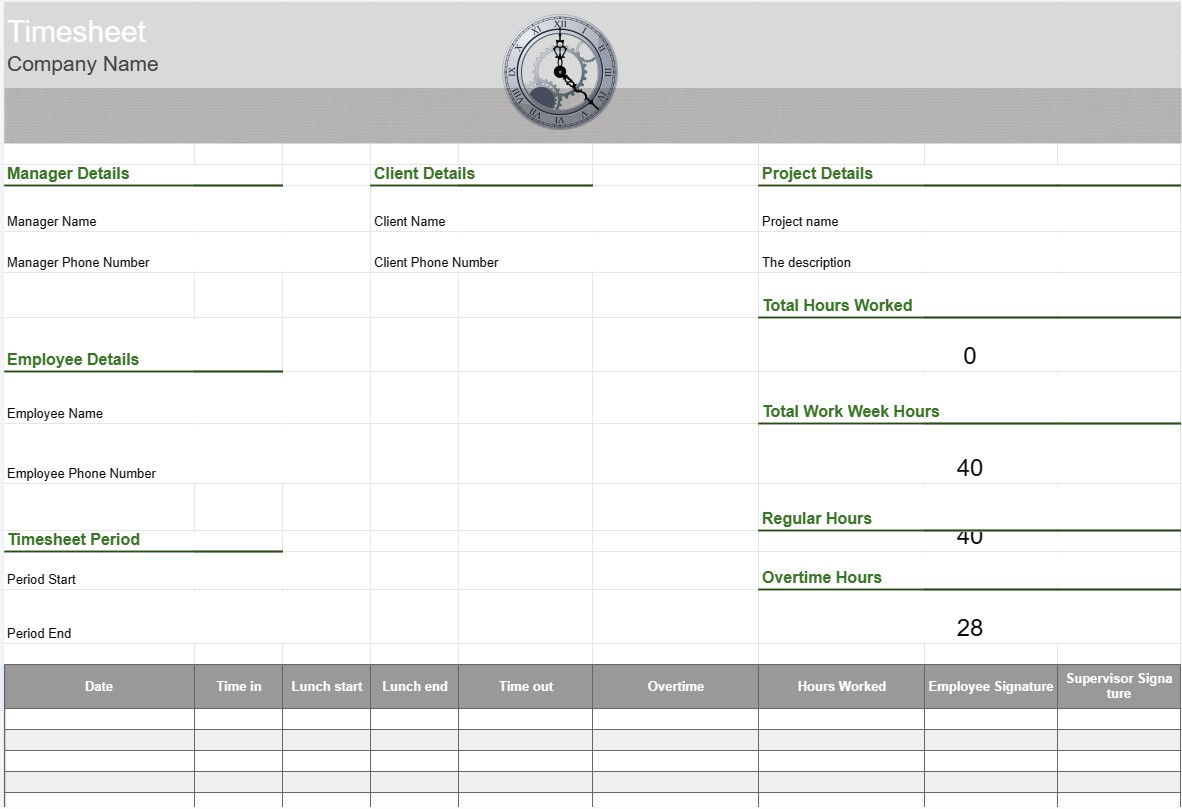
Scheda attività di lavoro per tenere traccia del personale per ottenere una panoramica su ciò che il dipartimento sta facendo durante l'orario di lavoro.
Un modello di scheda attività è uno strumento utilizzato da dipendenti e organizzazioni per tenere traccia e registrare il tempo impiegato in varie attività, progetti o incarichi. Le schede attività vengono comunemente utilizzate per tenere traccia dell'orario di lavoro, sia per scopi di gestione delle retribuzioni, di gestione dei progetti o per monitorare le ore fatturabili per i clienti. I modelli di scheda attività aiutano a garantire un monitoraggio e un reporting accurati del tempo.
Componenti chiave di un modello di scheda attività:
- Informazioni sul dipendente: il modello include dettagli sul dipendente, come nome, ID dipendente, dipartimento e informazioni di contatto.
- Data e ora: un formato di calendario o tabella visualizza le date e gli orari in cui i dipendenti registrano il proprio orario di lavoro . Questo può essere organizzato per giorni, settimane o mesi.
- Dettagli attività/progetto: i dipendenti inseriscono i dettagli sulle attività o sui progetti su cui stanno lavorando. Ciò può includere nomi di progetti, descrizioni di attività o codici di progetto.
- Time In e Time Out: per ogni giorno, i dipendenti registrano l'ora in cui hanno iniziato e terminato il lavoro, nonché eventuali pause effettuate durante la giornata lavorativa.
- Ore totali: il modello calcola il numero totale di ore lavorate ogni giorno, settimana o mese in base agli orari immessi.
- Monitoraggio degli straordinari: se applicabile, il modello può includere sezioni per il monitoraggio delle ore di straordinario, inclusi gli straordinari regolari, il doppio orario ed eventuali tariffe applicabili.
- Cliente o Cliente: se il lavoro è correlato a progetti del cliente, il modello può includere un campo per specificare il nome del cliente o del cliente.
- Approvazione e firma: Alcune schede attività includere spazi in cui i dipendenti possono firmare e i supervisori o i manager possono approvare le ore registrate.
- Note o commenti: i dipendenti possono aggiungere note o commenti relativi ad attività specifiche o voci di orario, come ad esempio spiegazioni per gli straordinari o contesto aggiuntivo.
- Fine settimana: la scheda attività indica in genere la data di fine della settimana lavorativa o del periodo di riferimento.
Vantaggi dell'utilizzo di un modello di scheda attività:
- Monitoraggio accurato del tempo: garantisce che le ore di lavoro dei dipendenti siano registrate accuratamente, il che è essenziale per l'elaborazione delle buste paga, la fatturazione dei progetti e la conformità con le norme sul lavoro. leggi.
- Gestione dei progetti: aiuta i project manager e i team a tenere traccia del tempo impiegato nelle varie attività del progetto, consentendo una migliore pianificazione del progetto e un'allocazione delle risorse.
- Elaborazione delle buste paga: semplifica il processo delle buste paga fornendo un registro dettagliato delle ore lavorate dai dipendenti, inclusi gli straordinari e i permessi.
- Fatturazione al cliente: Facilita la fatturazione ai clienti per ore lavorate fatturabili, semplificando la fatturazione accurata.
- Conformità: aiuta le organizzazioni a rispettare le normative sul lavoro e le leggi sull'occupazione relative all'orario di lavoro e agli straordinari.
- Analisi delle prestazioni: fornisce dati per analizzare la produttività dei dipendenti e l'efficienza delle attività.
- Documentazione: Serve come registrazione delle ore di lavoro, che può essere utile per gli audit , controversie o riferimenti futuri.
- Trasparenza: promuove la trasparenza nel monitoraggio del tempo e nel reporting del lavoro, aiutando dipendenti e datori di lavoro a mantenere la fiducia.
In conclusione, un modello di scheda attività è uno strumento prezioso per monitorare e documentare con precisione le ore di lavoro e le attività dei dipendenti. È essenziale per vari scopi, tra cui l'elaborazione delle buste paga, la gestione dei progetti, la fatturazione ai clienti e la conformità alle leggi e ai regolamenti sul lavoro.
Anteprima semplice e download del modello di foglio di calcolo
Visualizza la versione completa di un modello di foglio di calcolo senza limitazioni per vedere se ti piace, quindi puoi scaricare il modello Excel per memorizzarlo sul tuo dispositivo e utilizzarlo gratuitamente.
Accedi al modello di foglio di calcolo da qualsiasi luogo
Funziona su tutti i sistemi operativi più diffusi come Windows, MacOS, Linux, iOS. Puoi visualizzare i modelli di fogli di calcolo e scaricarli senza programmi aggiuntivi.
Come utilizzare un modello
Scopri come visualizzare in anteprima, scaricare e quindi utilizzare il modello di foglio di calcolo seguendo i passaggi estremamente facili da seguire
Modelli più simili
Visualizza altri modelli di fogli di calcolo che si trovano nella stessa categoria di quello scelto.













