
Scatola di Eisenhower
Categoria : Pianificatori
Questo è un modello di foglio di calcolo che simula un famoso modello scientifico che puoi utilizzare per il tuo progetto o scopo personale.
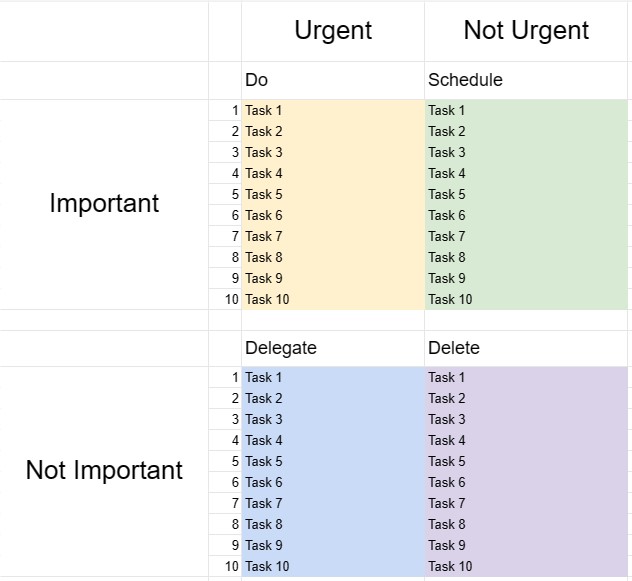
La Eisenhower Box, nota anche come Matrice Eisenhower o Matrice Urgente-Importante, è uno strumento decisionale e di gestione del tempo ispirato a una citazione attribuita al presidente Dwight D. Eisenhower: Ciò che è importante raramente è urgente, e ciò che è urgente è raramente importante. Questo modello è progettato per aiutare le persone a stabilire le priorità delle attività e a prendere decisioni su come allocare tempo e risorse in modo efficace.
Componenti chiave di un modello di scatola di Eisenhower:
- Quattro quadranti: il modello è diviso in quattro quadranti, ciascuno dei quali rappresenta una diversa categoria di attività in base alla loro urgenza e importanza.
- Quadrante I - Urgente e importante: I compiti in questo quadrante sono sia urgenti che importanti. Richiedono un'attenzione immediata e dovrebbero essere affrontati come una priorità assoluta.
- Quadrante II - Non urgente ma importante: i compiti in questo quadrante sono importanti ma non urgenti. Rappresentano attività proattive e a lungo termine che contribuiscono alla crescita e al successo personale e professionale. Pianificare e programmare queste attività è fondamentale.
- Quadrante III - Urgente ma non importante: le attività in questo quadrante sono urgenti ma non particolarmente importanti. Possono includere interruzioni, distrazioni o attività che possono essere delegate o ridotte al minimo per liberare tempo per questioni più importanti.
- Quadrante IV - Non urgente e non importante: attività in questo quadrante non sono né urgenti né importanti. Spesso sono attività che fanno perdere tempo e dovrebbero essere ridotte al minimo o eliminate.
- Elenco attività: gli utenti elencano le proprie attività nel quadrante appropriato in base alle loro valutazione dell'urgenza e dell'importanza di ciascuna attività.
- Piano d'azione: per le attività nei quadranti I e II, gli utenti possono creare piani d'azione, impostare scadenze e specificare i passaggi necessari per completarli .
- Revisione e aggiornamento: rivedere e aggiornare regolarmente l'Eisenhower Box aiuta le persone a rimanere concentrate su ciò che conta veramente e ad adattare le proprie priorità secondo necessità.
Vantaggi dell'utilizzo di un modello Eisenhower Box:
- Impostazione delle priorità: fornisce un quadro strutturato per dare priorità alle attività e prendere decisioni su dove allocare tempo e impegno.
- Gestione del tempo: aiuta gli utenti a concentrarsi su attività che contribuiscono al raggiungimento di obiettivi a lungo termine e a ridurre il tempo dedicato ad attività non importanti o reattive.
- Produttività: Aumenta la produttività enfatizzando le attività importanti e riducendo il tempo sprecato su quelle meno importanti.
- Riduzione dello stress: consente agli utenti di affrontare tempestivamente le questioni urgenti, assegnando tempo anche ad attività importanti ma non -compiti urgenti, riduzione dello stress e della sensazione di reagire costantemente alle crisi.
- Raggiungimento degli obiettivi: supporta il progresso verso obiettivi a lungo termine e lo sviluppo personale enfatizzando compiti importanti.
- Efficienza: aiuta le persone a lavorare in modo più intelligente identificando le attività che possono essere delegate, eliminate o ridotte al minimo.
- Consapevolezza del tempo: promuove la consapevolezza di come viene impiegato il tempo e incoraggia un uso più intenzionale del tempo.
In conclusione, un Eisenhower Box Template è uno strumento prezioso per le persone che cercano di gestire il proprio tempo in modo efficace, dare priorità alle attività e prendere decisioni informate su dove investire i propri sforzi. Classificando le attività in base alla loro urgenza e importanza, gli utenti possono aumentare la produttività, ridurre lo stress e lavorare per raggiungere i propri obiettivi in modo più efficiente.
Anteprima semplice e download del modello di foglio di calcolo
Visualizza la versione completa di un modello di foglio di calcolo senza limitazioni per vedere se ti piace, quindi puoi scaricare il modello Excel per memorizzarlo sul tuo dispositivo e utilizzarlo gratuitamente.
Accedi al modello di foglio di calcolo da qualsiasi luogo
Funziona su tutti i sistemi operativi più diffusi come Windows, MacOS, Linux, iOS. Puoi visualizzare i modelli di fogli di calcolo e scaricarli senza programmi aggiuntivi.
Come utilizzare un modello
Scopri come visualizzare in anteprima, scaricare e quindi utilizzare il modello di foglio di calcolo seguendo i passaggi estremamente facili da seguire
Modelli più simili
Visualizza altri modelli di fogli di calcolo che si trovano nella stessa categoria di quello scelto.













