Calendario degli appuntamenti giornalieri
Categoria : Calendari
Il tuo programma giornaliero sarà più chiaro se lo utilizzi per indicare tutti gli appuntamenti della giornata.
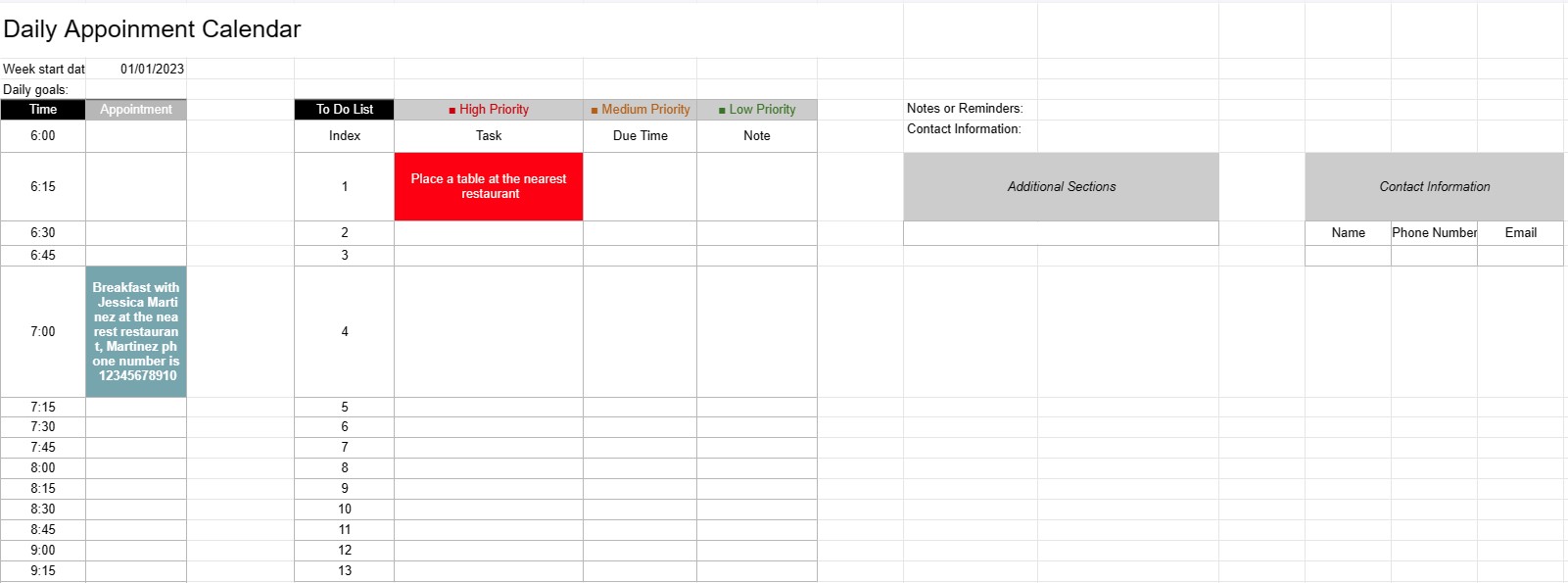
Un modello di calendario per appuntamenti giornalieri è uno strumento di pianificazione utilizzato da privati, professionisti e aziende per pianificare e gestire appuntamenti, riunioni e attività quotidiane. Fornisce un layout strutturato per organizzare le attività quotidiane, stabilire le priorità e garantire che il tempo venga allocato in modo efficiente.
Componenti chiave di un modello di calendario per appuntamenti giornalieri:
- Data: il modello in genere visualizza la data nella parte superiore di ogni pagina giornaliera, consentendo agli utenti di navigare tra giorni diversi.
- Fasce orarie: il giorno è diviso in fasce orarie o orari, solitamente iniziando la mattina e terminando la sera. Ogni fascia oraria rappresenta un periodo specifico durante la giornata.
- Dettagli appuntamento: gli utenti possono inserire i dettagli dell'appuntamento all'interno di ciascuna fascia oraria, tra cui:
- Orario dell'appuntamento
- Titolo o descrizione dell'appuntamento
- Luogo o sala riunioni
- Informazioni di contatto delle persone coinvolte
- Elenco cose da fare: alcuni modelli includono una sezione per elencare le attività o le cose da fare che devono essere completate durante il giorno. Questi possono essere classificati in base alla priorità o al tempo di scadenza.
- Note o promemoria: è possibile fornire uno spazio per note generali o promemoria nella parte inferiore della pagina.
- Priorità o obiettivi: alcuni modelli possono includere una sezione per impostare priorità o obiettivi quotidiani, aiutando gli utenti a rimanere concentrati sulle attività essenziali.
- Informazioni di contatto: È possibile includere i dettagli di contatto di persone o clienti importanti per un rapido riferimento.
- Sezioni aggiuntive: a seconda del modello, possono essere incluse sezioni aggiuntive per tenere traccia delle spese, del chilometraggio o di altre informazioni specifiche. essere inclusi.
Vantaggi derivanti dall'utilizzo di un modello di calendario per appuntamenti giornalieri:
- Gestione del tempo: aiuta gli utenti a distribuire il proprio tempo in modo efficace pianificazione di appuntamenti e attività.
- Organizzazione: fornisce un modo strutturato per tenere traccia degli impegni quotidiani, riducendo il rischio di overbooking o di appuntamenti mancanti.
- Priorità: consente agli utenti di dare priorità alle attività e agli appuntamenti, assicurando che gli elementi più importanti vengano affrontati per primi.
- Produttività: Facilita una migliore gestione del tempo e una maggiore produttività fornendo una panoramica visiva delle attività della giornata.
- Comunicazione: garantisce che gli utenti siano ben preparati per riunioni e appuntamenti avendo tutte le informazioni rilevanti a portata di mano.
- Monitoraggio del tempo: può essere utilizzato per tenere traccia delle ore fatturabili per i professionisti che addebitano tariffe orarie.
- Riferimento: Serve come punto di riferimento per la revisione del passato appuntamenti e attività.
- Efficienza: migliora l'efficienza riducendo il tempo sprecato in pianificazioni e pianificazioni disorganizzate.
In conclusione, un calendario giornaliero degli appuntamenti Il modello è uno strumento prezioso per gestire in modo efficiente la pianificazione quotidiana, gli appuntamenti e le attività. Aiuta individui e professionisti a rimanere organizzati, a dare priorità alle proprie attività e a sfruttare al massimo il proprio tempo.
Anteprima semplice e download del modello di foglio di calcolo
Visualizza la versione completa di un modello di foglio di calcolo senza limitazioni per vedere se ti piace, quindi puoi scaricare il modello Excel per memorizzarlo sul tuo dispositivo e utilizzarlo gratuitamente.
Accedi al modello di foglio di calcolo da qualsiasi luogo
Funziona su tutti i sistemi operativi più diffusi come Windows, MacOS, Linux, iOS. Puoi visualizzare i modelli di fogli di calcolo e scaricarli senza programmi aggiuntivi.
Come utilizzare un modello
Scopri come visualizzare in anteprima, scaricare e quindi utilizzare il modello di foglio di calcolo seguendo i passaggi estremamente facili da seguire
Modelli più simili
Visualizza altri modelli di fogli di calcolo che si trovano nella stessa categoria di quello scelto.