Calendario della settimana della conferenza o della formazione
Categoria : Calendari
Hai molte riunioni e un'agenda, come riesci a farle tutte? È qui che entra in gioco questo modello di foglio di calcolo e puoi usarlo per gestire il periodo.
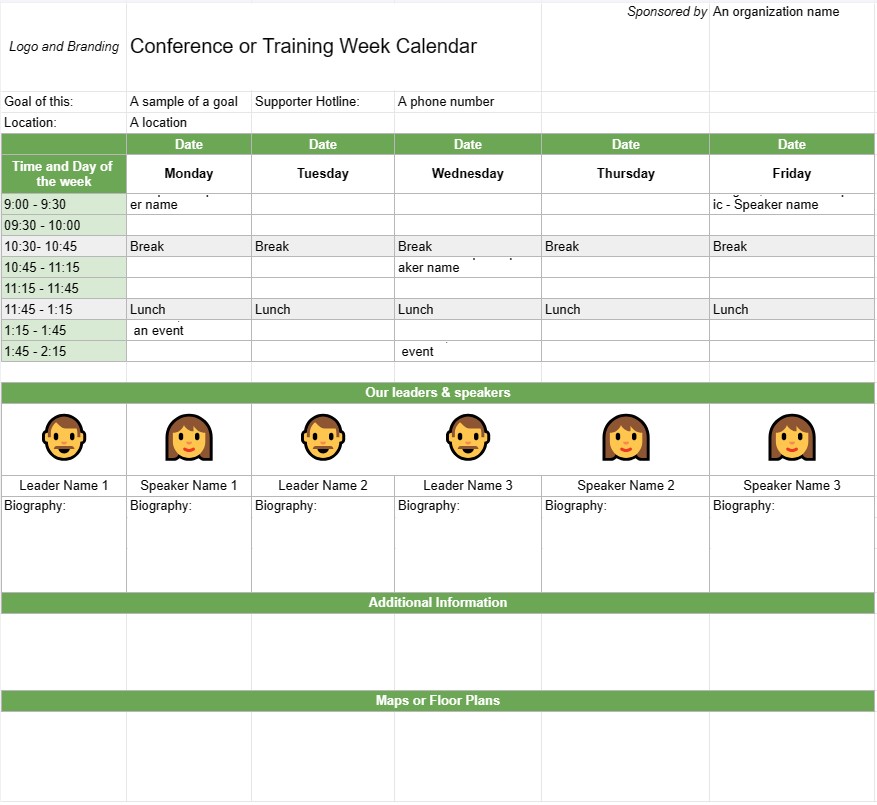
Un modello di calendario per conferenze o settimane di formazione è uno strumento di pianificazione utilizzato dalle organizzazioni e dagli organizzatori di eventi per programmare e organizzare conferenze, sessioni di formazione o workshop che si estendono su più giorni o su un'intera settimana. Aiuta a delineare l'agenda quotidiana dell'evento, inclusi argomenti della sessione, relatori, luoghi e altri dettagli rilevanti. Questo modello garantisce che tutti i partecipanti siano ben informati sul programma e sulla logistica dell'evento.
Componenti chiave di un modello di calendario per una conferenza o una settimana di formazione:
- Titolo dell'evento : Il modello in genere include il nome della conferenza o dell'evento di formazione nella parte superiore.
- Intervallo di date: specifica le date di inizio e fine della conferenza o della settimana di formazione .
- Posizione: fornisce informazioni sulla sede o sulle sedi dell'evento, inclusi indirizzi e nomi delle sale.
- Agenda giornaliera:Ogni il giorno dell'evento è delineato con dettagli quali:
- Data e giorno della settimana
- Programma di sessioni, workshop o attività
- Ora di inizio e fine dell'evento ogni sessione
- Titoli, argomenti o temi delle sessioni
- Nomi di relatori, formatori o facilitatori
- Assegnazioni di stanze o luoghi
- Pause e orari dei pasti
- Eventi speciali o opportunità di networking
- Descrizioni delle sessioni:fornisce brevi descrizioni o obiettivi per ogni sessione o workshop , aiutando i partecipanti a comprendere il contenuto e lo scopo.
- Biografia dei relatori: include informazioni biografiche sui relatori o sui formatori, evidenziandone le competenze e le qualifiche.
- Informazioni aggiuntive: questa sezione può includere dettagli sulla registrazione, procedure di check-in, informazioni di contatto per gli organizzatori dell'evento e numeri di contatto di emergenza.
- Mappe o planimetrie: Se necessario, il modello può includere mappe o planimetrie della/e sede/i dell'evento per aiutare i partecipanti a orientarsi nel luogo.
- Logo e branding: incorpora il logo e il branding dell'evento. o un tema per mantenere coerenza e riconoscimento.
Vantaggi derivanti dall'utilizzo di un modello di calendario per conferenze o settimane di formazione:
- Organizzazione: aiuta gli organizzatori a pianificare e struttura eventi di più giorni con chiarezza ed efficienza.
- Comunicazione: fornisce un programma dettagliato per partecipanti, relatori e personale, garantendo che tutti siano sulla stessa lunghezza d'onda.
- Efficienza: riduce la confusione e le sfide logistiche delineando chiaramente l'agenda quotidiana dell'evento.
- Assegnazione delle risorse: garantisce che sale, attrezzature e i materiali vengono assegnati correttamente per ogni sessione o workshop.
- Coinvolgimento dei partecipanti: consente ai partecipanti di pianificare la propria presenza e selezionare in anticipo le sessioni di interesse.
- Professionalità: migliora la professionalità dell'evento presentando un programma ben organizzato e visivamente accattivante.
- Networking: aiuta i partecipanti a identificare opportunità di networking ed eventi sociali durante l'evento conferenza o settimana di formazione.
- Riferimento: Serve come documento di riferimento a cui i partecipanti possono fare riferimento durante l'evento.
In conclusione, un Il modello di calendario per conferenze o settimane di formazione è uno strumento essenziale per pianificare ed eseguire eventi di più giorni. Fornisce un programma strutturato e organizzato, consentendo ai partecipanti di sfruttare al massimo la loro esperienza e garantendo che la logistica dell'evento funzioni senza intoppi.
Anteprima semplice e download del modello di foglio di calcolo
Visualizza la versione completa di un modello di foglio di calcolo senza limitazioni per vedere se ti piace, quindi puoi scaricare il modello Excel per memorizzarlo sul tuo dispositivo e utilizzarlo gratuitamente.
Accedi al modello di foglio di calcolo da qualsiasi luogo
Funziona su tutti i sistemi operativi più diffusi come Windows, MacOS, Linux, iOS. Puoi visualizzare i modelli di fogli di calcolo e scaricarli senza programmi aggiuntivi.
Come utilizzare un modello
Scopri come visualizzare in anteprima, scaricare e quindi utilizzare il modello di foglio di calcolo seguendo i passaggi estremamente facili da seguire
Modelli più simili
Visualizza altri modelli di fogli di calcolo che si trovano nella stessa categoria di quello scelto.