
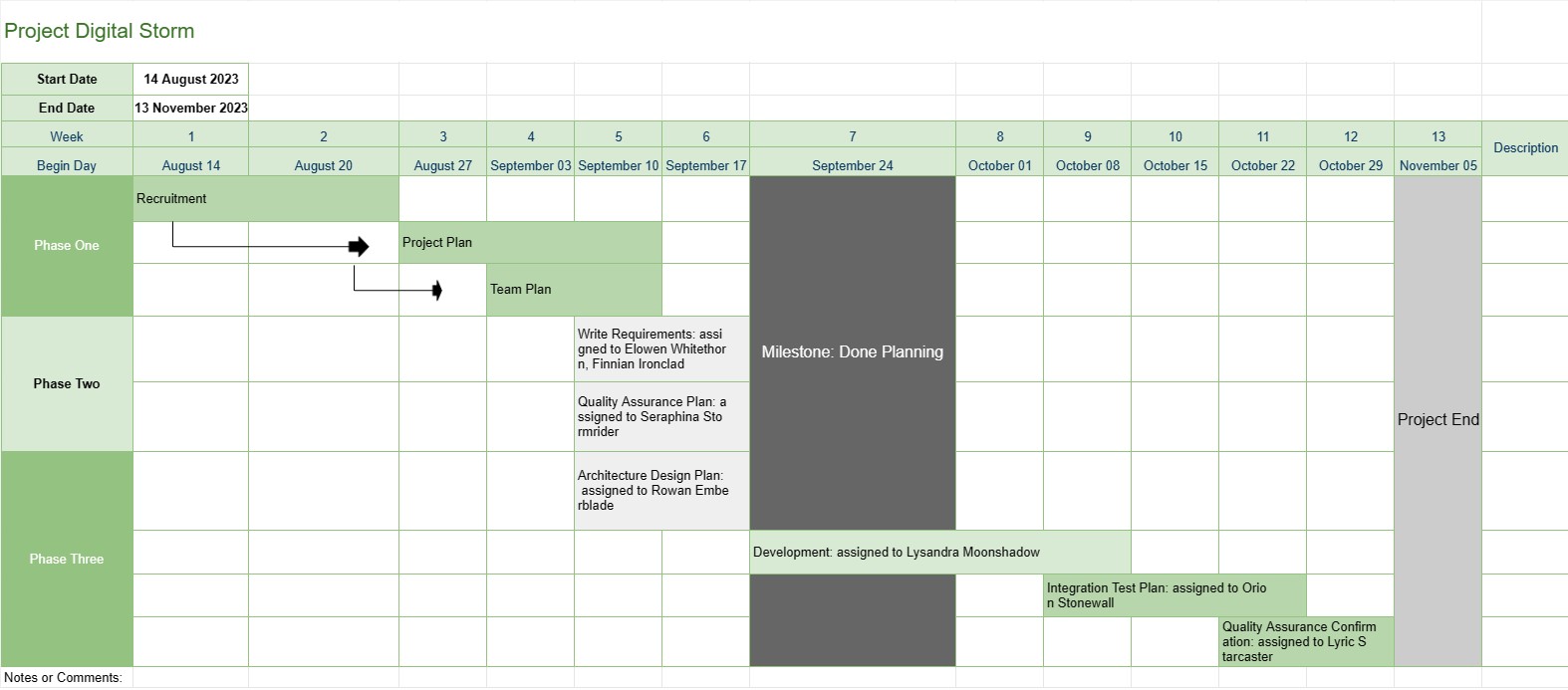
Garis Waktu Proyek
Kategori : Pelacak
Ini memberikan gambaran proyek yang lebih baik kepada manajer proyek, termasuk fase tugas dan tanggal jatuh tempo dari seluruh perkembangan pengembangan, ditambah semua data telah divisualisasikan dengan cara yang menarik.
Templat Timeline Proyek adalah alat manajemen proyek dasar yang menyediakan representasi visual dari pencapaian, tugas, dan tenggat waktu utama proyek selama periode tertentu. Templat ini berfungsi sebagai peta jalan bagi tim proyek dan pemangku kepentingan, yang menawarkan gambaran umum yang jelas dan ringkas mengenai kemajuan dan jadwal proyek.
Berikut adalah komponen dan fitur utama yang biasanya disertakan dalam template Timeline Proyek:
- Nama Proyek: Templat dimulai dengan nama atau judul proyek untuk memudahkan identifikasi.
- Durasi Proyek: Ini menentukan permulaan tanggal dan tanggal akhir proyek, yang menentukan jangka waktu penyelesaian proyek.
- Pencapaian: Pencapaian adalah peristiwa atau pencapaian penting dalam proyek yang menandai titik kemajuan penting. Biasanya direpresentasikan sebagai tanggal tertentu pada timeline dan berfungsi sebagai titik referensi untuk melacak kemajuan proyek.
- Tugas atau Aktivitas: Templat ini menguraikan berbagai tugas, aktivitas, atau fase yang terlibat dalam proyek tersebut. Setiap tugas dikaitkan dengan tanggal mulai dan perkiraan durasi.
- Ketergantungan: Beberapa templat Timeline Proyek menyertakan panah atau garis yang menghubungkan tugas untuk menggambarkan ketergantungan tugas. Hal ini membantu tim proyek memahami urutan tugas yang harus diselesaikan.
- Sumber Daya yang Ditugaskan: Manajer proyek dapat menunjukkan anggota tim atau sumber daya mana yang bertanggung jawab untuk setiap tugas. Hal ini memfasilitasi alokasi sumber daya dan penetapan tugas.
- Durasi Tugas: Perkiraan durasi untuk setiap tugas sering ditampilkan, sehingga tim dapat mengukur berapa lama waktu yang dibutuhkan untuk setiap aktivitas.
- Pelacakan Kemajuan: Template dapat menyertakan indikator visual untuk melacak penyelesaian tugas dan kemajuan proyek secara keseluruhan.
- Jalur Penting: Dalam Timeline Proyek yang lebih maju templat, jalur kritis, yang mewakili urutan tugas yang menentukan durasi minimum proyek, dapat diidentifikasi.
- Catatan atau Komentar: Pengguna dapat menambahkan catatan, komentar, atau deskripsi untuk memberikan konteks atau detail tambahan untuk tugas atau pencapaian tertentu.
Templat Timeline Proyek memainkan peran penting dalam manajemen proyek dengan memberikan beberapa manfaat utama:
- Visualisasi: Menawarkan representasi visual proyek, sehingga memudahkan tim proyek dan pemangku kepentingan untuk memahami cakupan, lini waktu, dan hasil utama proyek.
- Komunikasi: Garis waktu berfungsi sebagai alat komunikasi, yang memungkinkan manajer proyek menyampaikan kemajuan dan status proyek kepada anggota tim, klien, dan eksekutif.
- Perencanaan dan Koordinasi: Tim proyek dapat menggunakan garis waktu untuk merencanakan tugas, mengalokasikan sumber daya, dan mengoordinasikan aktivitas untuk memastikan proyek tetap pada jalurnya.
- Manajemen Risiko: Dengan mengidentifikasi ketergantungan tugas dan jalur kritis, manajer proyek dapat secara proaktif mengelola potensi risiko dan kemacetan.
- Dokumentasi: Garis waktu memberikan catatan sejarah kemajuan proyek, membantu analisis dan dokumentasi pascaproyek.
Singkatnya, templat Timeline Proyek adalah alat manajemen proyek yang sangat diperlukan untuk menyempurnakan perencanaan, pelaksanaan, dan pemantauan proyek. Hal ini memastikan tim proyek memiliki pemahaman yang jelas tentang tujuan, jadwal, dan ketergantungan proyek, sehingga pada akhirnya berkontribusi terhadap keberhasilan penyelesaian proyek.
Pratinjau Mudah dan Unduh Templat Spreadsheet
Lihat versi lengkap templat spreadsheet tanpa batasan untuk melihat apakah Anda menyukainya, lalu Anda dapat mengunduh templat excel untuk menyimpannya di perangkat Anda dan menggunakannya secara gratis.
Akses Templat Spreadsheet dari Mana Saja
Ini berfungsi pada semua sistem operasi populer seperti Windows, MacOS, Linux, iOS. Anda dapat melihat templat spreadsheet dan mendownloadnya tanpa program tambahan.
Cara menggunakan templat
Cari tahu cara mempratinjau, mengunduh, dan kemudian menggunakan templat spreadsheet dengan mengikuti langkah-langkah yang sangat mudah diikuti
Templat serupa lainnya
Lihat lebih banyak templat spreadsheet yang berada dalam kategori yang sama dengan yang dipilih.














