
Faktur Kontraktor
Kategori : perencana
Bekerja secara mandiri tidak akan pernah sesulit ini, di akhir pekerjaan jika Anda perlu mengirim faktur maka ini untuk Anda gunakan.
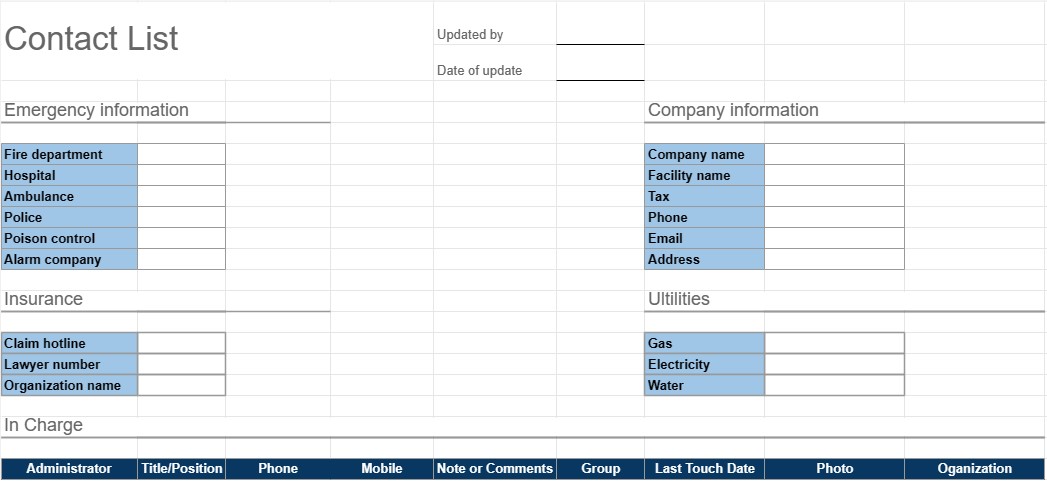
Templat Daftar Kontak adalah alat praktis dan terorganisir yang digunakan untuk mengumpulkan dan mengelola informasi kontak untuk individu atau kelompok. Ini biasanya digunakan untuk tujuan pribadi dan profesional, sehingga lebih mudah untuk mengakses dan memelihara daftar kontak yang lengkap. Templat ini sangat berguna untuk tetap terhubung, berjejaring, dan mengelola kontak penting secara efisien.
Komponen Utama Templat Daftar Kontak:
- Nama: Templat menyertakan ruang untuk memasukkan nama lengkap setiap kontak. Ini juga memungkinkan entri nama depan dan belakang secara terpisah.
- Informasi Kontak: Bagian ini biasanya mencakup bidang untuk berbagai detail kontak, yang mungkin mencakup nomor telepon, alamat email, alamat fisik, dan nomor faks.
- Organisasi: Pengguna dapat mencatat organisasi atau perusahaan tempat kontak tersebut berada. Hal ini sangat berguna terutama untuk kontak bisnis.
- Judul/Posisi: Untuk kontak profesional, jabatan atau posisi individu dalam organisasi dapat ditambahkan.
- Catatan atau Komentar: Bagian untuk menambahkan catatan, komentar, atau informasi tambahan tentang setiap kontak, seperti sifat hubungan atau detail spesifik apa pun.
- Kategori atau Grup: Pengguna dapat mengkategorikan atau mengelompokkan kontak berdasarkan kriteria seperti kontak bisnis, kontak pribadi, teman, keluarga, atau proyek atau minat tertentu.
- Foto: Beberapa template memungkinkan pengguna untuk menambahkan foto kontak, sehingga lebih mudah untuk mengenali individu.
- Tanggal Ditambahkan/Diperbarui: Tanggal ketika kontak ditambahkan atau kapan informasi mereka terakhir diperbarui dapat direkam.
- Penyortiran dan Pemfilteran: Banyak templat yang menawarkan opsi pengurutan dan pemfilteran untuk mengatur kontak berdasarkan abjad, kategori, atau berdasarkan kriteria lainnya.
Manfaat Menggunakan Templat Daftar Kontak:
- Organisasi: Menyimpan semua informasi kontak di satu lokasi terpusat, sehingga memudahkan untuk menemukan dan memperbarui detail sebagai diperlukan.
- Aksesibilitas: Memberikan akses cepat ke detail kontak penting, mengurangi waktu yang dihabiskan untuk mencari nomor telepon atau alamat email.
- Efisiensi: Menyederhanakan komunikasi dan membantu pengguna tetap terhubung dengan kolega, teman, dan keluarga.
- Jaringan: Berguna untuk tujuan jaringan, memungkinkan individu menyimpan daftar kontak profesional dan rekan bisnis.
- Cadangan: Berfungsi sebagai cadangan informasi kontak penting jika perangkat hilang atau kerusakan data.
- Manajemen Hubungan: Membantu pengguna menyimpan catatan hubungan dan interaksi dengan kontak, yang dapat berguna untuk tindak lanjut.
- Penyesuaian: Pengguna dapat menyesuaikan template agar sesuai dengan kebutuhan spesifik mereka dan preferensi.
Singkatnya, Templat Daftar Kontak adalah alat praktis untuk mengatur dan mengelola informasi kontak secara efisien. Baik digunakan untuk tujuan pribadi atau profesional, ini menyederhanakan proses penyimpanan, akses, dan memperbarui detail kontak, yang pada akhirnya memfasilitasi komunikasi dan pengelolaan hubungan.
Pratinjau Mudah dan Unduh Templat Spreadsheet
Lihat versi lengkap templat spreadsheet tanpa batasan untuk melihat apakah Anda menyukainya, lalu Anda dapat mengunduh templat excel untuk menyimpannya di perangkat Anda dan menggunakannya secara gratis.
Akses Templat Spreadsheet dari Mana Saja
Ini berfungsi pada semua sistem operasi populer seperti Windows, MacOS, Linux, iOS. Anda dapat melihat templat spreadsheet dan mendownloadnya tanpa program tambahan.
Cara menggunakan templat
Cari tahu cara mempratinjau, mengunduh, dan kemudian menggunakan templat spreadsheet dengan mengikuti langkah-langkah yang sangat mudah diikuti
Templat serupa lainnya
Lihat lebih banyak templat spreadsheet yang berada dalam kategori yang sama dengan yang dipilih.













