Napi találkozó naptár
Kategória : Naptárak
Napi ütemezése világosabb lesz, ha ezt használja a nap összes találkozójára.
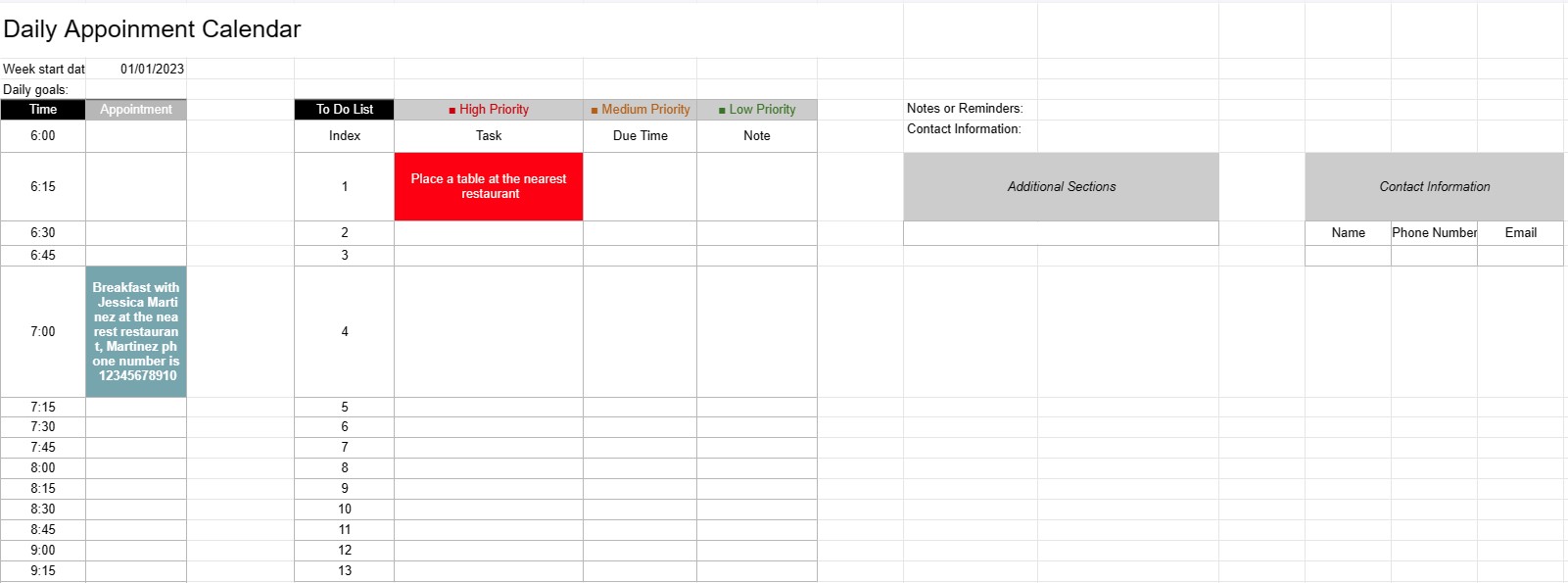
A napi találkozónaptársablon egy magánszemélyek, szakemberek és vállalkozások által használt tervezési eszköz napi találkozóik, értekezleteik és feladataik ütemezéséhez és kezeléséhez. Strukturált elrendezést biztosít a napi tevékenységek megszervezéséhez, a prioritások meghatározásához és az idő hatékony elosztásának biztosításához.
A napi találkozó naptársablonjának fő összetevői:
- Dátum: A sablon általában minden napi oldal tetején jeleníti meg a dátumot, lehetővé téve a felhasználók számára a különböző napok közötti navigálást.
- Idősávok: A nap fel van osztva idősávok vagy órák, általában reggel kezdődnek és este érnek véget. Minden időpont egy adott időszakot jelöl a nap folyamán.
- Találkozó részletei: A felhasználók minden egyes időpontban megadhatják a találkozó részleteit, beleértve a következőket:
- Találkozó időpontja
- A találkozó címe vagy leírása
- Helyszín vagy tárgyalóterem
- Az érintett személyek elérhetőségei
- Teendők listája: Egyes sablonok tartalmaznak egy szakaszt a nap folyamán elvégzendő feladatok vagy teendők felsorolásához. Ezek prioritás vagy határidő szerint kategorizálhatók.
- Megjegyzések vagy emlékeztetők: Az oldal alján helyet biztosíthat az általános megjegyzéseknek vagy emlékeztetőknek.
- Prioritások vagy célok: Egyes sablonok tartalmazhatnak egy szakaszt a napi prioritások vagy célok meghatározásához, segítve a felhasználókat, hogy az alapvető feladatokra összpontosíthassanak.
- Kapcsolatfelvételi adatok: A fontos személyek vagy ügyfelek elérhetőségei gyors áttekintés céljából szerepelhetnek.
- További szakaszok: A sablontól függően további szakaszok jelenhetnek meg a költségek, a futásteljesítmény vagy más konkrét információk nyomon követésére. bele kell foglalni.
A napi találkozó naptársablon használatának előnyei:
- Időgazdálkodás: Segíti a felhasználókat az idejük hatékony beosztásában találkozók és feladatok ütemezése.
- Szervezet: Strukturált módot biztosít a napi kötelezettségek nyomon követésére, csökkentve a túlfoglalás vagy az időpontok elmulasztásának kockázatát.
- Prioritizálás: Lehetővé teszi a felhasználók számára a feladatok és találkozók fontossági sorrendbe állítását, biztosítva, hogy a legfontosabb tételekkel foglalkozzanak először.
- Termékenység: Elősegíti a jobb időgazdálkodást és a termelékenység növelését azáltal, hogy a napi tevékenységek vizuális áttekintése.
- Kommunikáció: Biztosítja, hogy a felhasználók jól felkészüljenek az értekezletekre és találkozókra, mivel minden lényeges információ kéznél van.
- Időkövetés: A számlázható órák nyomon követésére használható azon szakemberek számára, akik óránként fizetnek.
- Referencia: Referenciapontként szolgál a múlt áttekintéséhez találkozók és feladatok.
- Hatékonyság: Növeli a hatékonyságot azáltal, hogy csökkenti a rendezetlen ütemezésre és tervezésre pazarolt időt.
Összefoglalva, a napi találkozónaptár A sablon értékes eszköz a napi menetrendek, találkozók és feladatok hatékony kezeléséhez. Segíti az egyéneket és a szakembereket abban, hogy szervezett maradjanak, priorizálják tevékenységeiket, és a legtöbbet hozzák ki idejükből.
Táblázatsablon egyszerű előnézete és letöltése
Tekintse meg egy táblázatsablon teljes verzióját korlátozások nélkül, és ellenőrizze, hogy tetszik-e, majd letöltheti az Excel-sablont, hogy tárolja az eszközén, és ingyenesen felhasználhassa.
Bárhonnan elérheti a táblázatsablont
Ez minden népszerű operációs rendszeren működik, például Windows, MacOS, Linux, iOS. Megtekintheti a táblázatsablonokat, és további programok nélkül letöltheti őket.
Hogyan használjunk sablont
Találja ki, hogyan tekintheti meg, töltheti le, majd használhatja a táblázatsablont a rendkívül egyszerűen követhető lépések végrehajtásával.
További hasonló sablonok
Tekintse meg azokat a táblázatsablonokat, amelyek a kiválasztottal azonos kategóriába tartoznak.