
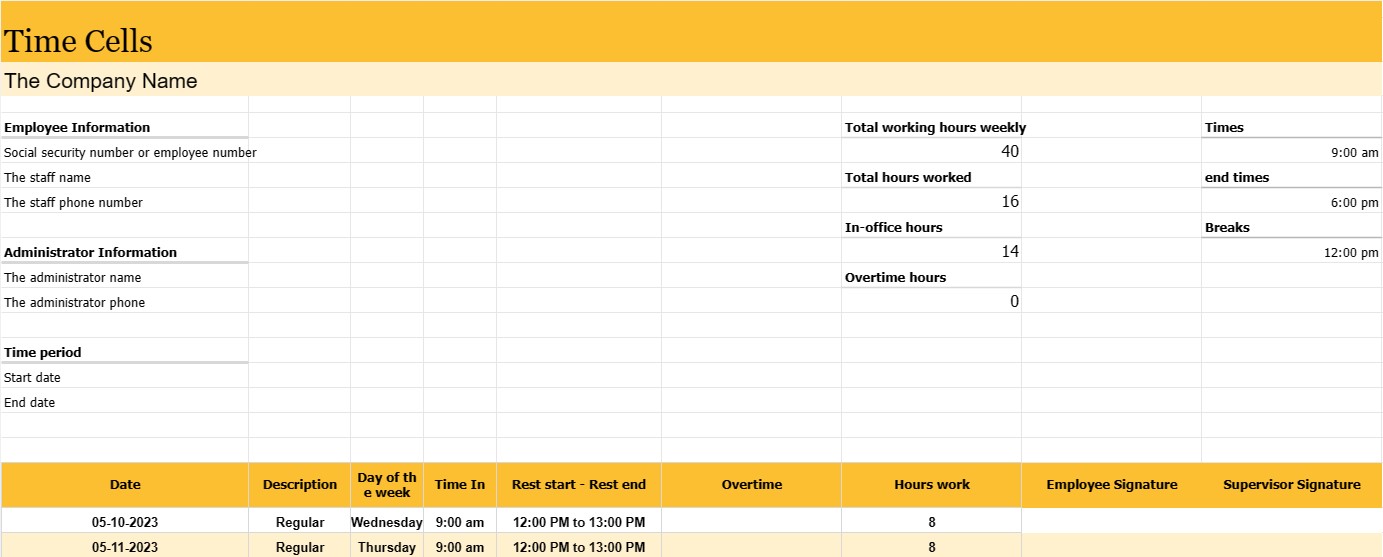
Cellules de temps
Catégorie : Traqueurs
Le responsable doit l'utiliser pour gérer les employés, ce qui leur permet de suivre plus attentivement leur personnel.
Un rapport de temps est un enregistrement ou un document utilisé pour suivre le temps d'un employé sur une période spécifique, généralement une semaine de travail ou une période de paie. Il s'agit d'un outil essentiel pour suivre et gérer la présence des employés, calculer la paie et garantir le respect des lois du travail et des politiques de l'entreprise.
Les rapports sur les employés sont couramment utilisés dans divers secteurs et lieux de travail, notamment les entreprises, les agences gouvernementales, organisations à but non lucratif, et bien d'autres.
Les parties et informations les plus importantes que l'on peut généralement trouver dans le journal d'emploi d'un employé sont :
- Informations sur l'employé : Le nom de l'employé et, dans certains cas, son numéro de sécurité sociale ou son numéro d'employé.
- Période : Une période de temps spécifique couverte par la feuille de temps, telle que une semaine, une période de paie bimensuelle ou un mois. Date : la ou les dates de chaque jour ouvrable au cours de la période spécifiée.
- Jour de la semaine : le jour de la semaine correspondant à chaque date (par exemple lundi, mardi) .
- Heures et heures de fin : les heures exactes auxquelles l'employé commence et termine son quart de travail pour chaque jour ouvrable. Ces informations sont généralement stockées en heures et en minutes.
- Pauses : l'heure des pauses de l'employé, le cas échéant, y compris l'heure de début et de fin des pauses repas et repos. Total des heures travaillées : le total des heures travaillées par l'employé pour chaque jour ouvrable et le total cumulé pour toute la période.
- Heures supplémentaires : Si un employé a effectué des heures supplémentaires (généralement définies comme des heures plus que la semaine ou la journée normale de travail), ils sont déclarés séparément.
- Signatures des employés et des superviseurs : De nombreuses feuilles de temps comprennent des espaces permettant à l'employé et au superviseur de signer et de vérifier l'exactitude des heures enregistrées.
Les newsletters des employés répondent à plusieurs objectifs importants :
- Salaire : Ils constituent la base de calcul des salaires des employés, y compris les salaires réguliers, les heures supplémentaires et tous les avantages sociaux.
- Conformité du travail : les feuilles de temps aident les organisations à se conformer aux lois et réglementations du travail, en particulier celles liées à la rémunération des heures supplémentaires et au nombre maximum d'heures.
- Suivi des présences : Ils surveillent l'assiduité et la ponctualité des employés, ce qui peut être utile dans l'évaluation des performances et la gestion de l'assiduité.
- Suivi des projets et des tâches : Dans certains cas, des feuilles de temps sont utilisées pour attribuer des heures. à des projets ou des tâches spécifiques, ce qui les rend précieux pour la gestion de projet et la facturation.
- Enregistrement : les feuilles de temps créent un enregistrement historique des heures de travail d'un employé, ce qui peut être important pour les audits, exigences légales et dossiers RH.
- Planification des ressources : Les feuilles de temps aident les entreprises à planifier et à allouer les ressources en fournissant des informations sur la disponibilité et la charge de travail des employés.
Alors que certaines organisations continuent d'utiliser des feuilles de temps traditionnelles sur papier, de nombreuses entreprises ont opté pour des systèmes de comptabilisation électronique du temps qui offrent plus de précision, de commodité et d'efficacité. Les systèmes électroniques peuvent calculer automatiquement les heures de travail, traiter les calculs des heures supplémentaires et générer des rapports, simplifiant ainsi la paie et réduisant le risque d'erreurs.
Modèle de feuille de calcul facile à prévisualiser et à télécharger
Affichez la version complète d'un modèle de feuille de calcul sans limitation pour voir si vous l'aimez, vous pouvez alors télécharger le modèle Excel pour le stocker sur votre appareil et l'utiliser gratuitement.
Accédez au modèle de feuille de calcul depuis n'importe où
Cela fonctionne sur tous les systèmes d'exploitation populaires tels que Windows, MacOS, Linux, iOS. Vous pouvez voir les modèles de feuilles de calcul et les télécharger sans programmes supplémentaires.
Comment utiliser un modèle
Découvrez comment prévisualiser, télécharger puis utiliser le modèle de feuille de calcul en suivant les étapes extrêmement faciles à suivre.
Plus de modèles similaires
Découvrez plus de modèles de feuilles de calcul qui appartiennent à la même catégorie que celui choisi.













