
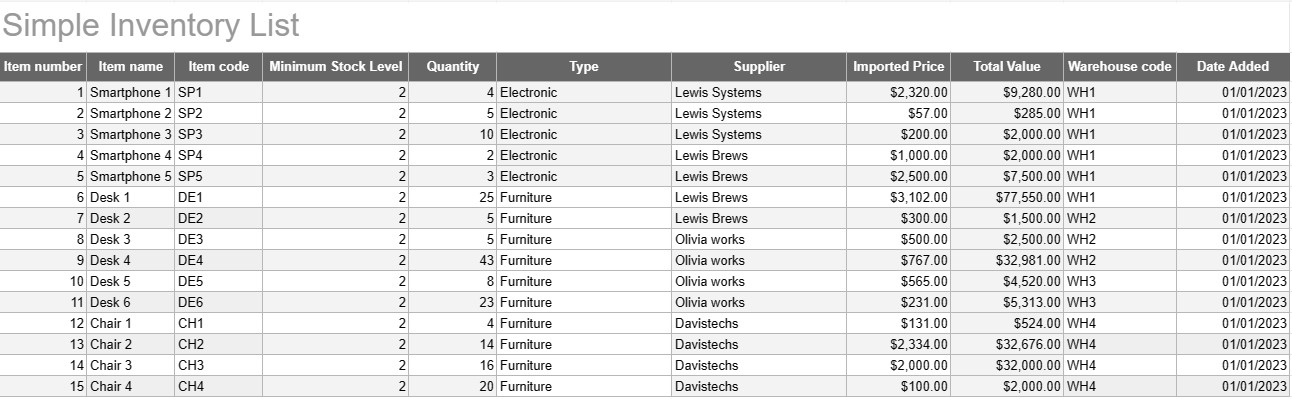
Simple Inventory List
Catégorie : Traqueurs
Write down all of your inventory names and descriptions so you can see on all them in one place.
A Simple Inventory List Template is a basic yet effective tool used by individuals and businesses to track and manage their inventory of goods, products, or assets. This template provides a structured format for recording item details, quantities, locations, and other relevant information, making it easier to monitor inventory levels and facilitate efficient management.
Key Components of a Simple Inventory List Template:
- Item Details: The template includes columns or sections for item-specific information, such as the item name, description, unique identifier (e.g., SKU or serial number), and any additional notes.
- Quantity: Users can record the quantity or units of each item in stock. This column is essential for tracking inventory levels accurately.
- Location: For businesses with multiple storage locations or warehouses, the template may include a column to specify the physical location of each item. This helps streamline retrieval and restocking.
- Unit Price: Users can enter the unit price or cost of each item. This information is valuable for calculating the total value of the inventory.
- Total Value: Some templates automatically calculate the total value of each item based on the quantity and unit price. This provides a quick overview of the total worth of the inventory.
- Date Added/Updated: To track changes and updates to the inventory, users can record the date each item was added or modified.
- Category/Type: Items can be categorized into different groups or types (e.g., electronics, office supplies, clothing) for better organization and reporting.
- Minimum Stock Level: Users can set a minimum stock level for each item. When the quantity falls below this level, it serves as a trigger to reorder or restock the item.
- Supplier Information: In a business setting, users may include supplier details, such as the supplier's name, contact information, and reorder information.
Benefits of Using a Simple Inventory List Template:
- Inventory Tracking: Provides a clear, up-to-date snapshot of inventory levels, helping prevent stockouts and overstocking.
- Cost Control: Enables businesses to monitor the value of their inventory and make informed decisions about restocking and purchasing.
- Efficiency: Streamlines inventory management by centralizing information and making it easily accessible.
- Data Accuracy: Reduces the risk of errors in tracking inventory, as all information is recorded systematically.
- Order Management: Helps in identifying when to reorder items and from which suppliers, improving supply chain management.
- Compliance: In some industries, maintaining accurate inventory records is essential for regulatory compliance and financial reporting.
- Resource Optimization: Enables businesses to allocate resources more effectively and reduce carrying costs.
In conclusion, a Simple Inventory List Template is a practical tool for individuals and businesses looking to maintain organized and accurate records of their inventory. Whether used for a small home inventory or as part of a larger business operation, this template simplifies inventory management, reduces the risk of shortages or overstocking, and contributes to better financial control and decision-making.
Modèle de feuille de calcul facile à prévisualiser et à télécharger
Affichez la version complète d'un modèle de feuille de calcul sans limitation pour voir si vous l'aimez, vous pouvez alors télécharger le modèle Excel pour le stocker sur votre appareil et l'utiliser gratuitement.
Accédez au modèle de feuille de calcul depuis n'importe où
Cela fonctionne sur tous les systèmes d'exploitation populaires tels que Windows, MacOS, Linux, iOS. Vous pouvez voir les modèles de feuilles de calcul et les télécharger sans programmes supplémentaires.
Comment utiliser un modèle
Découvrez comment prévisualiser, télécharger puis utiliser le modèle de feuille de calcul en suivant les étapes extrêmement faciles à suivre.
Plus de modèles similaires
Découvrez plus de modèles de feuilles de calcul qui appartiennent à la même catégorie que celui choisi.













