
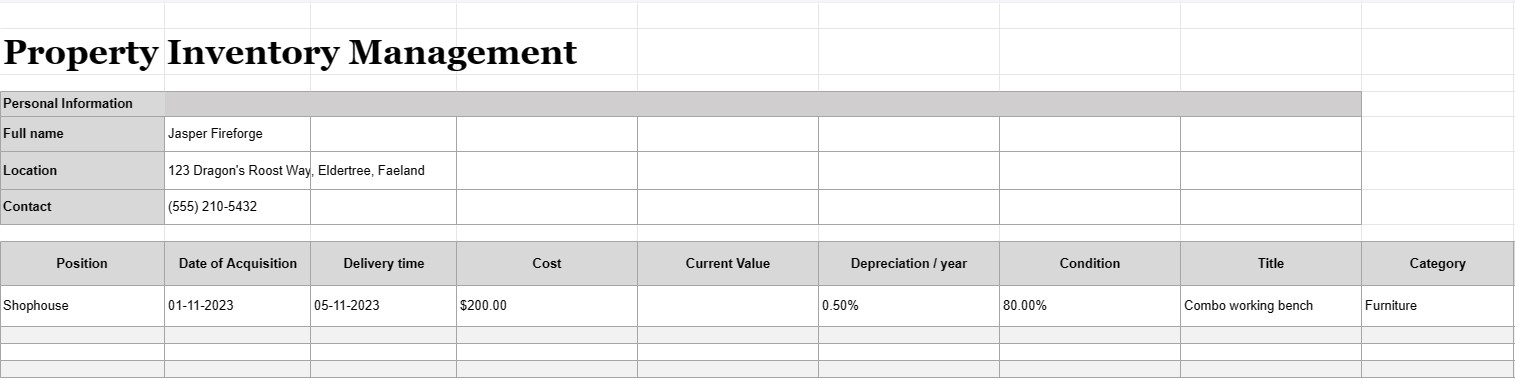
Gestion de l'inventaire des propriétés
Catégorie : Traqueurs
Avoir une propriété et la gérer et les inventaires à l'intérieur ne sont pas une tâche facile à gérer, nous pensons qu'il est beaucoup plus facile d'organiser vos objets en utilisant ce modèle Excel.


La gestion des stocks immobiliers est le processus de tenue d'un enregistrement détaillé et organisé de tous les actifs, équipements ou articles détenus, utilisés ou gérés par un individu, une entreprise ou une organisation. Un document de gestion de l'inventaire immobilier, souvent appelé liste d'inventaire ou registre des actifs, est un document ou une base de données utilisé pour enregistrer et suivre les informations sur ces actifs. Ce document est crucial à diverses fins, notamment la gestion des actifs, le suivi financier, la planification de la maintenance et l'évaluation des risques.
Voici les éléments clés généralement inclus dans un document de gestion de l'inventaire immobilier :
- Description de l'élément : une description détaillée de chaque élément, y compris son nom, son modèle, son numéro de série, son fabricant et tout autre détail pertinent identifiant de manière unique l'article.
- Catégorie d'actifs : Les actifs sont classés en fonction de leur type, comme le matériel de bureau, les machines, les véhicules, les meubles, l'électronique ou l'immobilier.
- Emplacement de l'actif : L'emplacement physique spécifique ou le service où se trouve l'actif, particulièrement important pour les grandes organisations disposant de plusieurs installations.
- Date d'acquisition : La date à laquelle l'actif a été acquis ou acheté. Cela permet de déterminer son âge et sa dépréciation.
- Coût : le coût d'achat initial ou le coût d'acquisition de l'actif, y compris les taxes, les frais d'expédition et d'installation.
- Valeur actuelle : La valeur actuelle estimée de l'actif, qui peut changer au fil du temps en raison de la dépréciation ou de l'appréciation.
- Condition : L'état actuel de l'actif, y compris tout besoin d'entretien ou de réparation nécessaire.
- Amortissement : Informations sur la dépréciation de l'actif, y compris la méthode d'amortissement (par exemple, linéaire ou dégressif) et la charge d'amortissement annuelle .
- Informations sur la garantie : Détails sur les garanties ou accords de service associés à l'actif, y compris les dates d'expiration de la garantie.
- Historique d'utilisation :
- Informations sur la fréquence et l'intensité d'utilisation de l'actif, qui peuvent faciliter la planification de la maintenance et du remplacement.
- Dossiers de maintenance : Enregistrements de toutes les activités de maintenance et de réparation effectuées sur le actif, y compris les dates, les coûts et les descriptions des travaux effectués.
- Informations sur la cession : détails sur la manière et le moment où l'actif a été cédé ou mis hors service, y compris le prix de vente et la valeur de récupération. , ou les coûts d'élimination.
- Code-barres ou code QR : Le cas échéant, les actifs peuvent être étiquetés avec des codes-barres ou des codes QR qui renvoient à leurs enregistrements respectifs dans le système de gestion des stocks, ce qui en fait plus facile à suivre et à localiser les articles.
- Partie responsable : La personne ou le service responsable de l'entretien, de la maintenance et de la gestion de l'actif.
- Assurance Informations : Informations sur la couverture d'assurance de l'actif, y compris les numéros de police et les détails de la couverture.
- Évaluation des risques : Notes sur les risques potentiels associés à l'actif, tels que problèmes de sécurité ou de conformité.
- Photographies : Documentation visuelle de l'actif, y compris des photos ou des numérisations des numéros de série, des étiquettes d'actif et de l'actif lui-même.
- Historique des utilisateurs et des emplacements : Enregistrements des changements dans l'emplacement des actifs et des utilisateurs au fil du temps, particulièrement pertinents pour les actifs partagés ou mobiles.
- Piste d'audit : A historique des modifications apportées aux enregistrements des actifs, y compris les noms d'utilisateur, les dates et les descriptions des modifications.
Les documents de gestion de l'inventaire des propriétés sont essentiels pour les entreprises et les organisations de toutes tailles, car ils permettent de garantir que les actifs sont correctement comptabilisés, entretenus et utilisés efficacement. Ces documents facilitent la prise de décision éclairée, améliorent la sécurité des actifs et soutiennent les rapports financiers et de conformité. De plus, ils sont cruciaux dans les scénarios de reprise après sinistre et pour les réclamations d'assurance en cas de perte ou de dommages aux actifs.
Modèle de feuille de calcul facile à prévisualiser et à télécharger
Affichez la version complète d'un modèle de feuille de calcul sans limitation pour voir si vous l'aimez, vous pouvez alors télécharger le modèle Excel pour le stocker sur votre appareil et l'utiliser gratuitement.
Accédez au modèle de feuille de calcul depuis n'importe où
Cela fonctionne sur tous les systèmes d'exploitation populaires tels que Windows, MacOS, Linux, iOS. Vous pouvez voir les modèles de feuilles de calcul et les télécharger sans programmes supplémentaires.
Comment utiliser un modèle
Découvrez comment prévisualiser, télécharger puis utiliser le modèle de feuille de calcul en suivant les étapes extrêmement faciles à suivre.
Plus de modèles similaires
Découvrez plus de modèles de feuilles de calcul qui appartiennent à la même catégorie que celui choisi.













