
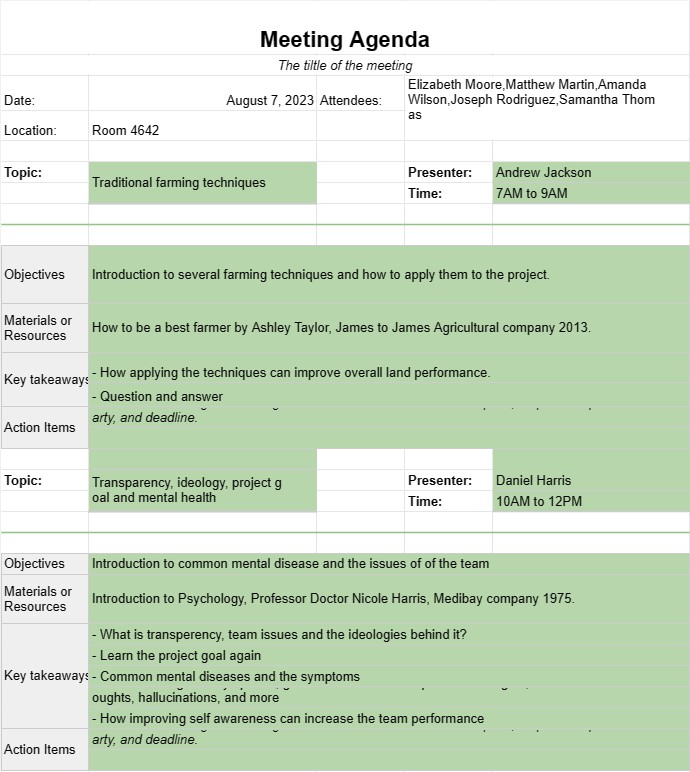
Programme de la réunion
Catégorie : Planificateurs
Gérez le calendrier et le sujet des réunions à l'aide de ces modèles simples.
Un modèle d'ordre du jour de réunion est un document structuré utilisé pour décrire les sujets, les objectifs et les activités à discuter et à réaliser lors d'une réunion. Il sert de guide aux participants, garantissant que la réunion reste sur la bonne voie, que les objectifs sont atteints et que le temps est géré efficacement. Les ordres du jour des réunions sont essentiels à la fois pour les réunions d'affaires formelles et les réunions d'équipe informelles.
Éléments clés d'un modèle d'ordre du jour de réunion :
- Détails de la réunion : Le Le modèle comprend généralement le titre de la réunion, la date, l'heure, le lieu (physique ou virtuel) et les noms des participants ou des participants.
- Points de l'ordre du jour : Chaque point de l'ordre du jour est répertorié avec un titre ou sujet clair. Les points doivent être organisés dans une séquence logique et leur ordre de discussion peut être hiérarchisé en fonction de leur importance ou de leur sensibilité temporelle.
- Durée : Des allocations de temps estimées sont spécifiées pour chaque point de l'ordre du jour. pour aider à gérer la durée globale de la réunion. Cela garantit que les discussions ne sont pas précipitées et qu'il y a suffisamment de temps pour chaque sujet.
- Présentateur : Le nom de la personne responsable de présenter ou de diriger la discussion sur chaque point de l'ordre du jour est mentionnés.
- Objectifs : Une brève description des buts ou des objectifs à atteindre pour chaque point de l'ordre du jour est fournie. Cela permet aux participants de rester concentrés sur les résultats escomptés.
- Matériels ou ressources S'il existe des documents, des rapports, des présentations ou des ressources liés à un point de l'ordre du jour, ils peuvent être référencés. dans cette section.
- Points d'action : Une section dédiée à la fin de l'ordre du jour répertorie les points d'action, les décisions ou les tâches de suivi qui surviennent au cours de la réunion. Chaque mesure à prendre comprend une description, une partie responsable et une date limite.
- Ajournement de la réunion : Une déclaration de clôture ou un résumé est inclus pour ajourner officiellement la réunion, remerciant les participants pour leur présence et leurs contributions. .
Avantages de l'utilisation d'un modèle d'ordre du jour de réunion :
- Concentration : Maintient la réunion concentrée sur des sujets et des objectifs spécifiques, réduisant ainsi la probabilité de s'écarter du sujet.
- Gestion du temps : Aide à allouer efficacement le temps pour chaque point de l'ordre du jour, évitant ainsi les dépassements et garantissant une réunion bien rythmée.
- Préparation : Permet aux participants de se préparer à l'avance en examinant les points de l'ordre du jour et les documents pertinents.
- Responsabilité : Documente les actions et les responsabilités, garantissant que les décisions sont suivi.
- Clarté : Fournit une structure claire pour la réunion, permettant aux participants de comprendre plus facilement le déroulement des discussions.
- Engagement : Encourage la participation active des participants en décrivant clairement leurs rôles et responsabilités.
- Tenue de dossiers : Sert de trace de ce qui a été discuté, décidé et attribué au cours de l'événement. réunion, qui peut être utile pour référence future.
- Professionnalisme : Démontre des compétences organisationnelles et un engagement envers une communication efficace au sein de l'équipe ou de l'organisation.
En conclusion, un modèle d'ordre du jour de réunion est un outil précieux pour planifier et mener des réunions productives. Cela permet de garantir que les réunions sont bien organisées, ciblées et axées sur les résultats, ce qui permet de gagner du temps et d'améliorer la communication entre les participants.
Modèle de feuille de calcul facile à prévisualiser et à télécharger
Affichez la version complète d'un modèle de feuille de calcul sans limitation pour voir si vous l'aimez, vous pouvez alors télécharger le modèle Excel pour le stocker sur votre appareil et l'utiliser gratuitement.
Accédez au modèle de feuille de calcul depuis n'importe où
Cela fonctionne sur tous les systèmes d'exploitation populaires tels que Windows, MacOS, Linux, iOS. Vous pouvez voir les modèles de feuilles de calcul et les télécharger sans programmes supplémentaires.
Comment utiliser un modèle
Découvrez comment prévisualiser, télécharger puis utiliser le modèle de feuille de calcul en suivant les étapes extrêmement faciles à suivre.
Plus de modèles similaires
Découvrez plus de modèles de feuilles de calcul qui appartiennent à la même catégorie que celui choisi.













