Conference or Training Week Calendar
Catégorie : Calendriers
You have a lot of meetings and agenda, how can you manage to do them all? This is where this spreadsheet template kicks in and you can use it to manage the period.
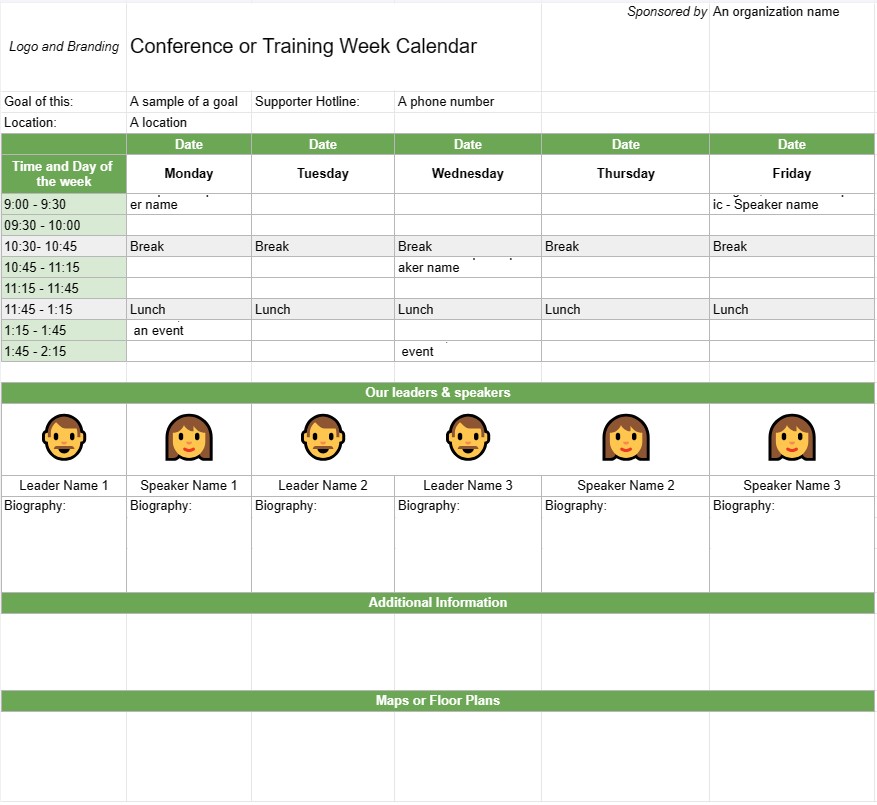
A Conference or Training Week Calendar Template is a planning tool used by organizations and event planners to schedule and organize conferences, training sessions, or workshops that span multiple days or a full week. It helps outline the event's daily agenda, including session topics, speakers, locations, and other relevant details. This template ensures that all participants are well-informed about the event's schedule and logistics.
Key Components of a Conference or Training Week Calendar Template:
- Event Title: The template typically includes the name of the conference or training event at the top.
- Date Range: Specifies the start and end dates of the conference or training week.
- Location: Provides information about the event's venue or venues, including addresses and room names.
- Daily Agenda:Each day of the event is outlined with details such as:
- Date and day of the week
- Schedule of sessions, workshops, or activities
- Start and end times for each session
- Session titles, topics, or themes
- Names of speakers, trainers, or facilitators
- Room or location assignments
- Breaks and meal times
- Special events or networking opportunities
- Session Descriptions:Provides brief descriptions or objectives for each session or workshop, helping participants understand the content and purpose.
- Speaker Bios: Includes biographical information about the speakers or trainers, highlighting their expertise and qualifications.
- Additional Information: This section may include details on registration, check-in procedures, contact information for event organizers, and emergency contact numbers.
- Maps or Floor Plans: If necessary, the template may include maps or floor plans of the event venue(s) to help participants navigate the location.
- Logo and Branding: Incorporates the event's logo, branding, or theme to maintain consistency and recognition.
Benefits of Using a Conference or Training Week Calendar Template:
- Organization: Helps organizers plan and structure multi-day events with clarity and efficiency.
- Communication: Provides a detailed schedule for participants, speakers, and staff, ensuring that everyone is on the same page.
- Efficiency: Reduces confusion and logistical challenges by clearly outlining the event's daily agenda.
- Resource Allocation: Ensures that rooms, equipment, and materials are properly allocated for each session or workshop.
- Participant Engagement: Allows participants to plan their attendance and select sessions of interest in advance.
- Professionalism: Enhances the professionalism of the event by presenting a well-organized and visually appealing schedule.
- Networking: Helps participants identify networking opportunities and social events during the conference or training week.
- Reference: Serves as a reference document for participants to refer to during the event.
In conclusion, a Conference or Training Week Calendar Template is an essential tool for planning and executing multi-day events. It provides a structured and organized schedule, allowing participants to make the most of their experience and ensuring that event logistics run smoothly.
Modèle de feuille de calcul facile à prévisualiser et à télécharger
Affichez la version complète d'un modèle de feuille de calcul sans limitation pour voir si vous l'aimez, vous pouvez alors télécharger le modèle Excel pour le stocker sur votre appareil et l'utiliser gratuitement.
Accédez au modèle de feuille de calcul depuis n'importe où
Cela fonctionne sur tous les systèmes d'exploitation populaires tels que Windows, MacOS, Linux, iOS. Vous pouvez voir les modèles de feuilles de calcul et les télécharger sans programmes supplémentaires.
Comment utiliser un modèle
Découvrez comment prévisualiser, télécharger puis utiliser le modèle de feuille de calcul en suivant les étapes extrêmement faciles à suivre.
Plus de modèles similaires
Découvrez plus de modèles de feuilles de calcul qui appartiennent à la même catégorie que celui choisi.