
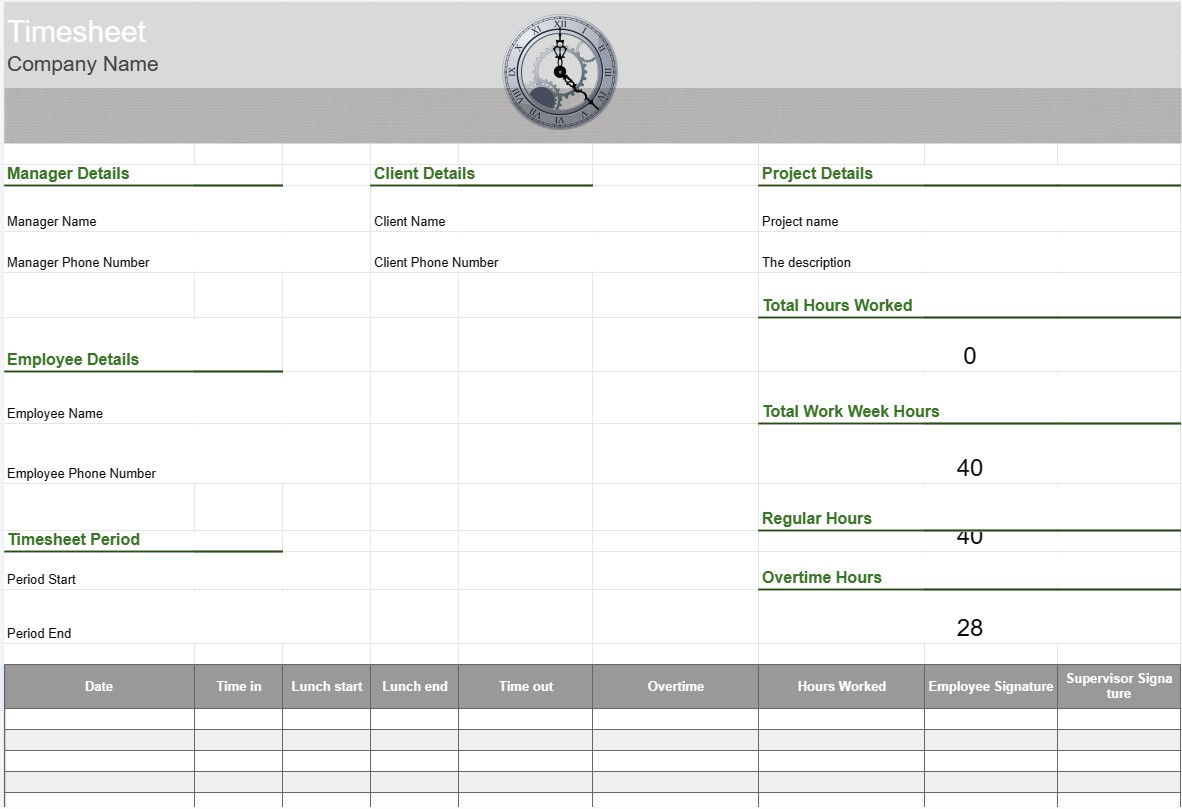
جدول زمانی
دسته بندی : ردیاب ها
جدول زمانی کار برای ردیابی کارکنان برای دستیابی به یک دید کلی در مورد آنچه که بخش در ساعات کاری انجام می دهد.
الگوی جدول زمانی ابزاری است که توسط کارمندان و سازمانها برای ردیابی و ثبت زمان صرف شده برای وظایف، پروژهها یا تکالیف مختلف استفاده میشود. برگههای زمانی معمولاً برای ردیابی ساعات کاری، خواه برای اهداف حقوق و دستمزد، مدیریت پروژه، یا نظارت بر ساعتهای قابل پرداخت برای مشتریان استفاده میشوند. الگوهای برگه زمانی به اطمینان از ردیابی و گزارش دقیق زمان کمک میکنند.
اجزای کلیدی یک الگوی صفحه زمانی:
- اطلاعات کارکنان: این الگو شامل جزئیاتی در مورد کارمند، مانند نام، شناسه کارمند، بخش، و اطلاعات تماس.
- تاریخ و زمان: قالب تقویم یا جدول تاریخ ها و زمان هایی را نشان می دهد که در آن کارمندان ساعات کاری خود را ثبت می کنند. . این می تواند بر اساس روز، هفته یا ماه سازماندهی شود.
- جزئیات وظیفه/پروژه: کارکنان جزئیات مربوط به وظایف یا پروژه هایی را که روی آنها کار می کنند وارد می کنند. این ممکن است شامل نام پروژه، شرح وظایف یا کدهای پروژه باشد.
- زمان ورود و خروج: برای هر روز، کارمندان زمان شروع و پایان کار و همچنین زمان را ثبت میکنند. هر استراحتی که در طول روز کاری انجام میشود.
- کل ساعتها: این الگو تعداد کل ساعات کار در هر روز، هفته یا ماه را بر اساس ورودیهای زمانی محاسبه میکند.
- ردیابی اضافه کاری: در صورت وجود، الگو ممکن است شامل بخشهایی برای پیگیری ساعات اضافه کاری باشد، از جمله اضافه کاری معمولی، دوبار، و هر نرخ قابل اجرا.
- کارفرما. یا مشتری: اگر کار مربوط به پروژه های مشتری باشد، الگو ممکن است دارای فیلدی برای تعیین نام مشتری یا مشتری باشد.
- تأیید و امضا: برخی از جدول زمانی شامل فضاهایی برای امضای کارکنان و سرپرستان یا مدیران برای تأیید ساعات ثبت شده.
- یادداشت ها یا نظرات: کارمندان می توانند یادداشت ها یا نظرات مربوط به وظایف خاص یا ورودی های زمانی را اضافه کنند، مانند توضیحاتی برای اضافه کاری یا زمینه اضافی.
- پایان هفته: برگه زمانی معمولاً تاریخ پایان هفته کاری یا دوره گزارش را نشان می دهد.
مزایا. استفاده از الگوی جدول زمانی:
- ردیابی دقیق زمان: اطمینان حاصل می کند که ساعات کاری کارمندان به طور دقیق ثبت شده است، که برای پردازش حقوق و دستمزد، صورتحساب پروژه و مطابقت با کار ضروری است. قوانین.
- مدیریت پروژه: به مدیران و تیمهای پروژه کمک میکند تا زمان صرف شده برای کارهای مختلف پروژه را پیگیری کنند و امکان برنامهریزی پروژه و تخصیص منابع بهتر را فراهم کند.
- <.پردازش حقوق و دستمزد: فرآیند حقوق و دستمزد را با ارائه یک رکورد دقیق از ساعات کار کارکنان، از جمله اضافه کاری و مرخصی، ساده میکند.
- صورتحساب مشتری: صورتحساب مشتریان را تسهیل میکند. ساعات کار قابل صورتحساب کارکرده است، که صدور صورتحساب دقیق را آسانتر میکند.
- انطباق: به سازمانها در پیروی از مقررات کار و قوانین استخدام در مورد ساعات کار و اضافه کاری کمک میکند.
- تجزیه و تحلیل عملکرد: دادههایی را برای تجزیه و تحلیل بهرهوری و کارایی کار کارکنان ارائه میدهد.
- اسناد: به عنوان رکوردی از ساعات کار عمل میکند که میتواند برای ممیزی مفید باشد. ، اختلافات یا مرجع آینده.
- شفافیت: شفافیت را در ردیابی زمان و گزارش کار ارتقا می دهد، به کارمندان و کارفرمایان کمک می کند تا اعتماد را حفظ کنند.
در نتیجه، یک الگوی صفحه زمانی ابزاری ارزشمند برای ردیابی و مستندسازی دقیق ساعات کاری و وظایف کارکنان است. برای اهداف مختلف، از جمله پردازش حقوق و دستمزد، مدیریت پروژه، صورتحساب مشتری، و انطباق با قوانین و مقررات کار ضروری است.
پیش نمایش آسان و دانلود الگوی صفحه گسترده
نسخه کامل یک قالب صفحهگسترده را بدون هیچ محدودیتی مشاهده کنید تا ببینید آیا آن را دوست دارید یا نه، سپس میتوانید الگوی اکسل را برای ذخیره آن در دستگاه خود دانلود کنید و به صورت رایگان از آن استفاده کنید.
دسترسی به الگوی صفحه گسترده از هر کجا
این بر روی تمام سیستم عامل های محبوب مانند Windows، MacOS، Linux، iOS کار می کند. می توانید قالب های صفحه گسترده را ببینید و بدون برنامه های اضافی دانلود کنید.
نحوه استفاده از قالب
نحوه پیشنمایش، دانلود و سپس استفاده از الگوی صفحهگسترده را با دنبال کردن مراحلی که انجام آن بسیار آسان است، بیابید.
الگوهای مشابه بیشتر
الگوهای صفحهگسترده بیشتری را مشاهده کنید که در یک دسته با الگوی انتخابی قرار دارند.













