
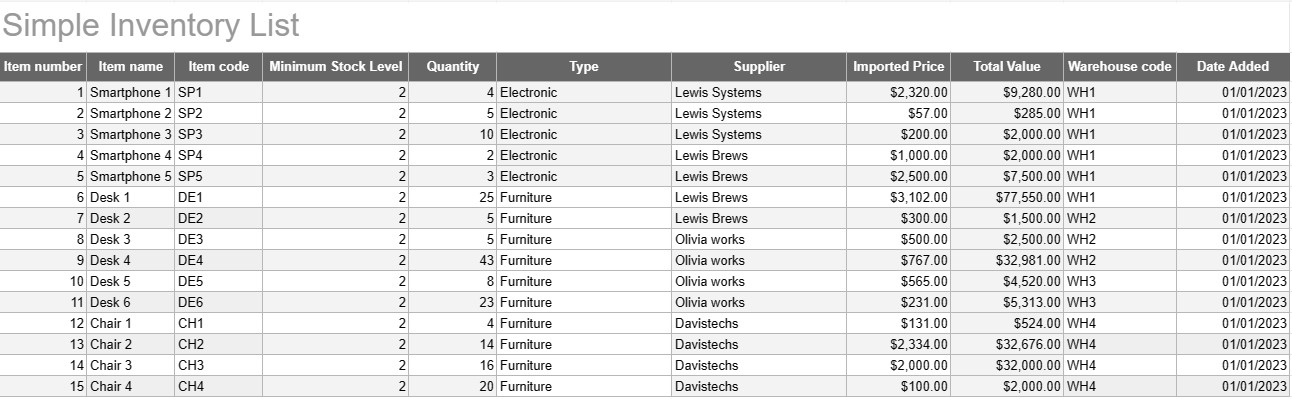
فهرست موجودی ساده
دسته بندی : ردیاب ها
همه نامها و توضیحات موجودی خود را بنویسید تا بتوانید همه آنها را در یک مکان ببینید.
الگوی فهرست موجودی ساده ابزاری اساسی و در عین حال مؤثر است که توسط افراد و کسب و کارها برای ردیابی و مدیریت موجودی کالاها، محصولات یا دارایی های خود استفاده می شود. این الگو یک قالب ساختاریافته برای ثبت جزئیات، کمیت ها، مکان ها و سایر اطلاعات مربوط به اقلام ارائه می دهد که نظارت بر سطح موجودی را آسان تر می کند و مدیریت کارآمد را تسهیل می کند.
اجزای کلیدی یک الگوی فهرست موجودی ساده:
- جزئیات مورد: این الگو شامل ستونها یا بخشهایی برای اطلاعات خاص مورد است، مانند نام مورد، توضیحات، شناسه منحصربهفرد (مانند SKU یا شماره سریال)، و هر یادداشت اضافی
- تعداد: کاربران میتوانند مقدار یا واحدهای هر کالای موجود را ثبت کنند. این ستون برای ردیابی دقیق سطوح موجودی ضروری است.
- موقعیت: برای کسب و کارهایی که مکانهای ذخیرهسازی یا انبارهای متعددی دارند، الگو ممکن است شامل ستونی برای تعیین مکان فیزیکی هر مورد باشد. این به سادهسازی بازیابی و ذخیرهسازی کمک میکند.
- قیمت واحد: کاربران می توانند قیمت واحد یا هزینه هر مورد را وارد کنند. این اطلاعات برای محاسبه ارزش کل موجودی کالا ارزشمند است.
- ارزش کل: برخی از الگوها به طور خودکار ارزش کل هر مورد را بر اساس مقدار و قیمت واحد محاسبه میکنند. این یک نمای کلی از ارزش کل موجودی ارائه می دهد.
- تاریخ افزودن/بهروزرسانی: برای ردیابی تغییرات و بهروزرسانیهای موجودی، کاربران میتوانند تاریخ افزودن یا اصلاح هر مورد را ثبت کنند.
- دسته/نوع: برای سازماندهی و گزارش دهی بهتر، اقلام را می توان در گروه ها یا انواع مختلف (مثلاً لوازم الکترونیکی، لوازم اداری، لباس) دسته بندی کرد.
- حداقل سطح موجودی: کاربران می توانند حداقل سطح موجودی را برای هر کالا تعیین کنند. هنگامی که مقدار به زیر این سطح میرسد، به عنوان محرکی برای سفارش مجدد یا ذخیره مجدد کالا عمل میکند.
- اطلاعات تامین کننده: در یک محیط تجاری، کاربران ممکن است جزئیات تامین کننده، مانند نام تامین کننده، اطلاعات تماس، و اطلاعات سفارش مجدد را درج کنند.
مزایای استفاده از یک الگوی فهرست موجودی ساده:
- ردیابی موجودی: یک عکس فوری واضح و بهروز ارائه میکند. از سطح موجودی، کمک می کند تا از انباشت و انباشت بیش از حد موجودی جلوگیری شود.
- کنترل هزینه: به کسب و کارها این امکان را می دهد تا بر ارزش موجودی خود نظارت کنند و تصمیمات آگاهانه ای در مورد ذخیره مجدد و خرید بگیرند.
- کارایی: مدیریت موجودی را با متمرکز کردن اطلاعات و دسترسی آسان به آن آسان می کند.
- دقت داده ها: خطر خطا در ردیابی موجودی را کاهش می دهد، زیرا تمام اطلاعات به صورت سیستماتیک ثبت می شوند.
- مدیریت سفارش: به شناسایی زمان سفارش مجدد اقلام و از کدام تامین کنندگان کمک می کند و مدیریت زنجیره تامین را بهبود می بخشد.
- تطابق: در برخی از صنایع، نگهداری سوابق دقیق موجودی برای رعایت مقررات و گزارشگری مالی ضروری است.
- بهینه سازی منابع: کسب و کارها را قادر می سازد تا منابع را به طور موثرتری تخصیص دهند و هزینه های حمل و نقل را کاهش دهند.
در پایان، یک الگوی فهرست موجودی ساده ابزاری کاربردی برای افراد و مشاغلی است که به دنبال نگهداری سوابق سازمان یافته و دقیق از موجودی خود هستند. این الگو چه برای یک موجودی خانه کوچک استفاده شود و چه به عنوان بخشی از یک عملیات تجاری بزرگتر، مدیریت موجودی را ساده می کند، خطر کمبود یا موجودی بیش از حد را کاهش می دهد و به کنترل مالی و تصمیم گیری بهتر کمک می کند.
پیش نمایش آسان و دانلود الگوی صفحه گسترده
نسخه کامل یک قالب صفحهگسترده را بدون هیچ محدودیتی مشاهده کنید تا ببینید آیا آن را دوست دارید یا نه، سپس میتوانید الگوی اکسل را برای ذخیره آن در دستگاه خود دانلود کنید و به صورت رایگان از آن استفاده کنید.
دسترسی به الگوی صفحه گسترده از هر کجا
این بر روی تمام سیستم عامل های محبوب مانند Windows، MacOS، Linux، iOS کار می کند. می توانید قالب های صفحه گسترده را ببینید و بدون برنامه های اضافی دانلود کنید.
نحوه استفاده از قالب
نحوه پیشنمایش، دانلود و سپس استفاده از الگوی صفحهگسترده را با دنبال کردن مراحلی که انجام آن بسیار آسان است، بیابید.
الگوهای مشابه بیشتر
الگوهای صفحهگسترده بیشتری را مشاهده کنید که در یک دسته با الگوی انتخابی قرار دارند.













