
Property Inventory Management
دسته بندی : ردیاب ها
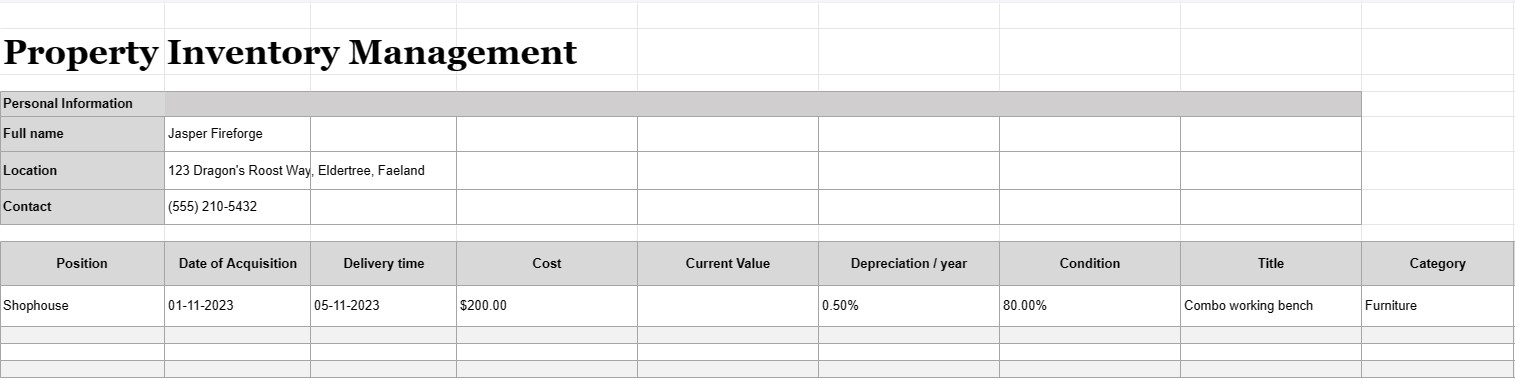
Have a property and manage it and the inventories inside are not an easy task to deal with, we believe this is much easier to organize your objects using this excel template.
Property inventory management is the process of keeping a detailed and organized record of all assets, equipment, or items owned, used, or managed by an individual, business, or organization. A property inventory management document, often referred to as an inventory list or asset register, is a document or database used to record and track information about these assets. This document is crucial for various purposes, including asset management, financial tracking, maintenance planning, and risk assessment.
Here are the key components typically included in a property inventory management document:
- Asset Description: A detailed description of each asset, including its name, model, serial number, manufacturer, and any other relevant details that uniquely identify the item.
- Asset Category: Assets are categorized based on their type, such as office equipment, machinery, vehicles, furniture, electronics, or real estate.
- Asset Location: The specific physical location or department where the asset is located, especially important for larger organizations with multiple facilities.
- Date of Acquisition: The date when the asset was acquired or purchased. This helps determine its age and depreciation.
- Cost: The original purchase cost or acquisition cost of the asset, including taxes, shipping, and installation fees.
- Current Value: The current estimated value of the asset, which may change over time due to depreciation or appreciation.
- Condition: The current condition of the asset, including any necessary maintenance or repair needs.
- Depreciation: Information on the asset's depreciation, including depreciation method (e.g., straight-line or declining balance) and annual depreciation expense.
- Warranty Information: Details about any warranties or service agreements associated with the asset, including warranty expiration dates.
- Usage History: Information about how frequently and intensively the asset is used, which can help with maintenance scheduling and replacement planning.
- Maintenance Records: Records of all maintenance and repair activities performed on the asset, including dates, costs, and descriptions of the work done.
- Disposal Information: Details about how and when the asset was disposed of or retired, including sale price, salvage value, or disposal costs.
- Barcode or QR Code: If applicable, assets may be labeled with barcodes or QR codes that link to their respective records in the inventory management system, making it easier to track and locate items.
- Responsible Party: The person or department responsible for the asset's care, maintenance, and management.
- Insurance Information: Information about insurance coverage for the asset, including policy numbers and coverage details.
- Risk Assessment: Notes on any potential risks associated with the asset, such as safety concerns or compliance issues.
- Photographs: Visual documentation of the asset, including photos or scans of serial numbers, asset tags, and the asset itself.
- User and Location History: Records of changes in asset location and users over time, particularly relevant for shared or mobile assets.
- Audit Trail: A history of changes made to the asset records, including user names, dates, and descriptions of modifications.
Property inventory management documents are essential for businesses and organizations of all sizes, as they help ensure that assets are properly accounted for, maintained, and utilized efficiently. These documents facilitate informed decision-making, improve asset security, and support financial and compliance reporting. Additionally, they are crucial in disaster recovery scenarios and for insurance claims in case of loss or damage to assets.
پیش نمایش آسان و دانلود الگوی صفحه گسترده
نسخه کامل یک قالب صفحهگسترده را بدون هیچ محدودیتی مشاهده کنید تا ببینید آیا آن را دوست دارید یا نه، سپس میتوانید الگوی اکسل را برای ذخیره آن در دستگاه خود دانلود کنید و به صورت رایگان از آن استفاده کنید.
دسترسی به الگوی صفحه گسترده از هر کجا
این بر روی تمام سیستم عامل های محبوب مانند Windows، MacOS، Linux، iOS کار می کند. می توانید قالب های صفحه گسترده را ببینید و بدون برنامه های اضافی دانلود کنید.
نحوه استفاده از قالب
نحوه پیشنمایش، دانلود و سپس استفاده از الگوی صفحهگسترده را با دنبال کردن مراحلی که انجام آن بسیار آسان است، بیابید.
الگوهای مشابه بیشتر
الگوهای صفحهگسترده بیشتری را مشاهده کنید که در یک دسته با الگوی انتخابی قرار دارند.













