
Project Timeline
دسته بندی : ردیاب ها
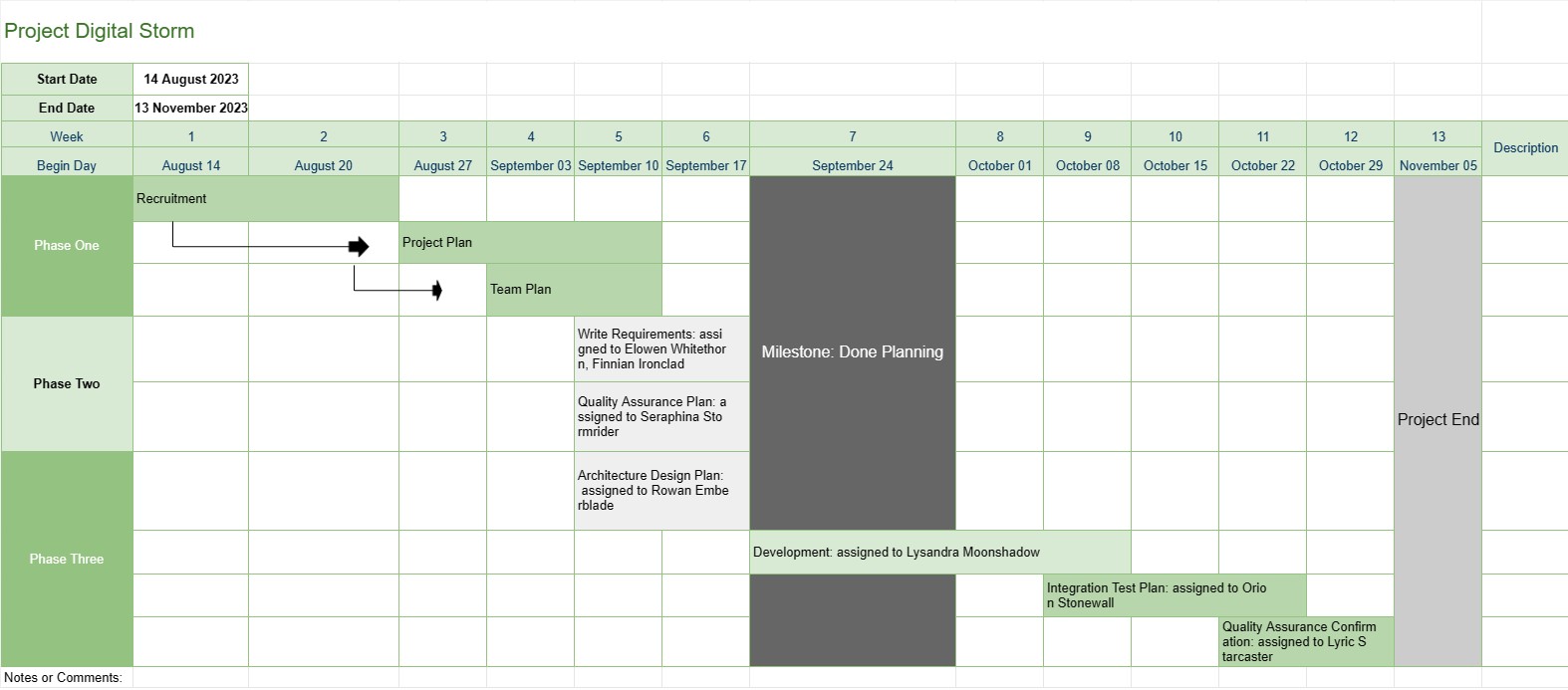
This provides a better overview of a project to the project manager, it is including the phases the tasks and the due date of the entire development progression, plus all of the data have been visualized in an eye-catching fashion.
The Project Timeline template is a fundamental project management tool that provides a visual representation of the project's key milestones, tasks, and deadlines over a specified period. It serves as a roadmap for project teams and stakeholders, offering a clear and concise overview of the project's progress and schedule.
Here are the key components and features typically included in a Project Timeline template:
- Project Name: The template starts with the project's name or title for easy identification.
- Project Duration: It specifies the start date and end date of the project, defining the timeframe in which the project will be completed.
- Milestones: Milestones are significant events or achievements within the project that mark important progress points. They are usually represented as specific dates on the timeline and serve as reference points for tracking project advancement.
- Tasks or Activities: The template outlines the various tasks, activities, or phases involved in the project. Each task is associated with a start date and an estimated duration.
- Dependencies: Some Project Timeline templates include arrows or lines connecting tasks to illustrate task dependencies. This helps project teams understand the order in which tasks must be completed.
- Assigned Resources: Project managers can indicate which team members or resources are responsible for each task. This facilitates resource allocation and task assignment.
- Task Durations: The estimated duration for each task is often displayed, allowing teams to gauge how long each activity will take.
- Progress Tracking: The template may include visual indicators to track task completion and overall project progress.
- Critical Path: In more advanced Project Timeline templates, the critical path, which represents the sequence of tasks that determine the project's minimum duration, may be identified.
- Notes or Comments: Users can add notes, comments, or descriptions to provide additional context or details for specific tasks or milestones.
The Project Timeline template plays a pivotal role in project management by providing several key benefits:
- Visualization: It offers a visual representation of the project, making it easier for project teams and stakeholders to understand the project's scope, timeline, and key deliverables.
- Communication: The timeline serves as a communication tool, allowing project managers to convey project progress and status to team members, clients, and executives.
- Planning and Coordination: Project teams can use the timeline to plan tasks, allocate resources, and coordinate activities to ensure the project stays on track.
- Risk Management: By identifying task dependencies and critical paths, project managers can proactively manage potential risks and bottlenecks.
- Documentation: The timeline provides a historical record of the project's progression, helping with post-project analysis and documentation.
In summary, the Project Timeline template is an indispensable project management tool that enhances project planning, execution, and monitoring. It ensures that project teams have a clear understanding of project objectives, timelines, and dependencies, ultimately contributing to successful project completion.
پیش نمایش آسان و دانلود الگوی صفحه گسترده
نسخه کامل یک قالب صفحهگسترده را بدون هیچ محدودیتی مشاهده کنید تا ببینید آیا آن را دوست دارید یا نه، سپس میتوانید الگوی اکسل را برای ذخیره آن در دستگاه خود دانلود کنید و به صورت رایگان از آن استفاده کنید.
دسترسی به الگوی صفحه گسترده از هر کجا
این بر روی تمام سیستم عامل های محبوب مانند Windows، MacOS، Linux، iOS کار می کند. می توانید قالب های صفحه گسترده را ببینید و بدون برنامه های اضافی دانلود کنید.
نحوه استفاده از قالب
نحوه پیشنمایش، دانلود و سپس استفاده از الگوی صفحهگسترده را با دنبال کردن مراحلی که انجام آن بسیار آسان است، بیابید.
الگوهای مشابه بیشتر
الگوهای صفحهگسترده بیشتری را مشاهده کنید که در یک دسته با الگوی انتخابی قرار دارند.














