
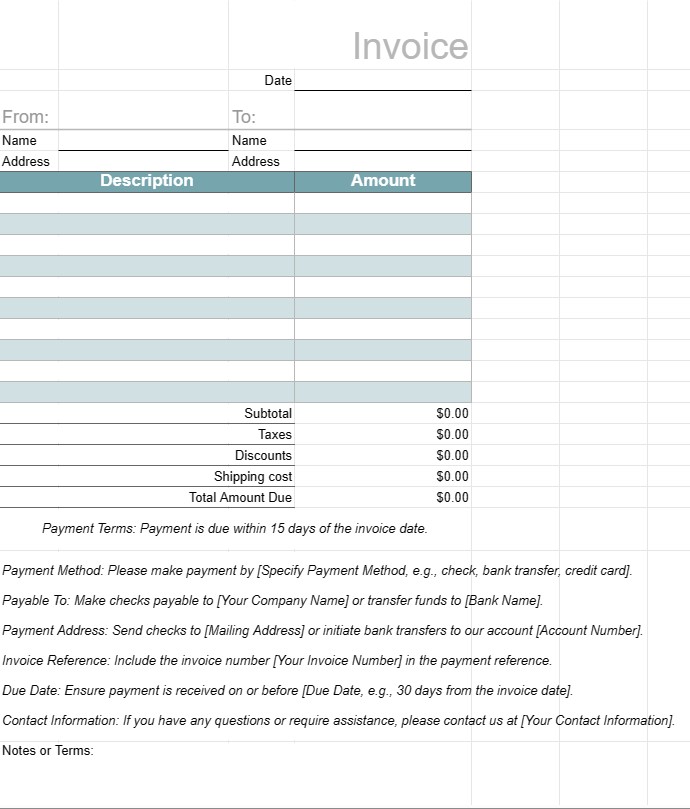
فاکتور 1
دسته بندی : برنامه ریزان
یک الگوی فاکتور برای ارسال به مشتریان پس از انجام کار
الگوی فاکتور یک سند استاندارد است که توسط کسب و کارها برای صدور صورتحساب به مشتریان یا مشتریان خود برای کالاها یا خدمات ارائه شده استفاده می شود. این به عنوان یک درخواست رسمی برای پرداخت عمل می کند و شامل جزئیات مربوط به محصولات یا خدمات، هزینه های آنها، شرایط پرداخت و اطلاعات تماس برای هر دو شرکت و مشتری است. فاکتورها برای ردیابی تراکنش ها، مدیریت جریان نقدی، و نگهداری سوابق مالی ضروری هستند.
اجزای اصلی یک الگوی فاکتور:
- سربرگ: بخش بالای فاکتور معمولاً شامل نام، نشانواره و اطلاعات تماس کسبوکار و همچنین شماره فاکتور و تاریخ صدور است.
- اطلاعات مشتری: این بخش شامل اطلاعات مشتری میشود. نام، شرکت (در صورت وجود)، آدرس صورتحساب، و جزئیات تماس.
- جزئیات فاکتور: خلاصهای از محصولات یا خدمات ارائهشده در این بخش گنجانده شده است. هر مورد خطی شامل توضیحات، مقدار، قیمت واحد و مقدار کل است.
- مجموع فرعی: جمع فرعی مجموع همه موارد خط قبل از مالیات یا هزینههای اضافی است.
- مالیات: در صورت وجود، هر گونه مالیات فروش، مالیات بر ارزش افزوده یا سایر مالیات ها به طور جداگانه درج می شود.
- تخفیف ها: هر گونه تخفیف، کوپن قابل اعمال ، یا پیشنهادات تبلیغاتی در این بخش فهرست شده است.
- حمل و نقل و جابجایی: اگر فاکتور شامل هزینه های حمل و نقل یا جابجایی باشد، به طور جداگانه مشخص می شوند.
- مجموع مبلغ سررسید: این کل کل صورتحساب، شامل همه هزینهها، مالیاتها، تخفیفها و کارمزدها است.
- شرایط پرداخت: پرداخت شرایط، تاریخ سررسید، روشهای پرداخت پذیرفته شده (مانند انتقال بانکی، چک، کارت اعتباری) و جریمههای دیرکرد را مشخص میکند.
- دستورالعملهای پرداخت: جزئیات حساب بانکی یا دستورالعملهای پرداخت برای تسهیل فرآیند پرداخت ارائه شدهاند.
- یادداشتها یا شرایط: هرگونه شرایط اضافی، دستورالعملها یا یادداشتهای ویژه مربوط به صورتحساب یا تراکنش ممکن است شامل شود.
- پانویس فاکتور: برخی از فاکتورها شامل پاورقی با اطلاعات تماس اضافی یا پیام تشکر میشوند.
مزایای استفاده از الگوی فاکتور:
- حرفهای بودن: تصویری حرفهای را به مشتریان ارائه میدهد و نشان میدهد که کسبوکار بهطور کارآمد و سیستماتیک عمل میکند.
- وضوح: محصولات یا خدمات ارائهشده را به وضوح تشریح میکند. ، هزینه های آنها و جزئیات پرداخت، خطر اختلاف یا سوء تفاهم را کاهش می دهد.
- نگهداری سوابق: به کسب و کارها کمک می کند سوابق دقیق تراکنش های مالی را برای اهداف حسابداری، مالیاتی و حسابرسی نگهداری کنند.
- کارایی: با ارائه یک قالب استاندارد که می تواند برای هر مشتری یا تراکنش سفارشی شود، در زمان صرفه جویی می کند.
- محافظت قانونی: یک سابقه رسمی از توافق بین کسب و کار و مشتری ارائه می دهد که می تواند در صورت بروز اختلاف مفید باشد.
- پرداخت فوری: مشتریان را تشویق می کند تا با تعیین تاریخ های سررسید و پرداخت به موقع و دستورالعملهای پرداخت.
- ثبات: اطمینان حاصل میکند که صورتحسابها از نظر قالب و محتوا سازگار هستند، که برای کسبوکارهایی که با چندین مشتری سروکار دارند، مهم است.
در نتیجه، یک قالب فاکتور ابزاری ضروری برای کسب و کارها است تا به صورت ساختاریافته و حرفه ای صورت حساب مشتریان و مشتریان را انجام دهند. این به سادهسازی فرآیند پرداخت، حفظ سوابق مالی و ایجاد انتظارات روشن در مورد پرداختها و شرایط کمک میکند.
پیش نمایش آسان و دانلود الگوی صفحه گسترده
نسخه کامل یک قالب صفحهگسترده را بدون هیچ محدودیتی مشاهده کنید تا ببینید آیا آن را دوست دارید یا نه، سپس میتوانید الگوی اکسل را برای ذخیره آن در دستگاه خود دانلود کنید و به صورت رایگان از آن استفاده کنید.
دسترسی به الگوی صفحه گسترده از هر کجا
این بر روی تمام سیستم عامل های محبوب مانند Windows، MacOS، Linux، iOS کار می کند. می توانید قالب های صفحه گسترده را ببینید و بدون برنامه های اضافی دانلود کنید.
نحوه استفاده از قالب
نحوه پیشنمایش، دانلود و سپس استفاده از الگوی صفحهگسترده را با دنبال کردن مراحلی که انجام آن بسیار آسان است، بیابید.
الگوهای مشابه بیشتر
الگوهای صفحهگسترده بیشتری را مشاهده کنید که در یک دسته با الگوی انتخابی قرار دارند.













