
جعبه آیزنهاور
دسته بندی : برنامه ریزان
این یک الگوی صفحه گسترده شبیه سازی یک مدل علمی معروف است که می توانید برای پروژه یا اهداف شخصی خود از آن استفاده کنید.
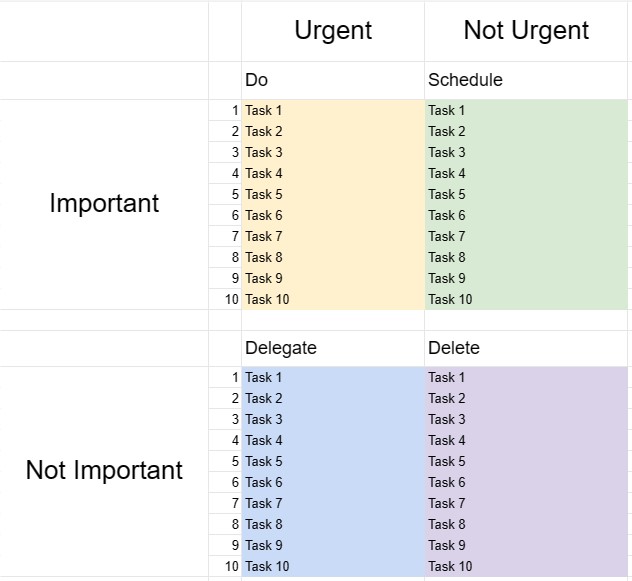
جعبه آیزنهاور که به عنوان ماتریس آیزنهاور یا ماتریس فوری-مهم نیز شناخته میشود، یک ابزار تصمیمگیری و مدیریت زمان است که از نقل قول منتسب به رئیس جمهور دوایت دی. آیزنهاور الهام گرفته شده است: آنچه مهم است به ندرت فوری است و آنچه که هست فوری به ندرت مهم است این الگو برای کمک به افراد در اولویت بندی وظایف و تصمیم گیری در مورد نحوه تخصیص موثر زمان و منابع طراحی شده است.
اجزای کلیدی یک الگوی جعبه آیزنهاور:
- چهار ربع: این الگو به چهار ربع تقسیم میشود که هر کدام دسته متفاوتی از وظایف را بر اساس فوریت و اهمیتشان نشان میدهند.
- ربع اول - فوری و مهم: وظایف در این ربع هم فوری و هم مهم هستند. آنها نیاز به توجه فوری دارند و باید به عنوان اولویت اصلی مورد بررسی قرار گیرند.
- ربع دوم - نه فوری اما مهم: وظایف در این ربع مهم هستند اما فوری نیستند. آنها نشان دهنده فعالیت های فعال و بلند مدت هستند که به رشد و موفقیت شخصی و حرفه ای کمک می کنند. برنامه ریزی و زمان بندی این وظایف کلیدی است.
- ربع سوم - فوری اما نه مهم: وظایف در این ربع فوری هستند اما اهمیت خاصی ندارند. آنها ممکن است شامل وقفهها، حواسپرتیها یا کارهایی باشند که میتوان آنها را محول کرد یا به حداقل رساند تا برای موارد مهمتر وقت آزاد شود.
- ربع چهارم - نه فوری و نه مهم: وظایف در این ربع نه فوری هستند و نه مهم. آنها اغلب فعالیتهایی هستند که زمان را تلف میکنند و باید به حداقل یا حذف شوند.
- فهرست وظایف: کاربران وظایف خود را در ربع مناسب فهرستبندی میکنند. ارزیابی فوریت و اهمیت هر کار.
- برنامه اقدام: برای وظایف در ربع اول و دوم، کاربران میتوانند برنامههای اقدام ایجاد کنند، ضربالاجل تعیین کنند و مراحل مورد نیاز برای تکمیل آنها را مشخص کنند. .
- بازبینی و بهروزرسانی: مرور و بهروزرسانی منظم جعبه آیزنهاور به افراد کمک میکند تا بر آنچه واقعاً مهم است تمرکز کنند و اولویتهای خود را در صورت نیاز تطبیق دهند.
مزایای استفاده از الگوی جعبه آیزنهاور:
- تنظیم اولویت: یک چارچوب ساختاریافته برای اولویتبندی وظایف و تصمیمگیری درباره محل تخصیص زمان و تلاش ارائه میدهد.
- مدیریت زمان: به کاربران کمک می کند تا روی کارهایی تمرکز کنند که به اهداف بلندمدت کمک می کند و زمان صرف شده برای فعالیت های غیر مهم یا واکنشی را کاهش می دهد.
- بهره وری: با تأکید بر کارهای مهم و کاهش زمان تلف شده برای کارهای کم اهمیت، بهره وری را افزایش می دهد.
- کاهش استرس: به کاربران اجازه می دهد تا به مسائل فوری رسیدگی کنند و در عین حال زمان را به موارد مهم اما غیر مهم اختصاص دهند. -کارهای فوری، کاهش استرس و احساس واکنش مداوم به بحران ها.
- دستیابی به هدف: با تاکید بر وظایف مهم، از پیشرفت به سمت اهداف بلندمدت و توسعه شخصی حمایت می کند.
- کارایی: به افراد کمک میکند تا با شناسایی وظایفی که میتوان آنها را محول، حذف یا به حداقل رساند، هوشمندانهتر کار کنند.
- آگاهی از زمان: آگاهی را ارتقا میدهد. چگونه زمان صرف میشود و استفاده عمدیتر از زمان را تشویق میکند.
در نتیجه، قالب جعبه آیزنهاور ابزار ارزشمندی برای افرادی است که به دنبال مدیریت مؤثر زمان، اولویتبندی وظایف و تصمیمگیری آگاهانه هستند. در مورد اینکه کجا تلاش های خود را سرمایه گذاری کنند. با دسته بندی وظایف بر اساس فوریت و اهمیت آنها، کاربران می توانند بهره وری را افزایش دهند، استرس را کاهش دهند و در جهت دستیابی به اهداف خود کارآمدتر تلاش کنند.
پیش نمایش آسان و دانلود الگوی صفحه گسترده
نسخه کامل یک قالب صفحهگسترده را بدون هیچ محدودیتی مشاهده کنید تا ببینید آیا آن را دوست دارید یا نه، سپس میتوانید الگوی اکسل را برای ذخیره آن در دستگاه خود دانلود کنید و به صورت رایگان از آن استفاده کنید.
دسترسی به الگوی صفحه گسترده از هر کجا
این بر روی تمام سیستم عامل های محبوب مانند Windows، MacOS، Linux، iOS کار می کند. می توانید قالب های صفحه گسترده را ببینید و بدون برنامه های اضافی دانلود کنید.
نحوه استفاده از قالب
نحوه پیشنمایش، دانلود و سپس استفاده از الگوی صفحهگسترده را با دنبال کردن مراحلی که انجام آن بسیار آسان است، بیابید.
الگوهای مشابه بیشتر
الگوهای صفحهگسترده بیشتری را مشاهده کنید که در یک دسته با الگوی انتخابی قرار دارند.













