
Seguimiento de problemas simples
Categoría : Rastreadores
Los problemas en la vida, los problemas del proyecto se pueden rastrear fácilmente utilizando estas plantillas de hoja de cálculo.


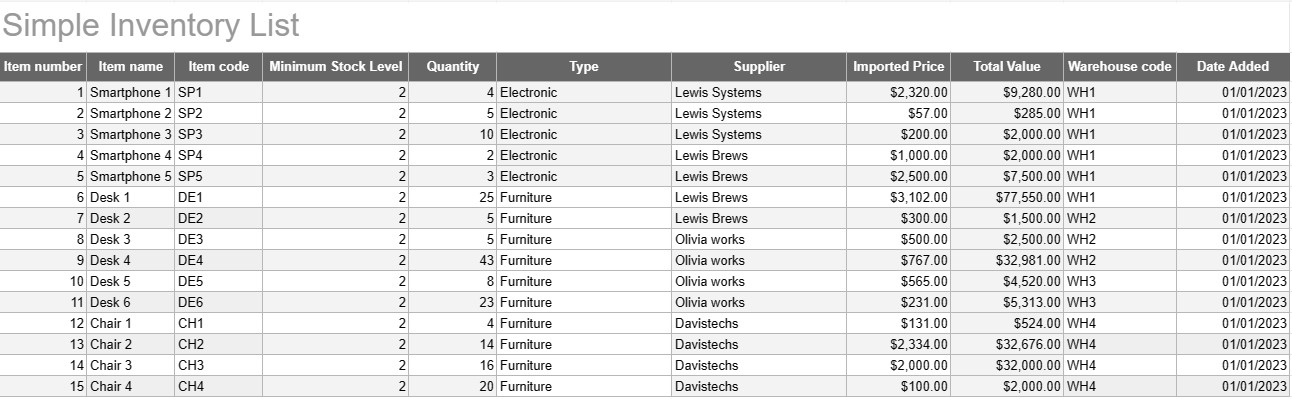
Una plantilla de lista de inventario simple es una herramienta básica pero efectiva utilizada por individuos y empresas para rastrear y administrar su inventario de bienes, productos o activos. Esta plantilla proporciona un formato estructurado para registrar detalles de artículos, cantidades, ubicaciones y otra información relevante, lo que facilita el seguimiento de los niveles de inventario y facilita la gestión eficiente.
Componentes clave de una plantilla de lista de inventario simple:
- Detalles del artículo: La plantilla incluye columnas o secciones para información específica del artículo, como el nombre del artículo, la descripción, el identificador único (por ejemplo, SKU o número de serie) y cualquier nota adicional.
- Cantidad: Los usuarios pueden registrar la cantidad o unidades de cada artículo en stock. Esta columna es esencial para realizar un seguimiento preciso de los niveles de inventario.
- Ubicación: para empresas con múltiples ubicaciones de almacenamiento o almacenes, la plantilla puede incluir una columna para especificar la ubicación física de cada artículo. Esto ayuda a agilizar la recuperación y la reposición.
- Precio unitario: Los usuarios pueden ingresar el precio unitario o el costo de cada artículo. Esta información es valiosa para calcular el valor total del inventario.
- Valor total: Algunas plantillas calculan automáticamente el valor total de cada artículo en función de la cantidad y el precio unitario. Esto proporciona una descripción general rápida del valor total del inventario.
- Fecha de adición/actualización: Para realizar un seguimiento de los cambios y actualizaciones del inventario, los usuarios pueden registrar la fecha en que se agregó o modificó cada elemento.
- Categoría/Tipo: Los artículos se pueden clasificar en diferentes grupos o tipos (p. ej., electrónica, material de oficina, ropa) para una mejor organización y generación de informes.
- Nivel de stock mínimo: Los usuarios pueden establecer un nivel de stock mínimo para cada artículo. Cuando la cantidad cae por debajo de este nivel, sirve como disparador para reordenar o reabastecer el artículo.
- Información del proveedor: en un entorno empresarial, los usuarios pueden incluir detalles del proveedor, como el nombre del proveedor, información de contacto e información de reorden.
Beneficios de utilizar una plantilla de lista de inventario simple:
- Seguimiento de inventario: Proporciona una instantánea clara y actualizada de los niveles de inventario, lo que ayuda a prevenir desabastecimientos y excesos de existencias.
- Control de costos: permite a las empresas monitorear el valor de su inventario y tomar decisiones informadas sobre reabastecimiento y compras.
- Eficiencia: Agiliza la gestión de inventario centralizando la información y haciéndola fácilmente accesible.
- Precisión de los datos: Reduce el riesgo de errores en el seguimiento del inventario, ya que toda la información se registra de forma sistemática.
- Gestión de pedidos: ayuda a identificar cuándo reordenar artículos y de qué proveedores, mejorando la gestión de la cadena de suministro.
- Cumplimiento: en algunas industrias, mantener registros de inventario precisos es esencial para el cumplimiento normativo y los informes financieros.
- Optimización de recursos: permite a las empresas asignar recursos de manera más efectiva y reducir los costos de mantenimiento.
En conclusión, una plantilla de lista de inventario simple es una herramienta práctica para personas y empresas que buscan mantener registros organizados y precisos de su inventario. Ya sea que se utilice para un pequeño inventario de viviendas o como parte de una operación comercial más grande, esta plantilla simplifica la gestión del inventario, reduce el riesgo de escasez o exceso de existencias y contribuye a un mejor control financiero y toma de decisiones.
Vista previa y descarga sencilla de la plantilla de hoja de cálculo
Vea la versión completa de una plantilla de hoja de cálculo sin limitaciones para ver si le gusta, luego puede descargar la plantilla de Excel para almacenarla en su dispositivo y usarla de forma gratuita.
Acceda a la plantilla de hoja de cálculo desde cualquier lugar
Esto funciona en todos los sistemas operativos populares, como Windows, MacOS, Linux, iOS. Puedes ver las plantillas de hojas de cálculo y descargarlas sin programas adicionales.
Cómo utilizar una plantilla
Descubra cómo obtener una vista previa, descargar y luego usar la plantilla de hoja de cálculo siguiendo los pasos que son extremadamente fáciles de seguir.
Más plantillas similares
Vea más plantillas de hojas de cálculo que se encuentran en la misma categoría que la elegida.













