
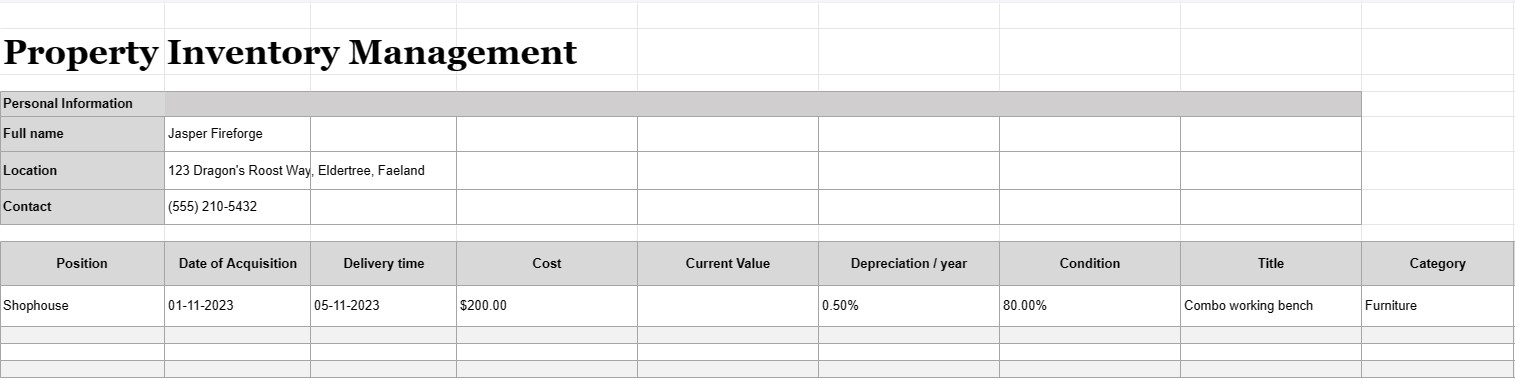
Gestión de inventario de propiedades
Categoría : Rastreadores
Tener una propiedad y administrarla y los inventarios internos no son una tarea fácil de manejar, creemos que es mucho más fácil organizar sus objetos usando esta plantilla de Excel.
La gestión de inventario de propiedades es el proceso de mantener un registro detallado y organizado de todos los activos, equipos o artículos que posee, utiliza o administra un individuo, empresa u organización. Un documento de gestión de inventario de propiedades, a menudo denominado lista de inventario o registro de activos, es un documento o base de datos que se utiliza para registrar y rastrear información sobre estos activos. Este documento es fundamental para diversos fines, incluida la gestión de activos, el seguimiento financiero, la planificación del mantenimiento y la evaluación de riesgos.
Estos son los componentes clave que normalmente se incluyen en un documento de gestión de inventario de propiedades:
- Descripción del activo: una descripción detallada de cada activo, incluido su nombre, modelo, número de serie, fabricante y cualquier otro detalle relevante que identifique de forma única el artículo.
- Categoría de activos: Los activos se clasifican según su tipo, como equipo de oficina, maquinaria, vehículos, muebles, productos electrónicos o bienes raíces.
- Ubicación del activo: La ubicación física específica o el departamento donde se encuentra el activo, especialmente importante para organizaciones más grandes con múltiples instalaciones.
- Fecha de adquisición: La fecha en que se adquirió o compró el activo. Esto ayuda a determinar su antigüedad y depreciación.
- Costo: el costo de compra original o el costo de adquisición del activo, incluidos impuestos, envío y tarifas de instalación.
- Valor actual: El valor estimado actual del activo, que puede cambiar con el tiempo debido a la depreciación o apreciación.
- Condición: La condición actual del el activo, incluidas las necesidades necesarias de mantenimiento o reparación.
- Depreciación: información sobre la depreciación del activo, incluido el método de depreciación (por ejemplo, línea recta o saldo decreciente) y el gasto de depreciación anual .
- Información de garantía: Detalles sobre cualquier garantía o acuerdo de servicio asociado con el activo, incluidas las fechas de vencimiento de la garantía.
- Historial de uso: Información sobre la frecuencia e intensidad con la que se utiliza el activo, lo que puede ayudar con la programación de mantenimiento y la planificación de reemplazo.
- Registros de mantenimiento: Registros de todas las actividades de mantenimiento y reparación realizadas en el activo, incluidas fechas, costos y descripciones del trabajo realizado.
- Información de enajenación: Detalles sobre cómo y cuándo se enajenó o retiró el activo, incluido el precio de venta y el valor de rescate o costos de eliminación.
- Código de barras o código QR: Si corresponde, los activos pueden etiquetarse con códigos de barras o códigos QR que se vinculan a sus respectivos registros en el sistema de gestión de inventario, lo que los convierte en más fácil de rastrear y localizar artículos.
- Parte responsable: La persona o departamento responsable del cuidado, mantenimiento y administración del activo.
- Seguros Información: información sobre la cobertura de seguro del activo, incluidos números de póliza y detalles de la cobertura.
- Evaluación de riesgos: notas sobre cualquier riesgo potencial asociado con el activo, como inquietudes de seguridad o problemas de cumplimiento.
- Fotografías: documentación visual del activo, incluidas fotografías o escaneos de números de serie, etiquetas de activo y el activo en sí.
- Historial de usuarios y ubicaciones: Registros de cambios en la ubicación de los activos y los usuarios a lo largo del tiempo, particularmente relevantes para activos compartidos o móviles.
- Pista de auditoría: Un historial de cambios realizados en los registros de activos, incluidos nombres de usuario, fechas y descripciones de modificaciones.
Los documentos de gestión de inventario de propiedades son esenciales para empresas y organizaciones de todos los tamaños, ya que ayudan a garantizar que Los activos se contabilizan adecuadamente, se mantienen y se utilizan de manera eficiente. Estos documentos facilitan la toma de decisiones informadas, mejoran la seguridad de los activos y respaldan la presentación de informes financieros y de cumplimiento. Además, son cruciales en escenarios de recuperación de desastres y para reclamaciones de seguros en caso de pérdida o daño de activos.
Vista previa y descarga sencilla de la plantilla de hoja de cálculo
Vea la versión completa de una plantilla de hoja de cálculo sin limitaciones para ver si le gusta, luego puede descargar la plantilla de Excel para almacenarla en su dispositivo y usarla de forma gratuita.
Acceda a la plantilla de hoja de cálculo desde cualquier lugar
Esto funciona en todos los sistemas operativos populares, como Windows, MacOS, Linux, iOS. Puedes ver las plantillas de hojas de cálculo y descargarlas sin programas adicionales.
Cómo utilizar una plantilla
Descubra cómo obtener una vista previa, descargar y luego usar la plantilla de hoja de cálculo siguiendo los pasos que son extremadamente fáciles de seguir.
Más plantillas similares
Vea más plantillas de hojas de cálculo que se encuentran en la misma categoría que la elegida.













