
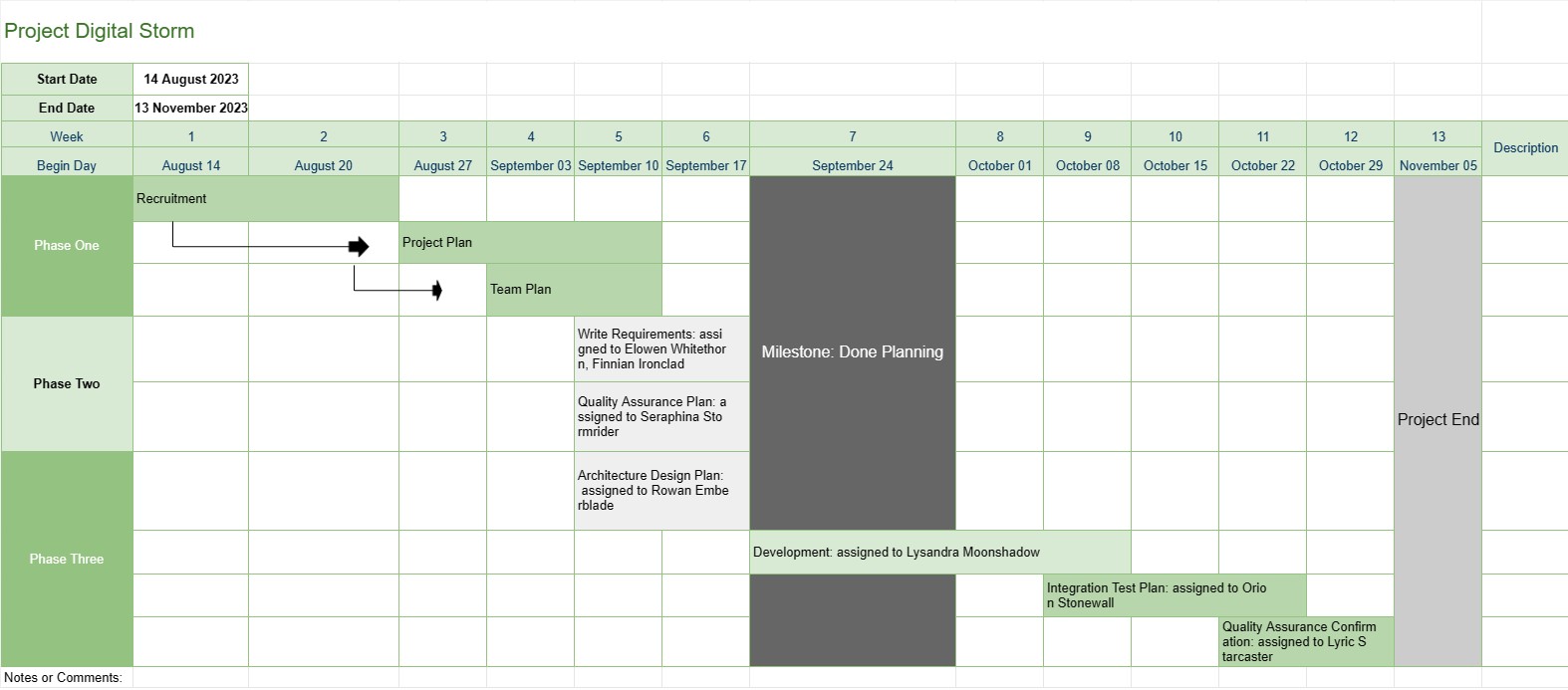
Línea de tiempo del proyecto
Categoría : Rastreadores
Esto proporciona una mejor visión general de un proyecto para el gerente del proyecto, incluye las fases, las tareas y la fecha de vencimiento de toda la progresión del desarrollo, además de que todos los datos se han visualizado de una manera llamativa.
La plantilla Línea de tiempo del proyecto es una herramienta fundamental de gestión de proyectos que proporciona una representación visual de los hitos, tareas y plazos clave del proyecto durante un período específico. Sirve como hoja de ruta para los equipos del proyecto y las partes interesadas, ofreciendo una descripción general clara y concisa del progreso y el cronograma del proyecto.
Estos son los componentes y características clave que normalmente se incluyen en una plantilla de cronograma del proyecto:
- Nombre del proyecto: La plantilla comienza con el nombre o título del proyecto para una fácil identificación.
- Duración del proyecto: Especifica el inicio fecha y fecha de finalización del proyecto, definiendo el plazo en el que se completará el proyecto.
- Hitos: Los hitos son eventos o logros significativos dentro del proyecto que marcan puntos de progreso importantes. Por lo general, se representan como fechas específicas en la línea de tiempo y sirven como puntos de referencia para seguir el avance del proyecto.
- Tareas o actividades: La plantilla describe las diversas tareas, actividades o fases involucradas. en el proyecto. Cada tarea está asociada con una fecha de inicio y una duración estimada.
- Dependencias: Algunas plantillas de línea de tiempo del proyecto incluyen flechas o líneas que conectan las tareas para ilustrar las dependencias de las mismas. Esto ayuda a los equipos de proyecto a comprender el orden en el que se deben completar las tareas.
- Recursos asignados: Los gerentes de proyecto pueden indicar qué miembros del equipo o recursos son responsables de cada tarea. Esto facilita la asignación de recursos y tareas.
- Duración de las tareas: A menudo se muestra la duración estimada de cada tarea, lo que permite a los equipos evaluar cuánto tiempo llevará cada actividad.
- Seguimiento del progreso: La plantilla puede incluir indicadores visuales para realizar un seguimiento de la finalización de la tarea y el progreso general del proyecto.
- Ruta crítica: En un cronograma del proyecto más avanzado En las plantillas se puede identificar la ruta crítica, que representa la secuencia de tareas que determinan la duración mínima del proyecto.
- Notas o comentarios: Los usuarios pueden agregar notas, comentarios o descripciones. para proporcionar contexto adicional o detalles para tareas o hitos específicos.
La plantilla Línea de tiempo del proyecto desempeña un papel fundamental en la gestión de proyectos al proporcionar varios beneficios clave:
- Visualización: ofrece una representación visual del proyecto, lo que facilita que los equipos del proyecto y las partes interesadas comprendan el alcance, el cronograma y los entregables clave del proyecto.
- Comunicación: La línea de tiempo sirve como herramienta de comunicación, lo que permite a los gerentes de proyectos transmitir el progreso y el estado del proyecto a los miembros del equipo, clientes y ejecutivos.
- Planificación y coordinación: Equipos de proyecto puede utilizar el cronograma para planificar tareas, asignar recursos y coordinar actividades para garantizar que el proyecto se mantenga encaminado.
- Gestión de riesgos: Al identificar las dependencias de las tareas y las rutas críticas, los gerentes de proyectos pueden gestionar de forma proactiva los posibles riesgos y cuellos de botella.
- Documentación: el cronograma proporciona un registro histórico del progreso del proyecto, lo que ayuda con el análisis y la documentación posteriores al proyecto.
En resumen, la plantilla de cronograma del proyecto es una herramienta de gestión de proyectos indispensable que mejora la planificación, ejecución y seguimiento del proyecto. Garantiza que los equipos de proyecto tengan una comprensión clara de los objetivos, los cronogramas y las dependencias del proyecto, lo que en última instancia contribuye a la finalización exitosa del proyecto.
Vista previa y descarga sencilla de la plantilla de hoja de cálculo
Vea la versión completa de una plantilla de hoja de cálculo sin limitaciones para ver si le gusta, luego puede descargar la plantilla de Excel para almacenarla en su dispositivo y usarla de forma gratuita.
Acceda a la plantilla de hoja de cálculo desde cualquier lugar
Esto funciona en todos los sistemas operativos populares, como Windows, MacOS, Linux, iOS. Puedes ver las plantillas de hojas de cálculo y descargarlas sin programas adicionales.
Cómo utilizar una plantilla
Descubra cómo obtener una vista previa, descargar y luego usar la plantilla de hoja de cálculo siguiendo los pasos que son extremadamente fáciles de seguir.
Más plantillas similares
Vea más plantillas de hojas de cálculo que se encuentran en la misma categoría que la elegida.














